


ORVIX
ORVIX SATA Hard Drive Cable & 2.5" HDD Caddy Bracket for Dell Alienware M15 R1 2018
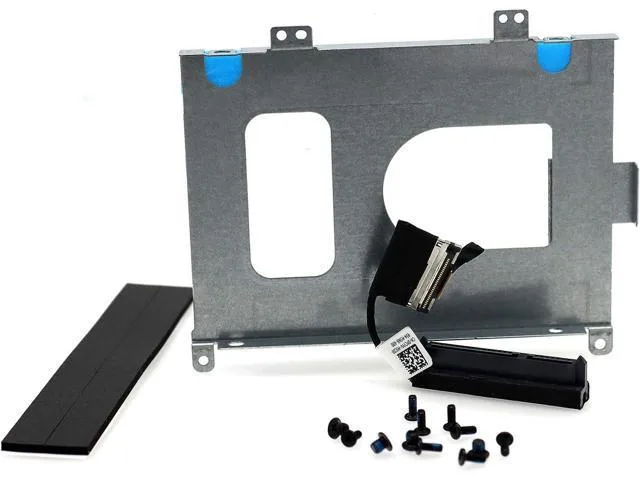
SATA cable and 2.5" drive bracket with screws for Dell Alienware M15 R1 2018
- Adds secondary 2.5" SATA storage to Alienware M15 R1 2018
- Includes exact-match SATA cable PCYYV and bracket 68WXJ for direct fit
- Supports drives up to 7.2 mm height for broad SSD choice
- Eight screws supplied for secure bracket mounting
- Compact 2.5 cm cable keeps internal routing tidy
What this kit replaces
This kit supplies the SATA data cable and the 2.5" drive caddy bracket that Dell used in the Alienware M15 R1 ALW15M 2018 series. It matches the original part numbers PCYYV and 68WXJ so the drive mounts and connects exactly as the factory assembly did. The package includes the bracket, the cable and eight mounting screws.
Thermals and power in daily use
The cable and bracket are passive parts that add no heat, noise or power draw of their own. They simply route the existing SATA signal and hold a 2.5" SATA hard drive or SSD up to 7.2 mm in height. Normal system thermals and acoustics remain unchanged.
Behaviour under sustained load
Because there are no active components, sustained workloads on the installed drive do not change the behaviour of the cable or bracket. The parts continue to provide a secure mechanical mount and a stable SATA connection for the duration of the drive’s operation.
Highlights
- Adds secondary 2.5" SATA storage to Alienware M15 R1 2018
- Includes exact-match SATA cable PCYYV and bracket 68WXJ for direct fit
- Supports drives up to 7.2 mm height for broad SSD choice
- Eight screws supplied for secure bracket mounting
- Compact 2.5 cm cable keeps internal routing tidy
Specifications
| Brand | ORVIX |
|---|
Questions about this item
How do I install the SATA cable and bracket in my Alienware M15 R1, and what step is often missed?
Remove the bottom cover, secure the drive to the bracket with the four included screws, connect the SATA cable to the motherboard header and the drive, then fasten the bracket with its four screws; the step often missed is seating the cable header fully before tightening the bracket.
What maintenance or replacement will the cable or bracket need later?
The SATA cable and metal bracket are passive parts with no moving components; they do not require scheduled maintenance, but the cable should be inspected if the drive becomes undetected after physical shocks.
What limit appears first under sustained use with a 7.2 mm drive installed?
The 7.2 mm height clearance is the physical limit; drives thicker than that will not fit the bracket, and the 2.5 cm cable length restricts routing options inside the chassis.
Also in this aisle
People compared these
Same shelf, same checkout — eight coins and a 30-minute rate lock.


Kensington
Kensington Desk Mount Cable Anchor K64613WW accessory
- Black
- Provides a secure a…
$19.99
0.00023086BTC
In stock
Panasonic
Panasonic CF-VDR291U laptop cooling pad
- Optical Drive
- Buffer Size: 2 MB B…
$213.99
0.00247133BTC
In stock
eReplacements
eReplacements PB992A-ER laptop battery 14.4V
- Battery
- Lithium-Ion
$65.99
0.00076211BTC
In stock