SonicWall
SonicWall 01-SSC-1465 Capture Advanced Threat Protection hardware license 1 Year TZ600 Series
- Capture Advance Thr…
$518.99
0.00614349BTC
In stockWe take cryptocurrency — so the coins you hold can buy real hardware.Pay in crypto, spend it on real hardware. Free insured shipping worldwide over $399. Plain, unbranded boxes, sent from Germany.Free insured shipping over $399. Your rate is locked for 30 minutes once checkout opens.Rate locked 30 minutes. Every item sealed, serial-checked and covered by a 24-month warranty.Sealed, 24-month warranty.


No Sew
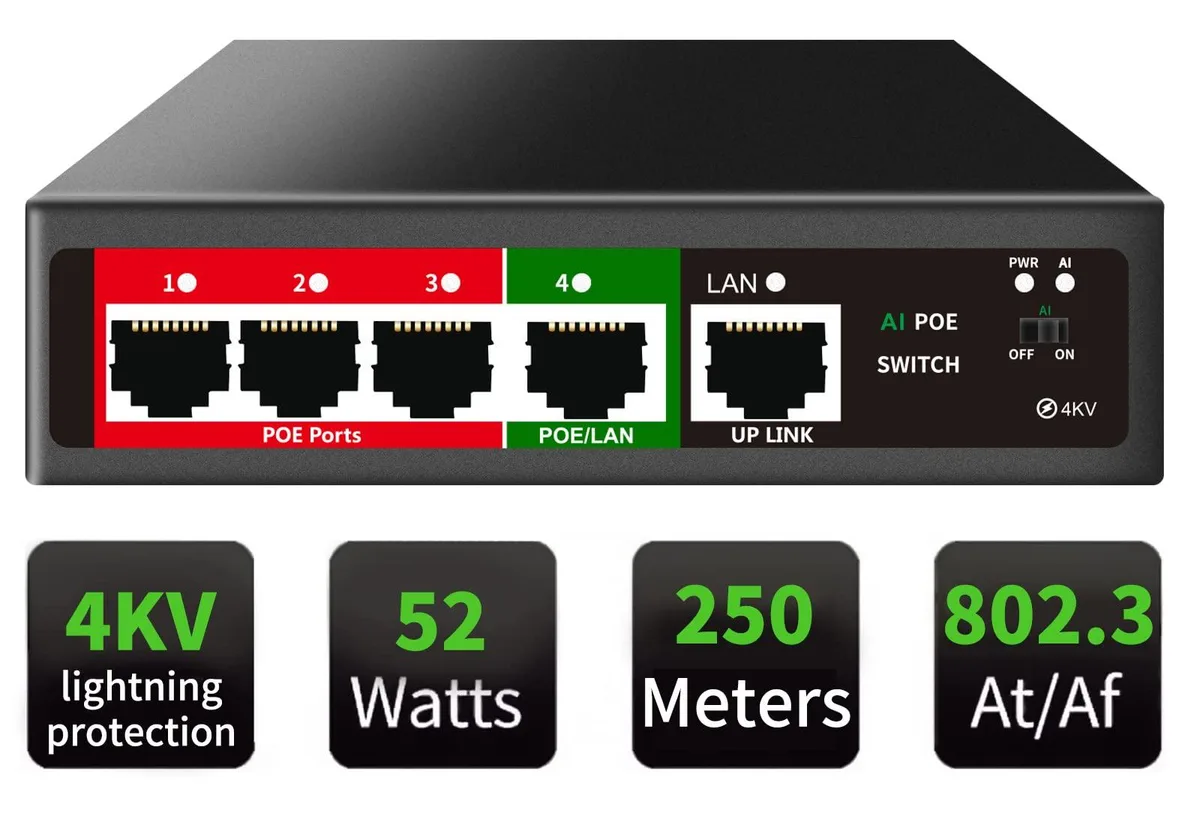
A five-port Easy Smart managed PoE+ switch with four powered ports, a 52 W total budget and fanless metal housing for silent operation
This 5-port PoE+ Easy Smart Managed Switch delivers power and data over a single Ethernet cable to IP cameras, VoIP phones, and wireless access points. It provides a 52W total PoE budget with up to 30W per port across four PoE+ interfaces. The fanless metal housing ensures silent operation and durable heat dissipation for desktop or wall mounting. Web UI, desktop software, and mobile app access simplify configuration for small business and home office networks.
It suits installers who need 802.1Q VLAN segmentation and QoS prioritisation for voice and video traffic without a command-line interface. Advanced features include cable quality detection, DHCP snooping, port mirroring, storm control, and static MAC binding for network stability. Buyers requiring full Layer 3 routing, SNMP monitoring, or stacking capabilities should consider a fully managed alternative. The 100 megabits_per_second packet forwarding rate fits modest bandwidth demands.
The single specification that decides suitability is the 52W total PoE budget shared across four PoE+ ports, two running at Gigabit speed and two at 10/100 Mbps. One additional Gigabit uplink handles upstream connectivity. Jumbo frame support reaches 9216 bytes and buffer memory is 768KB. If your powered devices collectively exceed 52W or you need more than four PoE ports, this switch cannot meet the requirement.
| Brand | NETGEAR |
|---|---|
| Series | ProSafe |
| Part Number | 104 |
| Format | Desktop |
| Standards | Passive PoE |
| Network Media | PoE, RJ45 |
| Uplink Ports | 8 |
| Uplink Interface | RJ45 |
| Uplink Speed | 10/100 Mbps |
| Uplink Speed/Type | PoE, RJ45 |
| Primary Port Count | 5 |
| Primary Ports | 16 x SFP + 8 x RJ45 |
| Primary Port Speed | 10/100Mbps + 1000Mbps |
| Primary Port Type | PoE, RJ45 |
| Management Interface | PoE, RJ45 |
| Jumbo Frames | 9216 bytes |
| Packet Forwarding Rate | 100 megabits_per_second |
| Buffer Memory | 768KB |
| PoE | No |
| SNMP | No |
| Layer 2 Features | PoE, RJ45, 100 megabits_per_second, 5 |
| Layer 3 Features | 5 Ports/52W 4xPoE+ |
| Cabling | PoE, RJ45 |
| PoE Ports | 4 x PoE |
| Dimensions | 14.33in W x 12.83in H x 9.06in D |
| Certification | not_applicable |
| Features | 5, PoE, RJ45, 100 megabits_per_second, Black-Megabit |
The fanless metal chassis supports desktop or wall mounting; use standard wall anchors spaced for the unit's built-in keyhole slots.
Connect the upstream link to the single Gigabit uplink port; the four PoE+ ports (two Gigabit, two 10/100) are for powered devices only.
The 52W PoE budget is delivered by an integrated supply rated for continuous operation; no user-replaceable power module exists.
Also in this aisle
Same shelf, same checkout — eight coins and a 30-minute rate lock.
What you pay in, and what you read prices in.
Sent from your wallet at checkout
Display only — the catalogue is priced in USD
No currency matches that.
Pick the language the site speaks to you in.
No language matches that.
New here?
Already have one?
There is no automatic reset: this shop sends no mail, so there is no one-time link to ask for. Leave the address on the account and it gets picked up by hand.
Request noted
Nothing is on its way to your inbox — this shop sends no mail at all. Someone picks these up by hand.
Remembered it?