
MSI
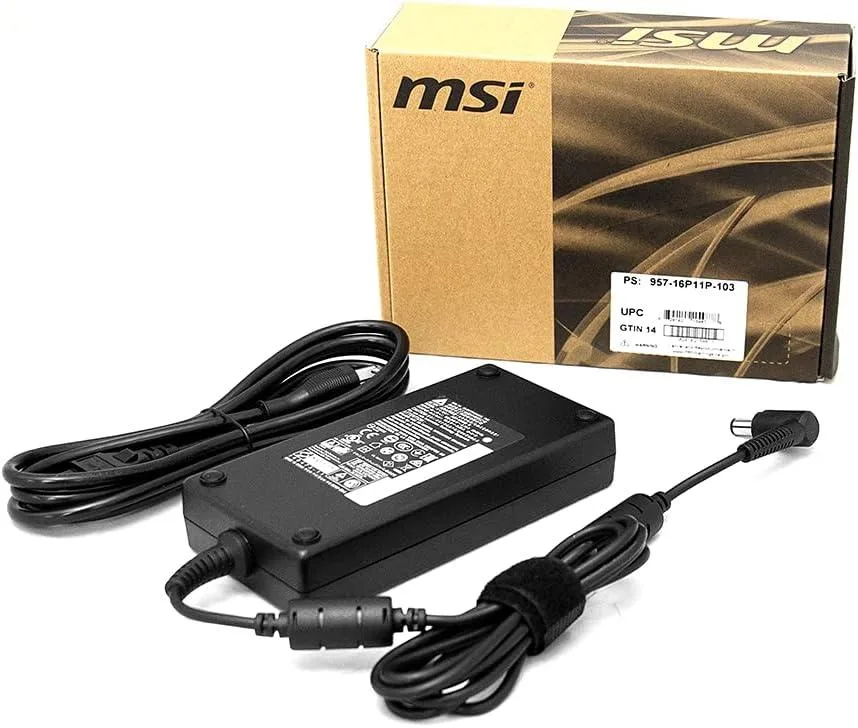
MSI 180 W AC Adapter 957-16P11P-103
180 W AC adapter compatible with multiple MSI notebook models including WS66, GS66, GS75, GP75 and Creator 15
- Delivers 180 W maximum output for demanding MSI notebooks
- Compatible with WS66 and GS66 models up to RTX 3000 and 2070 Max-Q
- Supports GS75, WS75 and WE75 with 2060, 3000 and below GPUs
- Works with GP75, GP65, Creator 15, WE73, GP73, GP63, GE63 and GE73
- Includes AC adapter and power cord in the package
Replacement Power for MSI Notebooks
This 180 W AC adapter is built for a wide range of MSI notebooks including the WS66 and GS66 with RTX 3000 or 2070 Max-Q graphics and below. It also matches the GS75, WS75 and WE75 with 2060 or 3000 series GPUs, the GP75 and GP65 with 1660Ti, and the Creator 15 with 2060. Older models such as the WE73 with P3200, GP73 and GP63 with 1060, GE63 and GE73 with 1060, plus GL63, GL73, GP75 and Alpha 15 are also covered. The package includes the adapter and a power cord. Part number 957-16P11P-103.
Thermals and Power Draw
Rated at 180 W maximum output, the unit delivers the power demanded by the supported notebooks during typical workloads. It operates from a standard mains supply and includes the required power cord. No additional specifications for fan noise, idle draw or efficiency are provided by the manufacturer.
Sustained Load Behaviour
Under continuous demand the adapter maintains its 180 W rating to keep compatible notebooks running without throttling due to insufficient power. It is not intended for notebooks that require a higher wattage supply or for non-MSI devices. Buyers who need more output capacity or a different connector should verify their notebook’s requirements before purchase.
Highlights
- Delivers 180 W maximum output for demanding MSI notebooks
- Compatible with WS66 and GS66 models up to RTX 3000 and 2070 Max-Q
- Supports GS75, WS75 and WE75 with 2060, 3000 and below GPUs
- Works with GP75, GP65, Creator 15, WE73, GP73, GP63, GE63 and GE73
- Includes AC adapter and power cord in the package
Specifications
| Brand | MSI |
|---|
Questions about this item
How do I connect the 180 W adapter to my WS66 or GS66 and what step do people miss?
Plug the barrel tip firmly into the laptop's DC-in jack until it clicks, then attach the IEC C5 power cord to the brick and a grounded outlet; the click is the step many skip.
What part of this 180 W adapter will need replacement first?
The detachable IEC C5 power cord tends to fray at the strain relief after repeated bending, while the brick and barrel cable usually last longer.
What thermal limit appears first when the 180 W adapter runs at full load continuously?
The brick's internal over-temperature protection will throttle output if airflow is blocked, so keep vents clear during sustained 180 W draw.
Also in this aisle
People compared these
Same shelf, same checkout — eight coins and a 30-minute rate lock.


Kensington
Kensington Desk Mount Cable Anchor K64613WW accessory
- Black
- Provides a secure a…
$19.99
0.00023367BTC
In stock
Panasonic
Panasonic CF-VDR291U laptop cooling pad
- Optical Drive
- Buffer Size: 2 MB B…
$213.99
0.00250137BTC
In stock
eReplacements
eReplacements PB992A-ER laptop battery 14.4V
- Battery
- Lithium-Ion
$65.99
0.00077137BTC
In stock