AGM Global Vision
AGM Global Vision Fuzion TM25-384 Fusion Thermal Monocular
- Monoculars
$1,130.99
0.01316375BTC
In stockWe take cryptocurrency — so the coins you hold can buy real hardware.Pay in crypto, spend it on real hardware. Free insured shipping worldwide over $399. Plain, unbranded boxes, sent from Germany.Free insured shipping over $399. Your rate is locked for 30 minutes once checkout opens.Rate locked 30 minutes. Every item sealed, serial-checked and covered by a 24-month warranty.Sealed, 24-month warranty.

MPF Products
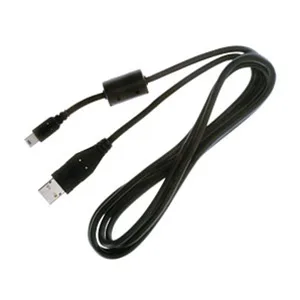
8-pin USB data cable connects compatible Panasonic Lumix cameras to a computer for file transfer and charging
This cable replaces the original Panasonic 8-pin USB lead for a wide range of Lumix digital cameras. It connects compatible models to a computer or USB charger for image transfer and power. Photographers who have lost or damaged the supplied cord can use this as a direct replacement.
The cable uses a standard USB interface and draws power from the host port during data transfer or charging. No external power supply is required and the passive design adds no audible noise. Normal use stays within the USB port's rated current limits.
The cord is listed as a substitute for Panasonic part numbers including K1HA05CD0014, K1HA08AD0001, K1HA08AD0002, K1HA08CD0001 and others. This broad cross-reference lets one cable serve many Lumix models from the DMC-F, DMC-FX, DMC-FZ, DMC-G, DMC-L, DMC-LX, DMC-LZ, DMC-TZ, DMC-ZR and DMC-ZS series. No software or driver installation is needed.
| Brand | Panasonic |
|---|---|
| Part | K1HA05CD0001, K1HA05CD0002, K1HA05CD0004, K1HA05CD0005, K1HA05CD0010, K1HA05CD0014, K1HA05CD0018, K2KZ4CB00005, K2KZ4CB00010, VFA0425, VFA0425B, VEK0A22, VFA0453 & VFA0454. |
| Cable Type | USB |
| Color | Black |
| Compatible | Panasonic Lumix DMC-F2, DMC-FP8, DMC-FS3, DMC-FS5, DMC-FS7, DMC-FS12, DMC-FS20, DMC-FS25, DMC-FS33, DMC-FS62, DMC-FX01, DMC-FX2, DMC-FX3, DMC-FX7, DMC-FX07, DMC-FX8, DMC-FX9, DMC-FX10, DMC-FX12, DMC-FX30, DMC-FX33, DMC-FX35, DMC-FX37, DMC-FX40, DMC-FX48, DMC-FX50, DMC-FX55, DMC-FX65, DMC-FX66, DMC-FX77, DMC-FX78, DMC-FX100, DMC-FX150, DMC-FX500, DMC-FX550, DMC-FX580, DMC-FX700, DMC-FZ1, DMC-FZ2, DMC-FZ3, DMC-FZ4, DMC-FZ5, DMC-FZ7, DMC-FZ10, DMC-FZ15, DMC-FZ18, DMC-FZ20, DMC-FZ28, DMC-FZ50, DMC-FZ150, DMC-G1, DMC-G2, DMC-G10, DMC-GF1, DMC-L1, DMC-L10, DMC-L33, DMC-LC1, DMC-LC5, DMC-LC |
Align the 8-pin connector with the camera port, insert it straight in until it clicks, then plug the USB end into your computer; forcing the connector at an angle can bend the pins.
The 8-pin connector tips and the USB plug see the most insertions; if contacts loosen or the sheath frays near either end, replace the cable.
The cable uses standard USB signalling, so sustained throughput is capped by the USB 2.0 interface on both the camera and the host port.
Also in this aisle
Same shelf, same checkout — eight coins and a 30-minute rate lock.
What you pay in, and what you read prices in.
Sent from your wallet at checkout
Display only — the catalogue is priced in USD
No currency matches that.
Pick the language the site speaks to you in.
No language matches that.
New here?
Already have one?
There is no automatic reset: this shop sends no mail, so there is no one-time link to ask for. Leave the address on the account and it gets picked up by hand.
Request noted
Nothing is on its way to your inbox — this shop sends no mail at all. Someone picks these up by hand.
Remembered it?