

Extreme Networks
Extreme Networks Silhouette Ceiling Mounting Bracket 14 or 18
$23.99
0.00028504BTC
In stockWe take cryptocurrency — so the coins you hold can buy real hardware.Pay in crypto, spend it on real hardware. Free insured shipping worldwide over $399. Plain, unbranded boxes, sent from Germany.Free insured shipping over $399. Your rate is locked for 30 minutes once checkout opens.Rate locked 30 minutes. Every item sealed, serial-checked and covered by a 24-month warranty.Sealed, 24-month warranty.
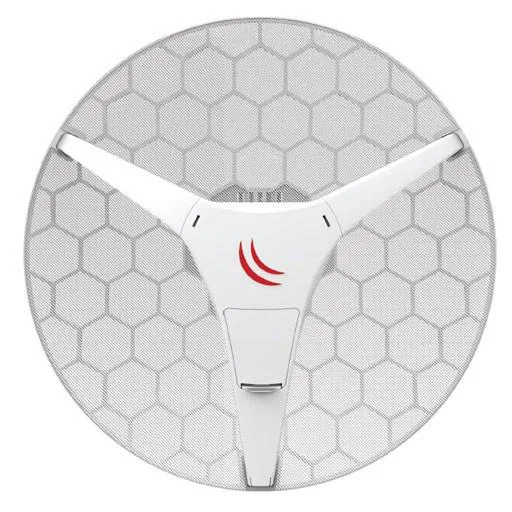


Mikrotik
A 60 GHz 802.11ad CPE with 650 MHz CPU, 64 MB RAM, 16 MB flash and one 10/100 Ethernet port for point-to-multipoint links up to 800 m
The MikroTik LHG Lite60 is a new 60 GHz customer-premises unit built for point-to-multipoint links. It integrates an 802.11ad radio, a 650 MHz QCA9531 CPU and 64 MB RAM in a compact 391 x 222 mm housing. A single 10/100 Mbps Ethernet port accepts passive PoE from 12 V to 30 V.
This CPE suits installers who need up to eight subscriber units on one 60 GHz access point at distances up to 800 metres. It is not for networks that require gigabit wired throughput, active PoE compliance or operation in the 2.4 and 5 GHz bands. Licence level 3 limits advanced routing features.
The built-in 60 GHz 802.11ad radio determines whether the link reaches the intended 800 metres. Obstructions, rain fade or misalignment will reduce the usable distance, so verify clear line-of-sight before deployment.
| Brand | MikroTik |
|---|---|
| Model | LHG Lite60 (RBLHG-60ad) |
Connect up to eight LHG Lite60 units to a 60 GHz access point such as the wAP60G AP for point-to-multipoint links up to 800 meters.
The 10/100 Mbps LAN port is the only wired interface; plan your backhaul capacity around that 100 Mbps ceiling.
Check signal strength, modulation rate and error counters in the RouterOS wireless registration table to confirm the 60 GHz link is healthy.
Also in this aisle
Same shelf, same checkout — eight coins and a 30-minute rate lock.
What you pay in, and what you read prices in.
Sent from your wallet at checkout
Display only — the catalogue is priced in USD
No currency matches that.
Pick the language the site speaks to you in.
No language matches that.
New here?
Already have one?
There is no automatic reset: this shop sends no mail, so there is no one-time link to ask for. Leave the address on the account and it gets picked up by hand.
Request noted
Nothing is on its way to your inbox — this shop sends no mail at all. Someone picks these up by hand.
Remembered it?


