

Astro Gaming
Astro Gaming Wireless Keyboard Mouse Combo Silver White 2 in 1 Accessories
$43.99
0.00052372BTC
In stockWe take cryptocurrency — so the coins you hold can buy real hardware.Pay in crypto, spend it on real hardware. Free insured shipping worldwide over $399. Plain, unbranded boxes, sent from Germany.Free insured shipping over $399. Your rate is locked for 30 minutes once checkout opens.Rate locked 30 minutes. Every item sealed, serial-checked and covered by a 24-month warranty.Sealed, 24-month warranty.
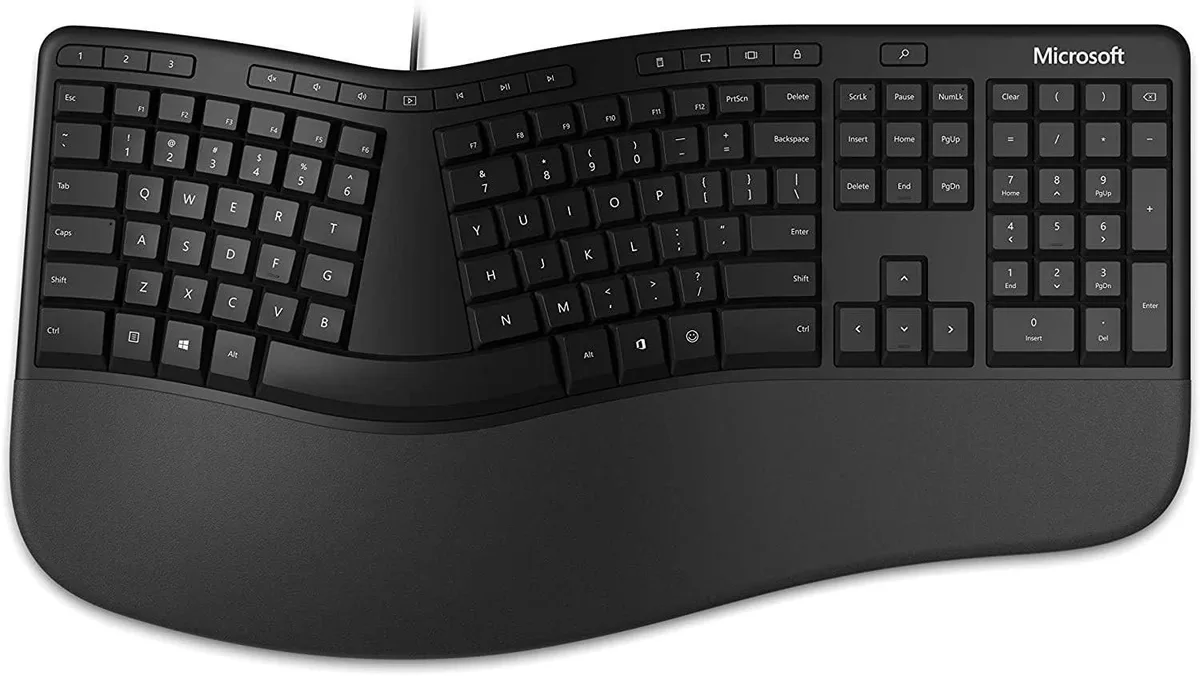


Microsoft
A split ergonomic keyboard with integrated number pad and dedicated Office 365, emoji, and media shortcut keys for all-day comfort
The Microsoft Ergonomic Keyboard for Business is a wired 2-in-1 accessory built for professionals who type for long periods. Its split layout and ergonomist-approved design promote a neutral wrist posture to reduce fatigue. Integrated palm rest cushioning covered in premium fabric adds all-day comfort. Dedicated shortcut keys for Office 365, emojis, search and media controls streamline common tasks.
A wired USB connection delivers consistent speed and accuracy without the latency or battery concerns of wireless alternatives. The keyboard draws minimal power directly from the host, so it adds negligible heat to the workstation. No active cooling or moving parts mean completely silent operation during intensive data entry or general office use.
Full functionality of the Office 365 and emoji shortcut keys requires Windows 10. On Windows 8.1 or Windows 7 those dedicated keys have no function, limiting the productivity gains. Buyers who rely on those shortcuts on older operating systems will not get the intended benefit. The integrated number pad remains active across all supported versions.
No published specifications for this item yet.
Plug the USB cable into a free port; Windows 10 installs the driver automatically. The Office 365 and emoji keys work immediately, but on Windows 8.1 or 7 those dedicated keys have no function, so do not expect them to trigger apps.
The fabric-covered palm rest and membrane key switches are the components that degrade with heavy daily typing. The palm rest cushion compresses over time and the key mechanisms can lose tactile response, while the wired cable and integrated number pad typically remain reliable.
The split layout and cushioned palm rest promote a neutral wrist posture, yet sustained use can still cause finger fatigue because the membrane switches require a consistent actuation force and the fixed tilt angle cannot be adjusted for individual preference.
Also in this aisle
Same shelf, same checkout — eight coins and a 30-minute rate lock.
What you pay in, and what you read prices in.
Sent from your wallet at checkout
Display only — the catalogue is priced in USD
No currency matches that.
Pick the language the site speaks to you in.
No language matches that.
New here?
Already have one?
There is no automatic reset: this shop sends no mail, so there is no one-time link to ask for. Leave the address on the account and it gets picked up by hand.
Request noted
Nothing is on its way to your inbox — this shop sends no mail at all. Someone picks these up by hand.
Remembered it?


