

Microsoft
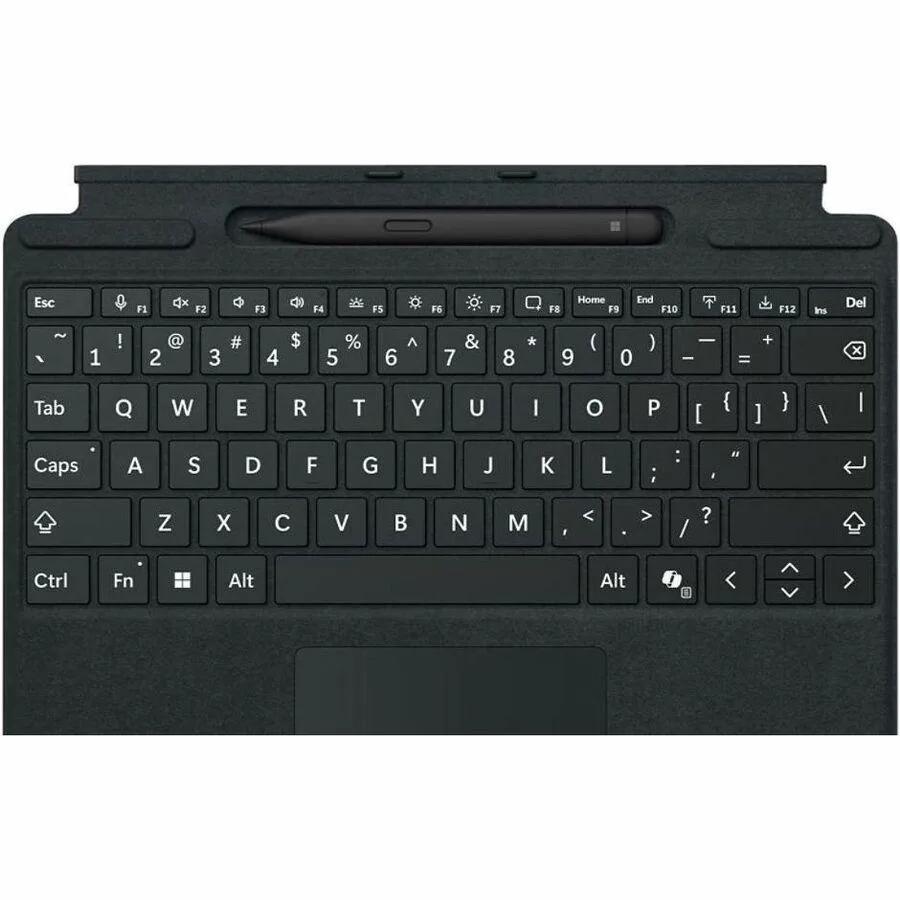
Microsoft 8XA-00168 Surface Pro 13-inch Keyboard Alcantara Black
$132.99$147.99−10%
0.00153997BTC
In stockWe take cryptocurrency — so the coins you hold can buy real hardware.Pay in crypto, spend it on real hardware. Free insured shipping worldwide over $399. Plain, unbranded boxes, sent from Germany.Free insured shipping over $399. Your rate is locked for 30 minutes once checkout opens.Rate locked 30 minutes. Every item sealed, serial-checked and covered by a 24-month warranty.Sealed, 24-month warranty.


Microsoft
A 13-inch keyboard with bold backlit keys, large glass trackpad, dedicated Copilot key and built-in Slim Pen storage tray
Size Bold
The Microsoft 8XA-00191 Surface Pro 13-inch Keyboard Black Bold Keys is designed for professionals and students using Surface Pro 11th Edition, Surface Pro 9, or Surface Pro 8 devices. It delivers a full mechanical keyset, backlit keys, and a large glass touchpad for precise navigation. A dedicated Copilot key provides instant access to AI experiences, while a built-in storage tray secures and recharges the Surface Slim Pen 2.
The keyboard clicks instantly into place using enhanced magnetic stability and adjusts to almost any angle via the device kickstand. Closing the cover protects the screen and conserves battery life, while folding it back enables a compact tablet mode. Its slim profile performs like a traditional laptop keyboard without adding bulk, making it suitable for mobile work environments.
This keyboard replaces earlier Type Cover models that lack a dedicated Copilot key, integrated pen storage, and the bold high-contrast keyset. The jump is worth it for users who want immediate AI access, secure pen charging, and improved key visibility in varied lighting. It is not suited for owners of older Surface Pro generations or non-Surface tablets that cannot use the magnetic connector.
| Brand | Microsoft |
|---|---|
| Shipping weight | 0.66 kg |
| Package size | 310 × 251 × 25 mm |
Other versions of this model
Same family, different memory, cooler or clock — compare before you commit.
Align the magnetic connector on the keyboard with the bottom edge of the Surface Pro 11, then press down until it clicks; the step people miss is ensuring the kickstand is open to the desired angle before attaching so the hinge supports the screen properly.
The tray holds and charges a Surface Slim Pen 2; keep the charging contacts clean with a dry, lint-free cloth and ensure the pen seats fully so it charges reliably — no other user-serviceable parts are inside the tray.
The compact 13-inch layout with bold keys and full mechanical travel can cause finger fatigue sooner than a full-size desktop keyboard because the key spacing is optimised for portability rather than extended marathon typing.
Also in this aisle
Same shelf, same checkout — eight coins and a 30-minute rate lock.
What you pay in, and what you read prices in.
Sent from your wallet at checkout
Display only — the catalogue is priced in USD
No currency matches that.
Pick the language the site speaks to you in.
No language matches that.
New here?
Already have one?
There is no automatic reset: this shop sends no mail, so there is no one-time link to ask for. Leave the address on the account and it gets picked up by hand.
Request noted
Nothing is on its way to your inbox — this shop sends no mail at all. Someone picks these up by hand.
Remembered it?


