

Astro Gaming
Astro Gaming Wireless Keyboard Mouse Combo Silver White 2 in 1 Accessories
$43.99
0.0005195BTC
In stockWe take cryptocurrency — so the coins you hold can buy real hardware.Pay in crypto, spend it on real hardware. Free insured shipping worldwide over $399. Plain, unbranded boxes, sent from Germany.Free insured shipping over $399. Your rate is locked for 30 minutes once checkout opens.Rate locked 30 minutes. Every item sealed, serial-checked and covered by a 24-month warranty.Sealed, 24-month warranty.


Microsoft
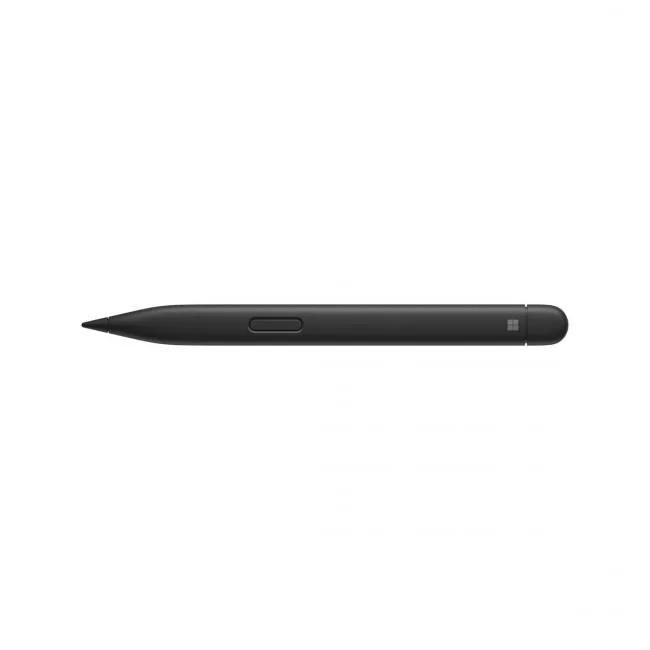
A rechargeable Bluetooth pen with 4,096 pressure levels, haptic feedback, zero-force inking and a 77° tilt for precise shading on compatible Surface devices
The Microsoft Surface Slim Pen 2 is a matte black 2 in 1 accessory designed for writing and drawing on compatible Surface hardware. It connects through Bluetooth Wireless 5.0 technology and includes a side button plus a top button with eraser functionality. The rechargeable lithium ion battery provides up to 15 hours of typical usage.
Tactile signals from the built-in haptic motor work only with Surface Laptop Studio and Surface Pro 8 running Windows 11. On every other listed device the pen still writes but without haptic response. Buyers who want the paper-like feel on a different model will not get it.
Pairing is handled through the Bluetooth settings of the host device; no driver disc or special utility is required. The pen charges inside the Surface Slim Pen charger or a compatible Surface keyboard tray, neither of which is included in the box. Without a charging accessory the pen cannot be powered.
| Brand | Microsoft |
|---|---|
| Model | 8WV-00001 |
| Accessory Type | Surface Slim Pen 2 |
| Color | Matte Black |
| Compatibility | Surface Laptop Studio Surface Pro 3 - Surface Pro 8 Surface Pro X Surface Duo, Surface Duo 2 Surface Go, Go 2, Surface Go 3 Surface Hub 2S Surface Laptop 1 - 4 Surface Studio 1, 2 Surface Book 1 - 3 Non-Surface devices that support Microsoft Pen Protocol (MPP) |
| Dimension | 5.38" x 0.44" x 0.25" |
| Weight | 0.03 lb. |
| Specifications | Connection: Bluetooth Wireless 5.0 Technology Buttons: Side button, Top Button with eraser functionality Tactile signals: Haptic feedback functionality compatible only with Surface Laptop Studio and Surface Pro 8 with Windows 11 Color and material: Matte Black Plastic Enclosure Pressure and sensitivity: 4,096 pressure levels, Zero force inking Battery: Rechargeable Lithium Ion, Up to 15 hours of typical usage Battery capacities: 0.171 Nominal (WH), 0.164 Min (WH) |
| Package Content | Surface Slim Pen 2 Quick Start Guide Safety and Warranty documents |
| Shipping weight | 0.08 kg |
| Package size | 202 × 52 × 19 mm |
It gives you 4,096 distinct steps of force detection so the ink thickens or thins smoothly as you press harder or lighter, and zero-force inking starts the stroke the moment the tip touches the glass.
The haptic motor only activates on Surface Laptop Studio and Surface Pro 8 running Windows 11; on every other compatible device the pen works but without tactile signals.
The pen measures 5.38 by 0.44 by 0.25 inches and weighs 0.03 lb, matching the slim profile that slides into the Surface Pro 8's built-in storage and charging trough.
Also in this aisle
Same shelf, same checkout — eight coins and a 30-minute rate lock.
What you pay in, and what you read prices in.
Sent from your wallet at checkout
Display only — the catalogue is priced in USD
No currency matches that.
Pick the language the site speaks to you in.
No language matches that.
New here?
Already have one?
There is no automatic reset: this shop sends no mail, so there is no one-time link to ask for. Leave the address on the account and it gets picked up by hand.
Request noted
Nothing is on its way to your inbox — this shop sends no mail at all. Someone picks these up by hand.
Remembered it?


