


MCHOSE
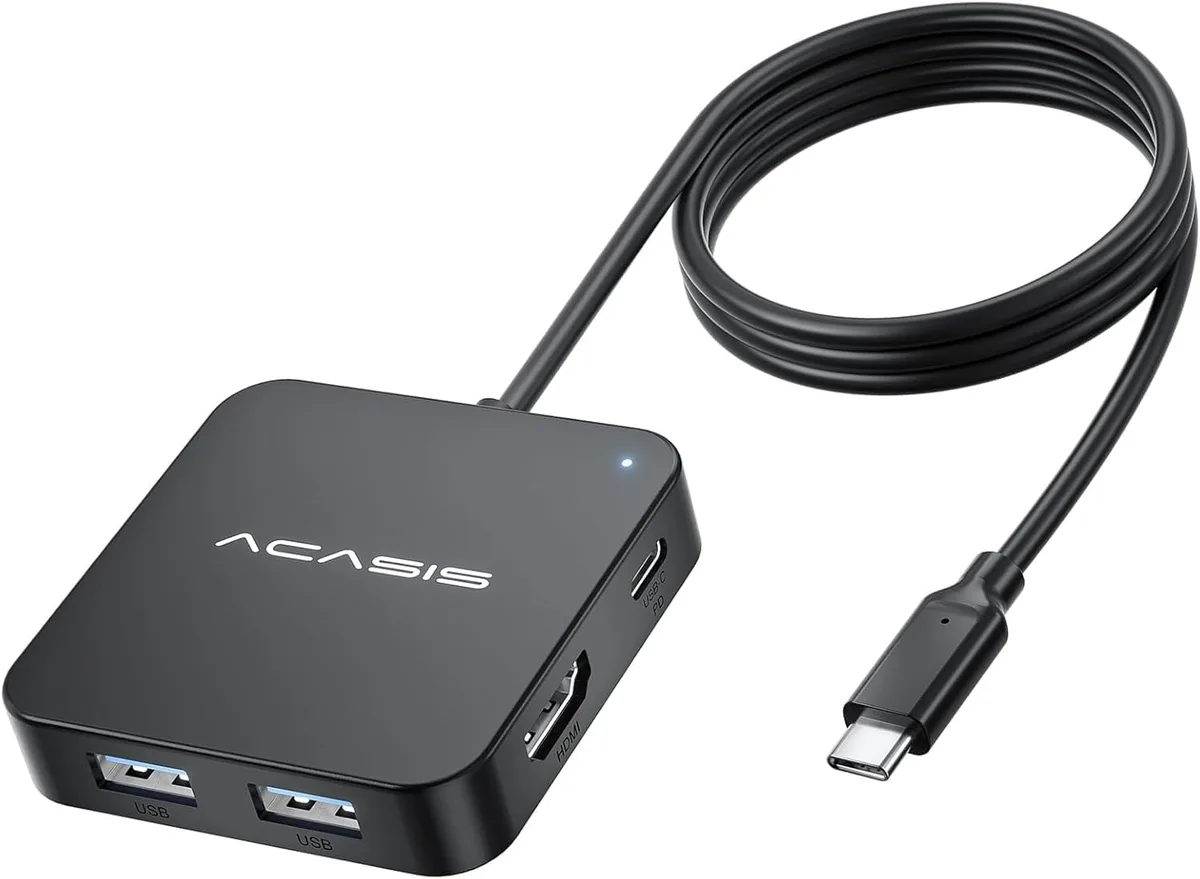
MCHOSE USB C Hub 4FT 10Gbps 4K 60Hz HDMI 100W PD 3 USB A3.1 1 USB-C 3.1
A 4 ft hub adds 4K 60 Hz HDMI, three USB-A 3.1 ports, one USB-C 3.1 port and 100 W Power Delivery through a single USB-C connection
- TypeUSB Hubs
- 4 ft cable keeps host ports within reach on a desktop
- 4K 60 Hz HDMI mirrors or extends one external display
- 10 Gbps USB-A 3.1 and USB-C 3.1 ports move a 1 GB file in 3–5 seconds
- 100 W Power Delivery charges a laptop while every port is in use
- Square port layout stops cables from blocking each other
Compact multi-port adapter for USB-C hosts
The MCHOSE USB-C hub adds six connections through a single host port: one HDMI output, three USB-A 3.1 ports, one USB-C 3.1 data port and a USB-C power-delivery input. A 4 ft cable lets the hub sit clear of a desktop tower or laptop stand while keeping the work surface tidy. The adapter draws operating power from the host and passes up to 100 W through the PD port to charge the connected device.
Suited to single-display workflows
Professionals who need one 4K 60 Hz external monitor, fast access to USB-A drives and simultaneous laptop charging will find the port mix convenient. Users who need to drive two or more external screens, or who require aggregate bandwidth beyond the 10 Gbps shared pool, should look at a different class of dock. The hub also requires the host USB-C port to support video-out alternate mode; systems without that capability cannot use the HDMI output.
10 Gbps shared bandwidth across all data ports
The single upstream link runs at 10 Gbps and is divided among the three USB-A 3.1 ports and the USB-C 3.1 data port, so simultaneous heavy transfers will share that ceiling. This figure is the primary constraint when planning workloads such as moving large video files while driving a 4K display.
Highlights
- 4 ft cable keeps host ports within reach on a desktop
- 4K 60 Hz HDMI mirrors or extends one external display
- 10 Gbps USB-A 3.1 and USB-C 3.1 ports move a 1 GB file in 3–5 seconds
- 100 W Power Delivery charges a laptop while every port is in use
- Square port layout stops cables from blocking each other
Specifications
| Type | USB Hubs |
|---|
Questions about this item
How do I connect the 4FT cable and HDMI, and what step do people miss?
Plug the USB-C plug into a host port that supports video output, then connect the HDMI cable to a 4K 60Hz display; the step often missed is confirming the host port carries video, not just data.
What maintenance or replacement will the hub need later?
No scheduled maintenance is required; if the 4FT cable sheath frays or a port stops passing 10 Gbps data or 100 W charging, replace the entire adapter.
What limit appears first during sustained heavy use?
The 100 W Power Delivery ceiling is reached first when charging a laptop while driving 4K 60Hz video and moving data across all four 3.1 ports simultaneously.
Also in this aisle
People compared these
Same shelf, same checkout — eight coins and a 30-minute rate lock.


Tripp Lite
Tripp Lite U324-003-BK USB 3.0 cable USB-A to USB-A 3 ft
- USB
- Black
$13.99
0.00016668BTC
In stock

MADE IN USA TONER
MADE IN USA TONER TK-8367K Cyan Toner Cartridge 25000 Pages
$48.99
0.00058368BTC
In stock