


MANHATTAN
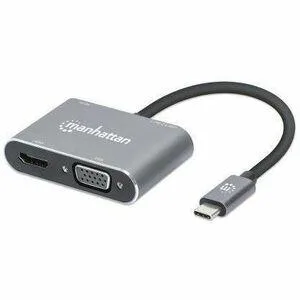
MANHATTAN USB-C 4-in-1 Docking Converter HDMI VGA Power Delivery
Connects a USB-C laptop to HDMI and VGA displays while charging via Power Delivery
- Connect external displays via HDMI or VGA ports
- Charge your laptop while docked with Power Delivery support
- Expand connectivity using the integrated USB-A port
- Compact 4-in-1 design suits travel and desk setups
USB-C 4-in-1 Docking Converter
This Manhattan docking converter adds HDMI and VGA video outputs plus USB Power Delivery pass-through through a single USB-C port. It is designed for laptop users who need to connect to external displays while keeping the host device charged. The compact adapter suits mobile professionals and home-office setups alike.
Replaces separate video adapters and chargers
Carrying individual HDMI and VGA dongles plus a dedicated power brick is no longer necessary when this converter handles video and charging simultaneously. The upgrade makes sense when a laptop has only one USB-C port but the user regularly switches between modern and legacy monitors. It does not suit buyers who need additional USB-A ports, Ethernet or multi-monitor support beyond a single external display.
Highlights
- Connect external displays via HDMI or VGA ports
- Charge your laptop while docked with Power Delivery support
- Expand connectivity using the integrated USB-A port
- Compact 4-in-1 design suits travel and desk setups
Specifications
| Brand | Manhattan |
|---|
Questions about this item
What laptop port and cable clearance does the Manhattan USB-C 4-in-1 Docking Converter need?
It plugs directly into a USB-C port that supports video output and Power Delivery; allow about 5 cm of cable length behind the port for the short tethered lead.
Which step do users often miss when setting up the Manhattan USB-C 4-in-1 Docking Converter?
Connect the laptop's USB-C charger to the dock's Power Delivery port first, then attach the HDMI or VGA display; the dock will not pass video until it receives power.
Also in this aisle
People compared these
Same shelf, same checkout — eight coins and a 30-minute rate lock.


Kensington
Kensington Desk Mount Cable Anchor K64613WW accessory
- Black
- Provides a secure a…
$19.99
0.00023527BTC
In stock
Panasonic
Panasonic CF-VDR291U laptop cooling pad
- Optical Drive
- Buffer Size: 2 MB B…
$213.99
0.00251851BTC
In stock
eReplacements
eReplacements PB992A-ER laptop battery 14.4V
- Battery
- Lithium-Ion
$65.99
0.00077665BTC
In stock