


LUOM
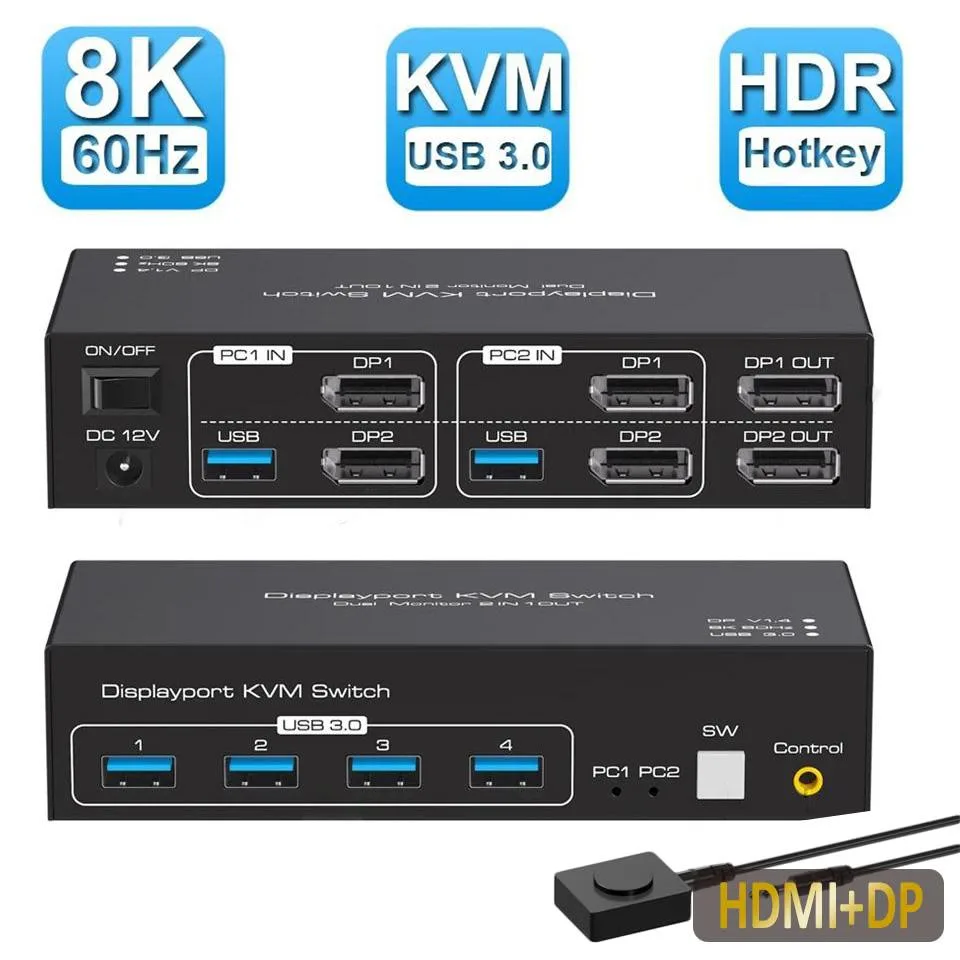
LUOM SW222-1DP1HD 8K 60Hz 4K 120Hz KVM switch
Lets you control two computers with one keyboard, mouse and dual monitors at up to 8K 60Hz or 4K 120Hz
- TypeHDMI DP USB
- PC ConnectorsHDMI DP USB
- Computer Connections2 Ports
- Monitor Connections2 Ports
- Video Resolution8K 60Hz
- PC SelectionPush Buttons/Desktop Controller
- Share two computers across dual monitors at 8K 60Hz
- Switch instantly between systems with 4K 120Hz clarity
- Connect four USB 3.0 peripherals for shared access
- Control both PCs from one keyboard and mouse set
- Supports extended and duplicate display modes for flexibility
2-in-2-out KVM with 8K 60 Hz support
The LUOM SW222-1DP1HD is a dual-monitor KVM switch that lets one keyboard, one mouse and two displays — one HDMI, one DisplayPort — control two computers. It handles resolutions up to 8K at 60 Hz and 4K at 120 Hz with full RGB 4:4:4 colour. Four USB 3.0 ports share peripherals such as drives or printers across both systems. A wired remote and front-panel buttons provide instant switching, while EDID emulation keeps display settings stable when changing inputs.
Suited for dual-display workstations.
This unit targets professionals who run two computers side by side and need both screens active in either extended or mirrored mode. It works with Windows, macOS, Linux and Unix without driver installation. Buyers who only need to switch a single monitor, or who require more than two computer ports, will not find the port count they need here. The included 12 V 1 A power adapter ensures stable operation when high-draw USB devices are attached.
Sustained 8K 60 Hz and 4K 120 Hz throughput
Under continuous load the switch maintains 8K at 60 Hz and 4K at 120 Hz without signal degradation, thanks to the external power supply and built-in EDID management. USB 3.0 ports sustain 5 Gbps bandwidth for storage or peripherals during long sessions. Auto-scan can cycle inputs every three seconds for monitoring tasks. The metal enclosure dissipates heat passively, so performance remains consistent during extended work or streaming periods.
Highlights
- Share two computers across dual monitors at 8K 60Hz
- Switch instantly between systems with 4K 120Hz clarity
- Connect four USB 3.0 peripherals for shared access
- Control both PCs from one keyboard and mouse set
- Supports extended and duplicate display modes for flexibility
Specifications
| Brand | LUOM |
|---|---|
| Series | SW222-1DP1HD |
| Model | SW222-1DP1HD |
| Type | HDMI DP USB |
| PC Connectors | HDMI DP USB |
| Computer Connections | 2 Ports |
| Monitor Connections | 2 Ports |
| Video Resolution | 8K 60Hz |
| PC Selection | Push Buttons/Desktop Controller |
| AutoScan Interval | 3 seconds |
| LED Indicators | Yes |
| USB Features | with USB support |
| Features | 2 In 2 Out 4K 120Hz USB 3.0 HDMI DP KVM Switch Box dual monitor for 2 PC Sharing Keyboard Mouse Printer Plug Play Video 2 Display USB Switch Splitter - Product Type: 8K HDMI DP USB 3.0 KVM Switch (2 in 2 out) - Input Port: HDMI 2.1, DP 1.4 ,USB 3.0 data x2, USB 3.0 x 4 - Output Port: HDMI 2.1, DP 1.4 - Dimensions: 150x65x35mm - Material: Aluminum Alloy shellanti-rust, anti-corrosion, anti-interference, fast transmission, surtace oxidation Features - Support HDMI 2.1 HDCP 2.3 / Displayport 1.4 - Resolution: Support 1080P/1080@144/165/240Hz, 2K@120/144Hz, 4K@60/120Hz,8K@60Hz resolution |
| Dimensions | 5.43 x 5.35 x 1.46 inches |
| Weight | 9.52 Ounces |
| Package Contents | 1 x HDMI DP KVM USB Switch, 2 x USB 3.0 data cable, 1x DC power adapter,1 x User Manual. |
Questions about this item
What cables must I already have to connect both monitors to the LUOM SW222-1DP1HD?
You need one HDMI cable and one DisplayPort cable for the monitor outputs, plus two HDMI and two DisplayPort cables for the computer inputs, matching the 2.1 and 1.4 interfaces on the switch.
Will my older 4K 60 Hz displays work with the 8K 60 Hz and 4K 120 Hz capabilities of this KVM?
Yes, the switch is backward compatible and will pass 4K 60 Hz signals through its HDMI 2.1 and DisplayPort 1.4 ports without any extra setup.
How can I confirm the KVM is delivering 8K 60 Hz or 4K 120 Hz to each screen after I set it up?
Check the on-screen display of each monitor or your GPU control panel; both should report 8K at 60 Hz or 4K at 120 Hz with RGB 4:4:4 when the front-panel LEDs show the active port.
Also in this aisle
People compared these
Same shelf, same checkout — eight coins and a 30-minute rate lock.


Black Box Corporation
Black Box Corporation 4K60 HDMI Dual-Head KVM Switch 4 Port
$774.99
0.00919706BTC
In stock