


LUOM
LUOM OZK5 2-Port 8K USB-C KVM Switch
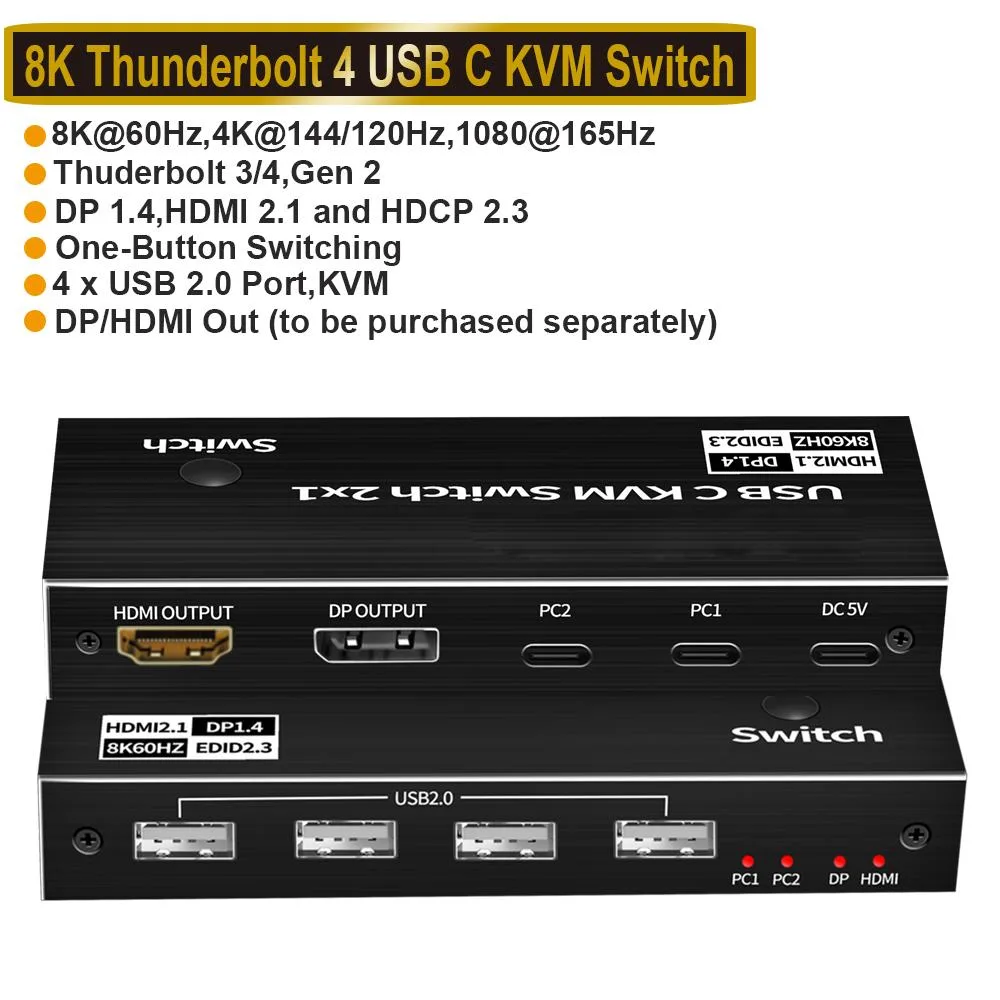
Connects two USB-C computers to one 8K monitor and four USB peripherals with push-button switching
- TypeHDMI, USB
- PC ConnectorsUSB-C
- Computer Connections2 Ports
- Monitor Connections1 Port
- Video Resolution7680*4320
- PC SelectionPush Buttons
- Share two computers on one 8K monitor at 60 Hz via DP 1.4 or HDMI 2.1
- Switch instantly between systems using the front push button with LED status
- Connect keyboard, mouse and two USB 2.0 devices through four shared ports
- Includes two 1.2 m USB-C Gen 2 cables and a USB-A to USB-C power cable
- Compact 5.43 × 5.35 × 1.46 in design weighs 9.52 oz for tidy desk setup
Two-computer KVM for single-monitor workflows
The LUOM OZK5 lets two USB-C laptops or desktops share one DisplayPort 1.4 or HDMI 2.1 display and four USB 2.0 peripherals. It is built for users who switch between a work machine and a personal system without duplicating monitors, keyboards or mice. Switching is handled by a front-panel button, and an auto-scan mode cycles every three seconds.
Fits a dual-PC desk with minimal cabling
Each computer connects through a single USB-C Gen 2 cable that carries video, data and peripheral traffic. The switch draws power from a supplied USB-A-to-C cable plugged into any convenient USB source, so no separate adapter is required. Two 1.2-metre USB-C cables are included, keeping the host connections tidy while the monitor cable of your choice runs from the DP or HDMI output.
Sustained 8K 60 Hz output with DSC compression
When the host ports support Thunderbolt 4, the switch maintains 7680×4320 at 60 Hz over either DisplayPort 1.4 or HDMI 2.1 using Display Stream Compression. At 4K it holds 120 Hz or 144 Hz, and lower resolutions reach 165 Hz. USB 2.0 peripherals share a 480 Mbps pool, so high-bandwidth storage is not supported, but keyboards, mice and flash drives run without interruption during long sessions.
Highlights
- Share two computers on one 8K monitor at 60 Hz via DP 1.4 or HDMI 2.1
- Switch instantly between systems using the front push button with LED status
- Connect keyboard, mouse and two USB 2.0 devices through four shared ports
- Includes two 1.2 m USB-C Gen 2 cables and a USB-A to USB-C power cable
- Compact 5.43 × 5.35 × 1.46 in design weighs 9.52 oz for tidy desk setup
Specifications
| Brand | LUOM |
|---|---|
| Series | OZK5 |
| Model | OZK5 |
| Type | HDMI, USB |
| PC Connectors | USB-C |
| Computer Connections | 2 Ports |
| Monitor Connections | 1 Port |
| Video Resolution | 7680*4320 |
| PC Selection | Push Buttons |
| AutoScan Interval | 3 seconds |
| LED Indicators | Yes |
| USB Features | with USB support |
| Application | Widely used in many occasions:Our This USB-C Switch is easy to use and can be widely used in Studying, Entertainment, Work and other Occasions, ultra-High-Definition Smooth Video and Picture Quality Experience, Multi-source Switching, providing multiple possibilities for work and entertainment |
| Features | 2xUSB-C 8K KVM Switch with one DisplayPort 1.4 or HDMI 2.1 Port for Video,with this 2 Port 8K KVM Switcher,you are able to connect from the switcher's two PC Input Port to your USB-C PC/Laptops via two standard USB-C Gen-2 Cable,then connect from the switcher's Standard DP 1.4 /HDMI 2.1 port to your Monitors via your own displayport 8K Standard Cable,you can press the "Switch"button to switch between two of your PCs.Note:You must plug our USB C to USB A cable to power the switcher while working With 4 x USB2.0 Output Port,two Computers share one set,you can connect 4xUSB2.0 Output to |
| Dimensions | 5.43 x 5.35 x 1.46 inches |
| Weight | 9.52 Ounces |
| Package Contents | • 1 x USB C Thunderbolt 4 KVM Switch • 1 x USB Power Cable(Type A to Type C) • 2 x 1.2 meter USB Gen 2 Cable(Type C to Type C) • 1 x User Manual |
Questions about this item
Will the single DisplayPort 1.4 or HDMI 2.1 output handle 8K at 60 Hz without compression?
The switch supports 8K at 60 Hz only with DSC compression over DisplayPort 1.4 or HDMI 2.1; uncompressed 8K at 60 Hz exceeds the 32.4 Gbps or 48 Gbps bandwidth limits.
Does the unit need active cooling or an external power brick for continuous operation?
It draws power from the included USB-A to USB-C cable connected to any 5 V source; there is no fan, so heat stays low and noise is silent during all-day use.
Which cables must I supply myself before the switch will function?
You must provide one DisplayPort 1.4 or HDMI 2.1 cable up to 2.0 metres for the monitor; two 1.2 metre USB-C Gen 2 cables and a USB-A to USB-C power cable are included.
Also in this aisle
People compared these
Same shelf, same checkout — eight coins and a 30-minute rate lock.


Black Box Corporation
Black Box Corporation 4K60 HDMI Dual-Head KVM Switch 4 Port
$774.99
0.00900879BTC
In stock