

Lexmark
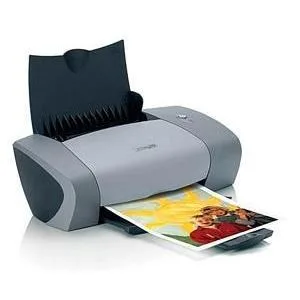
Lexmark Z615 inkjet printer 14/8 ppm 4800×1200 dpi 100 sheets USB
Colour inkjet printer with 4800×1200 dpi resolution, 14 ppm mono and 8 ppm colour, 100-sheet tray and USB
- Recommended UsePhoto
- Output TypeColor
- Color Print SpeedColor
- Black Print Quality4800 x 1200 dpi
- Color Print Quality4800 x 1200 dpi
- Max. Duty Cycle2000 pages per month
- Sharp 4800×1200 dpi text and photos from a compact desktop inkjet
- 14 ppm black and 8 ppm colour for quick everyday output
- 100-sheet tray with Accu-Feed handling cuts paper jams
- USB connectivity plugs straight into any PC or laptop
- 2 000-page monthly duty cycle suits light home or office use
Print speed and resolution
The Lexmark Z615 is a colour inkjet printer built for desktop use. It delivers a maximum black print speed of 14 pages per minute and a colour speed of 8 pages per minute. Print quality reaches 4800 x 1200 dpi for both monochrome and colour output. A 100-sheet input tray handles paper feeding for everyday tasks.
Home photo users, not high-volume offices
This model suits households and students who need affordable colour prints and occasional photo output on media sizes up to A4. Its 2000-page monthly duty cycle and single USB connection make it a poor fit for shared workgroups or environments that require network printing, automatic duplexing or larger paper capacities.
USB-only connectivity decides fit
The sole data interface is a USB port, so the printer must sit near a host computer. Buyers who need Wi-Fi, Ethernet or mobile printing standards should look elsewhere, as this hardware does not support them.
Highlights
- Sharp 4800×1200 dpi text and photos from a compact desktop inkjet
- 14 ppm black and 8 ppm colour for quick everyday output
- 100-sheet tray with Accu-Feed handling cuts paper jams
- USB connectivity plugs straight into any PC or laptop
- 2 000-page monthly duty cycle suits light home or office use
Specifications
| Brand | LEXMARK |
|---|---|
| Recommended Use | Photo |
| Output Type | Color |
| Color Print Speed | Color |
| Black Print Quality | 4800 x 1200 dpi |
| Color Print Quality | 4800 x 1200 dpi |
| Max. Duty Cycle | 2000 pages per month |
| Copy Quality, Black | 4800 x 1200 dpi |
| Copy Quality, Color | 4800 x 1200 dpi |
| Scan Resolution, Optical | 4800 x 1200 dpi |
| Scan Maximum Document Size | Envelope No. 10 - 4.13" x 9.50" Envelope No. 7 3/4 - 3.88" x 7.50" Envelope No. 9 - 3.88" x 8.90" A4 - 8.27" x 11.70" A5 - 5.83" x 8.27" B5 Envelope - 6.93" x 9.84" C5 Envelope - 6.38" x 9.02" DL Envelope - 4.33" x 8.66" Envelope No. 6 3/4 - 3.25" x 6.50" A2 - 4.37" x 5.75" A6 Postcard - 4.13" x 5.83" B5 - 7.17" x 10.12" C6 Envelope - 4.49" x 6.38" Custom Size Hagaki Card - 3.94" x 5.83" Index Card - 3" x 5" Executive - 7.25" x 10.50" Legal - 8.50" x 14" Letter - 8.50" x 11" Postcard - 4" x 6" 4" x 6" Statement - 5.50" x 8.50" L - 3.50" x 5" 2L - 5" x 7" Chou 3 Envelope - 4.72" x 9.2 |
| Borderless Photo Sizes | Envelope No. 10 - 4.13" x 9.50" Envelope No. 7 3/4 - 3.88" x 7.50" Envelope No. 9 - 3.88" x 8.90" A4 - 8.27" x 11.70" A5 - 5.83" x 8.27" B5 Envelope - 6.93" x 9.84" C5 Envelope - 6.38" x 9.02" DL Envelope - 4.33" x 8.66" Envelope No. 6 3/4 - 3.25" x 6.50" A2 - 4.37" x 5.75" A6 Postcard - 4.13" x 5.83" B5 - 7.17" x 10.12" C6 Envelope - 4.49" x 6.38" Custom Size Hagaki Card - 3.94" x 5.83" Index Card - 3" x 5" Executive - 7.25" x 10.50" Legal - 8.50" x 14" Letter - 8.50" x 11" Postcard - 4" x 6" 4" x 6" Statement - 5.50" x 8.50" L - 3.50" x 5" 2L - 5" x 7" Chou 3 Envelope - 4.72" x 9.2 |
| Power Requirements | 110 V AC |
Questions about this item
What USB standard does the Lexmark Z615 use and what practical speed limit does that impose?
The Z615 connects via USB 1.1, so data transfer caps at 12 Mbit/s even if the host port is faster.
What desk space and paper capacity does the Z615 need to sit and feed correctly?
It is a desktop unit with a single 100-sheet input tray; allow room for the tray to extend and for output to exit the front.
How is the Z615 set up, and which step do users most often skip?
Install the driver from the CD or download before plugging in the USB cable; connecting first makes Windows load a generic driver that lacks photo features.
Also in this aisle
People compared these
Same shelf, same checkout — eight coins and a 30-minute rate lock.



CHIEF MANUFACTURING
CHIEF MANUFACTURING CMS018 18" 457 mm Fixed Extension Column projector accessory
- Extension Column
- Projector
$22.99$22.99
0.00027215BTC
In stock