


Lexmark
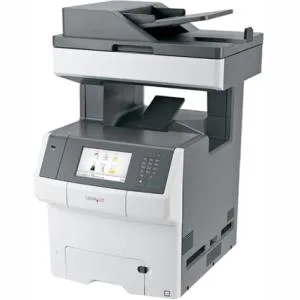
Lexmark X746DE colour laser multifunction printer 35 ppm 650 sheets
Colour laser multifunction prints, copies, scans and faxes at 35 ppm with automatic duplex and a 650-sheet capacity
- Recommended UsePlain Paper Print
- Output TypeColor
- Color Print SpeedColor
- Black Print Quality2400 x 600 dpi
- Duplex printingAutomatic
- Max. Duty Cycle100000 pages per month
- High-quality colour output at 2400 x 600 dpi resolution
- Fast 35 pages per minute print speed for efficient workflows
- Automatic duplex printing reduces paper consumption
- Large 650-sheet input capacity minimises reload frequency
- Gigabit Ethernet connectivity enables secure network sharing
Workgroup colour MFP
The Lexmark X746DE is a desktop laser multifunction printer built for busy workgroups. It prints and copies at up to 35 ppm in both colour and mono, and scans and faxes in colour. A 100000-page monthly duty cycle supports sustained high-volume output.
Desktop form with Gigabit Ethernet
The unit ships new in a desktop form factor with a touchscreen for walk-up control. Automatic duplex printing cuts paper use. Standard input and output trays each hold 650 sheets of plain paper, card stock, envelopes or labels. A Gigabit Ethernet port and USB provide wired network and local connectivity.
Check power and media handling
Verify that your site supplies 220 V AC power before ordering. The flatbed scanner handles documents up to A4 size; larger formats are not supported. Media capacity is fixed at 650 sheets with no expansion option, so confirm the volume suits your workflow.
Highlights
- High-quality colour output at 2400 x 600 dpi resolution
- Fast 35 pages per minute print speed for efficient workflows
- Automatic duplex printing reduces paper consumption
- Large 650-sheet input capacity minimises reload frequency
- Gigabit Ethernet connectivity enables secure network sharing
Specifications
| Brand | Lexmark |
|---|---|
| Recommended Use | Plain Paper Print |
| Output Type | Color |
| Color Print Speed | Color |
| Black Print Quality | 2400 x 600 dpi |
| Duplex printing | Automatic |
| Max. Duty Cycle | 100000 pages per month |
| Copy Speed, Color | Color |
| Scan Element | Flatbed |
| Scan Resolution, Optical | 600 dpi |
| Scan Resolution, Hardware | Flatbed |
| Scan Maximum Document Size | A4 - 8.27" x 11.69" A5 - 5.83" x 8.27" A6 - 4.13" x 5.83" B5 - 6.93" x 9.84" Envelope No. 10 Envelope No. 7 3/4 Envelope No. 9 C5 Envelope - 6.38" x 1.14" DL Envelope - 4.33" x 8.66" B5 Envelope - 6.93" x 9.84" Executive - 7.24" x 10.51" Folio - 8.27" x 12.99" B5 (JIS) Letter - 8.50" x 10.98" Legal - 8.50" x 14.02" Statement - 8.50" x 5.51" Universal Officio |
| Color Fax | Color |
| Input Capacity, std. | 650 sheets |
| Input Capacity, max. | 650 sheets |
| Output Capacity, std. | 650 sheets |
| Output Capacity, max. | 650 sheets |
| Network Ports | Ethernet |
| Connectivity Technology | Ethernet (RJ-45) |
| Power Requirements | 220 V AC |
Questions about this item
What speed does the Gigabit Ethernet port actually limit network throughput to?
The Gigabit Ethernet port caps throughput at 1 Gbps in practice.
What desktop space and power supply are needed for the 650-sheet desktop unit?
It requires a flat desktop area and a 220 V AC power outlet.
How is the printer installed on the network, and which step is often missed?
Connect the Ethernet cable, power on, then run the driver installer to add the device by IP address.
Also in this aisle
People compared these
Same shelf, same checkout — eight coins and a 30-minute rate lock.


MADE IN USA TONER
MADE IN USA TONER toner cartridge for KIP 7170 103 2 x 400 gm black
- Black
- Compatible
$86.99
0.00100449BTC
In stock
