
PM Company
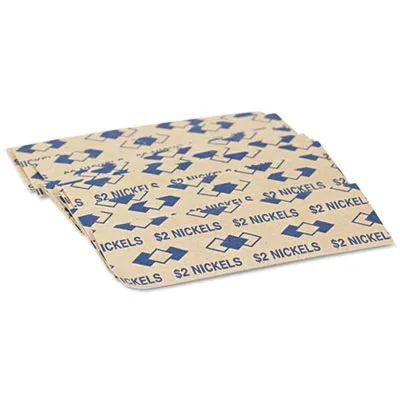
PM Company 53005 Tubular Coin Wrappers, Nickels, $2, 1000/Pack
- Coin & Cash Wrappers
- Sturdy, single-ply…
$7.99
0.00009355BTC
In stockWe take cryptocurrency — so the coins you hold can buy real hardware.Pay in crypto, spend it on real hardware. Free insured shipping worldwide over $399. Plain, unbranded boxes, sent from Germany.Free insured shipping over $399. Your rate is locked for 30 minutes once checkout opens.Rate locked 30 minutes. Every item sealed, serial-checked and covered by a 24-month warranty.Sealed, 24-month warranty.


Lexmark
Fuser maintenance kit for compatible Lexmark laser printers operating at 230 V AC
The Lexmark 40X8424 is a fuser maintenance kit designed for laser printers. It operates on a 230 V AC input voltage. This kit is a return programme supply intended to keep compatible devices running reliably.
The kit fits the MX810 MX811 MX812 MX710 MX711 MS810 MS811 MS812 M5155 M5163 M5170 XM5163 XM5170 XM7155 XM7163 XM7170 printer families. It is not suitable for printers outside this listed compatibility range.
This maintenance kit requires a 230 V AC power supply to function. Verify that the target printer operates on this voltage before installation. The voltage specification is the primary factor in confirming the correct part.
No published specifications for this item yet.
The kit is designed for the MX812dme and listed compatible models; it installs into the existing fuser cavity using the printer's built-in latches.
After inserting the fuser, the maintenance counter must be reset from the printer menu so the device recognises the new kit.
Replace the kit when the printer displays the fuser life warning or after the rated page interval indicated in the printer's maintenance schedule.
Also in this aisle
Same shelf, same checkout — eight coins and a 30-minute rate lock.
What you pay in, and what you read prices in.
Sent from your wallet at checkout
Display only — the catalogue is priced in USD
No currency matches that.
Pick the language the site speaks to you in.
No language matches that.
New here?
Already have one?
There is no automatic reset: this shop sends no mail, so there is no one-time link to ask for. Leave the address on the account and it gets picked up by hand.
Request noted
Nothing is on its way to your inbox — this shop sends no mail at all. Someone picks these up by hand.
Remembered it?


