


Lenovo
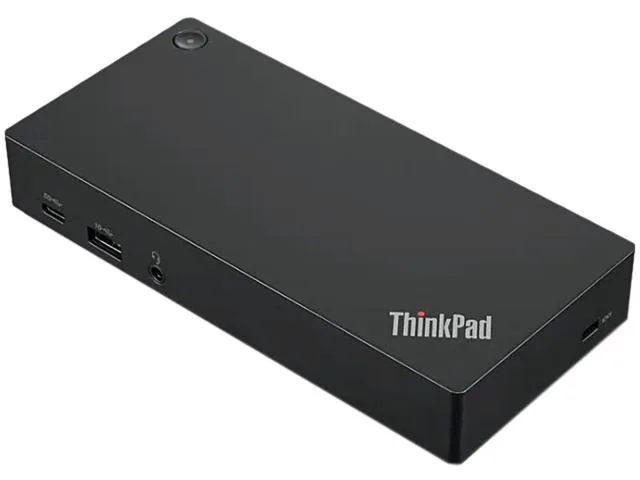
Lenovo ThinkPad USB-C Dock Gen 2 40AY0090US Black
A universal USB-C dock adds three monitors, wired Ethernet and five USB ports while delivering 90 W power
- ColorBlack
- Dimension8.30 x 3.10 x 1.20
- Weight1.05 lbs
- One cable connects power, data and up to three external displays
- Supports one 4K screen at 60 Hz or two 4K screens at 30 Hz
- Three USB 3.1 ports plus two USB 2.0 ports for peripherals
- Gigabit Ethernet gives a stable wired network link
- Compact 8.30 × 3.10 × 1.20 inch design weighs 1.05 lbs
One-cable universal dock
The ThinkPad USB-C Dock Gen 2 expands a notebook with data, power and video through a single USB-C link. It suits professionals who need a tidy desk setup with wired networking and legacy USB peripherals. Compatibility covers Lenovo and non-Lenovo notebooks alike. The 90 W AC adapter is included so the host can charge while docked.
Passive cooling and power delivery
No fan is present, so the unit runs silently during normal operation. The bundled 90 W power adapter supplies the dock and charges the connected notebook up to its supported limit. Power draw scales with attached peripherals and display load. Heat dissipates through the aluminium enclosure without audible noise.
Included accessories and video flexibility
The package adds a 90 W AC adapter, power cord and USB-C cable for immediate use. Video outputs comprise one HDMI 2.0 and two DisplayPort 1.4 ports, enabling up to three external monitors. Maximum configurations reach one 4K display at 60 Hz, two 4K displays at 30 Hz or three 1080p displays depending on host capability. Buyers who need more than three monitors or higher refresh rates at 4K will find this dock insufficient.
Highlights
- One cable connects power, data and up to three external displays
- Supports one 4K screen at 60 Hz or two 4K screens at 30 Hz
- Three USB 3.1 ports plus two USB 2.0 ports for peripherals
- Gigabit Ethernet gives a stable wired network link
- Compact 8.30 × 3.10 × 1.20 inch design weighs 1.05 lbs
Specifications
| Brand | Lenovo |
|---|---|
| Color | Black |
| Dimension | 8.30 x 3.10 x 1.20 |
| Weight | 1.05 lbs |
Questions about this item
How do I connect the ThinkPad USB-C Dock Gen 2 and which step is often missed?
Connect the supplied USB-C cable from the dock to the laptop and plug the 90W AC adapter into mains power; the step users miss is forgetting the power adapter, so the dock cannot drive video or charge the notebook.
What part will need replacement first on the ThinkPad USB-C Dock Gen 2?
The 90W AC power adapter is the only external wear item; cables and ports are solid-state, so the adapter typically fails before the dock itself.
What video limit appears first when running three monitors continuously on this dock?
The dock supports a maximum of one 4K display at 60 Hz or two 4K displays at 30 Hz; the third monitor forces 1080p output, so 4K bandwidth is the first sustained-use limit.
Also in this aisle
People compared these
Same shelf, same checkout — eight coins and a 30-minute rate lock.


Kensington
Kensington Desk Mount Cable Anchor K64613WW accessory
- Black
- Provides a secure a…
$19.99
0.00023785BTC
In stock
Panasonic
Panasonic CF-VDR291U laptop cooling pad
- Optical Drive
- Buffer Size: 2 MB B…
$213.99
0.0025462BTC
In stock
eReplacements
eReplacements PB992A-ER laptop battery 14.4V
- Battery
- Lithium-Ion
$65.99
0.00078519BTC
In stock