


Lenovo
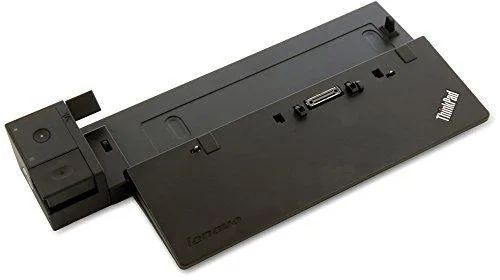
Lenovo ThinkPad Pro Docking Station 90W (40A10090US)
Connects compatible ThinkPad laptops to three USB 2.0 ports, three USB 3.0 ports, Gigabit Ethernet, DisplayPort 1.2, DVI-D, VGA and audio while delivering 90 W charging
- Charges your ThinkPad with the included 90W AC adapter
- Connects up to two external monitors via DisplayPort 1.2, DVI-D or VGA
- Adds three USB 3.0 and three USB 2.0 ports, one always-on for charging
- Gigabit Ethernet enables wired enterprise network manageability
- One-step eject button removes the laptop quickly and securely
Compatible ThinkPad Models
This Lenovo ThinkPad Pro Docking Station 90W connects supported ThinkPad laptops including the L440, L450, L460, L470, L540, L560, L570, P50s, P51s, T440, T440p, T440s, T450, T450s, T460, T460s, T470, T470s, T540p, T550, T560, T570, W550s, X240, X250, X260 and X270. It does not support models with quad-core processors such as the T460p with discrete graphics, P50, P51, P70 or P71, which require the Ultra Dock 170W instead.
Ports and Build Integration
The dock provides three USB 2.0 ports, one with always-on charging, plus three USB 3.0 ports, a 10/100/1000 Gigabit Ethernet jack with enterprise manageability, one DisplayPort 1.2 and one DVI-D that share exclusive operation, a VGA output, a stereo/microphone combo audio port, a security lock hole and a convenient eject button for one-step system removal. It charges the attached ThinkPad through the included 90W AC adapter and supports up to two external monitors using different connection types.
Sustained Operation Notes
The unit relies on downloaded Lenovo firmware and drivers to function correctly, so keeping those updated is essential for stable long-term use. Because DisplayPort 1.2 and DVI-D cannot be active simultaneously, multi-monitor layouts must plan around that exclusivity. The Gigabit Ethernet link maintains enterprise manageability features during extended sessions, and the always-on USB port continues to charge devices even when the laptop is undocked.
Highlights
- Charges your ThinkPad with the included 90W AC adapter
- Connects up to two external monitors via DisplayPort 1.2, DVI-D or VGA
- Adds three USB 3.0 and three USB 2.0 ports, one always-on for charging
- Gigabit Ethernet enables wired enterprise network manageability
- One-step eject button removes the laptop quickly and securely
Specifications
No published specifications for this item yet.
Questions about this item
How many external monitors can the 90 W Pro Dock drive at once?
The dock supports a maximum of two external monitors using its DisplayPort 1.2, DVI-D and VGA outputs, though DisplayPort and DVI-D cannot be active simultaneously.
How hot or loud does the 90 W Pro Dock get when left running all day?
The unit has no fan and draws up to 90 W from its included AC adapter, so it runs silently and produces only modest warmth during continuous use.
Which ThinkPad models must I already own for the 90 W Pro Dock to work?
Compatible models include T440–T470, T440p, T440s, T450s, T460p, T460s, T470p, T470s, L440–L570, X240–X270, P50s and P51s; quad-core T460p, P50, P51, P70 and P71 are not supported.
Also in this aisle
People compared these
Same shelf, same checkout — eight coins and a 30-minute rate lock.


Kensington
Kensington Desk Mount Cable Anchor K64613WW accessory
- Black
- Provides a secure a…
$19.99
0.00023182BTC
In stock
Panasonic
Panasonic CF-VDR291U laptop cooling pad
- Optical Drive
- Buffer Size: 2 MB B…
$213.99
0.00248159BTC
In stock
eReplacements
eReplacements PB992A-ER laptop battery 14.4V
- Battery
- Lithium-Ion
$65.99
0.00076527BTC
In stock