


Lenovo
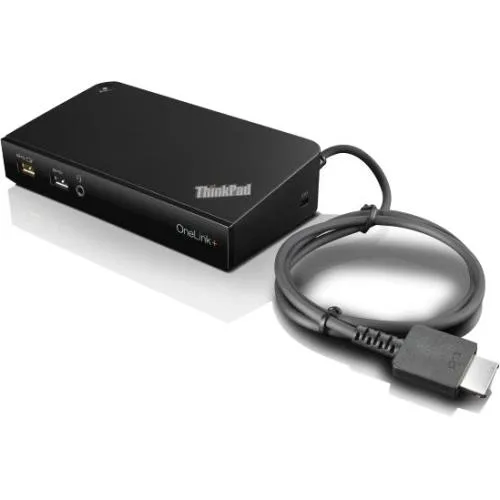
Lenovo ThinkPad OneLink+ Dock 03X6296 6×USB 3.0/2.0 90W
A docking station for notebook or tablet PC with six USB ports, OneLink+ connectivity, and a 90 W AC adapter included
- Single OneLink+ cable delivers power, data and video
- 90 W AC adapter charges notebook and mobile devices
- Six USB ports including four 3.0 and two 2.0
- Front always-on USB 3.0 port powers phone while docked
- Supports two external displays with uncompressed video
OneLink+ Dock for ThinkPad notebooks
The Lenovo ThinkPad OneLink+ Dock 03X6296 connects a compatible notebook through a single OneLink+ connector. It supplies up to 90 W of power while adding six USB ports, two external display outputs and audio. A 90 W slim-tip AC adapter is included in the box.
Suited for ThinkPad owners with OneLink+
This dock serves users who want a permanent desk setup with multiple peripherals and dual monitors driven without compression or extra drivers. It is not for notebooks that lack the OneLink+ port or for buyers who need more than six USB connections or more than two external displays.
Single OneLink+ connector with 90 W delivery
The decisive specification is the OneLink+ interface that carries data, video and up to 90 W of charging through one cable. If your ThinkPad does not have a OneLink+ socket, this dock cannot be used.
Highlights
- Single OneLink+ cable delivers power, data and video
- 90 W AC adapter charges notebook and mobile devices
- Six USB ports including four 3.0 and two 2.0
- Front always-on USB 3.0 port powers phone while docked
- Supports two external displays with uncompressed video
Specifications
| Brand | Lenovo |
|---|---|
| Shipping weight | 1.36 kg |
| Package size | 305 × 229 × 127 mm |
Questions about this item
What connector does the ThinkPad OneLink+ Dock 03X6296 use to attach to the notebook?
It connects through Lenovo's OneLink+ connector, a single proprietary plug that carries power, video and data without extra cables.
How is the dock set up, and what step do people often miss?
Plug the included 90W slim-tip AC adapter into the dock, connect the OneLink+ cable to the notebook, and attach peripherals; the step often missed is seating the OneLink+ plug fully so both video and charging activate.
What will need replacement first on the 03X6296 dock?
The 90W slim-tip AC adapter is the only external power part; if the dock stops charging the notebook, replace the adapter before troubleshooting the dock itself.
Also in this aisle
People compared these
Same shelf, same checkout — eight coins and a 30-minute rate lock.


Kensington
Kensington Desk Mount Cable Anchor K64613WW accessory
- Black
- Provides a secure a…
$19.99
0.00024068BTC
In stock
Panasonic
Panasonic CF-VDR291U laptop cooling pad
- Optical Drive
- Buffer Size: 2 MB B…
$213.99
0.00257642BTC
In stock
eReplacements
eReplacements PB992A-ER laptop battery 14.4V
- Battery
- Lithium-Ion
$65.99
0.00079451BTC
In stock