


Lenovo
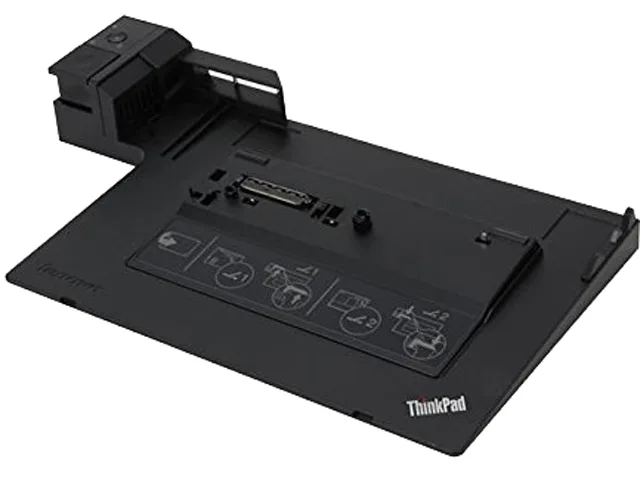
Lenovo 4337-10U ThinkPad Mini Dock Series 3 docking station
Connects compatible ThinkPad laptops to six USB 2.0 ports, DVI-D, VGA, DisplayPort, Ethernet and audio, supporting dual external monitors
- CompatibilityThinkPad L412, L420, L512, L520, T400s, T410, T410i, T410s,
- Ports SpecSix USB 2.0 ports 1 x Single-Link DVI-D 1 x D-Sub 1 x Displa
- FeaturesLeft corner alignment for easy system attachment Convenient
- Dimension14" x 7.8" x 2.2"
- Weight2 lbs.
- Connect two external monitors with DVI-D, DisplayPort or VGA outputs
- Six USB 2.0 ports keep peripherals connected without extra hubs
- Wired RJ-45 Ethernet adds reliable network access at the desk
- Left-corner alignment and eject button simplify laptop docking and removal
- Integrated key lock and cable slot secure the ThinkPad physically
ThinkPad Mini Dock Series 3
This Lenovo 4337-10U docking station expands connectivity for compatible ThinkPad models including the T420, T520, X220 and L-series laptops. It adds six USB 2.0 ports, wired Ethernet, audio jacks and three video outputs to a single desk connection. The unit is designed for professionals who need a permanent desk setup with legacy monitor support.
Left-corner alignment and eject button
The dock uses a left-corner alignment mechanism so the laptop slides on from the side and locks into place. A convenient eject button releases the system in one step without forcing the connector. No software driver installation is required for the port replication itself; video output simply works when the laptop is seated correctly.
Dual-monitor limit and cable choice
Only two of the three video ports can be active at once; attaching two external monitors disables the ThinkPad's own display. The Single-Link DVI-D port does not accept a DVI-to-VGA adapter, and DisplayPort cables reduce the maximum resolution to 1920 x 1200. Verify that your monitors have native DVI-D, VGA or DisplayPort inputs and that your ThinkPad model appears in the supported list before ordering.
Highlights
- Connect two external monitors with DVI-D, DisplayPort or VGA outputs
- Six USB 2.0 ports keep peripherals connected without extra hubs
- Wired RJ-45 Ethernet adds reliable network access at the desk
- Left-corner alignment and eject button simplify laptop docking and removal
- Integrated key lock and cable slot secure the ThinkPad physically
Specifications
| Brand | lenovo |
|---|---|
| Model | 4337-10U |
| Compatibility | ThinkPad L412, L420, L512, L520, T400s, T410, T410i, T410s, T410si, T420, T420s, T510, T510i, T520 Dual Core models, X220 |
| Ports Spec | Six USB 2.0 ports 1 x Single-Link DVI-D 1 x D-Sub 1 x DisplayPort 1 x Analog microphone in 1 x Headphone out RJ-45 Ethernet port |
| Features | Left corner alignment for easy system attachment Convenient eject button for one-step system removal Three video ports: - Any two, of the three, video ports can be used simultaneously. Attaching two monitors disables the ThinkPad display. - VGA analog monitor supporting 1920 x 1200 resolution - One Single-Link DVI-D digital monitor supporting 1920 x 1200 resolution (Single-Link DVI-D port does not support attachment of a DVI-to-VGA monitor adapter) - One DisplayPort monitor supporting 2560 x 1600 resoltion (Supports attachment of DisplayPort monitor cables; Using DisplayPort monitor |
| Dimension | 14" x 7.8" x 2.2" |
| Weight | 2 lbs. |
| Shipping weight | 2.27 kg |
| Package size | 559 × 457 × 152 mm |
Questions about this item
How can I confirm the ThinkPad Mini Dock Series 3 is working after connecting my T420?
Connect power, attach the laptop via the left-corner alignment, and press the eject button to verify the one-step removal works. Check that two of the three video ports — DVI-D, D-Sub, or DisplayPort — drive external monitors while the built-in screen disables, and test the RJ-45 Ethernet and six USB 2.0 ports for data.
What comes in the box with the 4337-10U and what must I buy separately?
The dock includes the unit with six USB 2.0 ports, Single-Link DVI-D, D-Sub, DisplayPort, analog microphone in, headphone out, and RJ-45 Ethernet. You must supply compatible ThinkPad models such as T410, T420, T520, X220 or listed L-series, plus any monitor cables and a power adapter.
Which video port combination should I choose for dual monitors on a T510?
Use any two of the three ports — DVI-D, D-Sub, or DisplayPort — simultaneously. DVI-D and D-Sub each support 1920 x 1200; DisplayPort supports 2560 x 1600 but drops to 1920 x 1200 with DisplayPort cables. The DVI-D port does not accept a DVI-to-VGA adapter.
Also in this aisle
People compared these
Same shelf, same checkout — eight coins and a 30-minute rate lock.


Kensington
Kensington Desk Mount Cable Anchor K64613WW accessory
- Black
- Provides a secure a…
$19.99
0.00023769BTC
In stock
Panasonic
Panasonic CF-VDR291U laptop cooling pad
- Optical Drive
- Buffer Size: 2 MB B…
$213.99
0.00254447BTC
In stock
eReplacements
eReplacements PB992A-ER laptop battery 14.4V
- Battery
- Lithium-Ion
$65.99
0.00078466BTC
In stock