


Lenovo
Lenovo 40AJ0135US ThinkPad Ultra Docking Station 135W
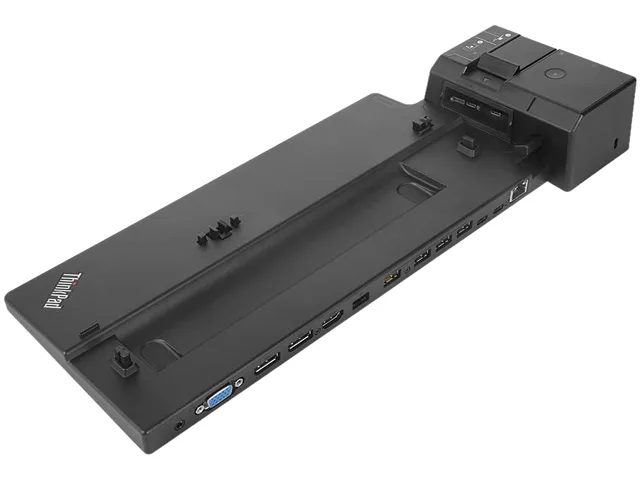
A 135 W docking station adds six USB ports, dual DisplayPort, HDMI, VGA, wired network and audio to compatible ThinkPad notebooks over a single USB-C link
- ColorBlack
- CompatibilityLenovo
- Weight1.00 lbs
- FunctionInternet Tablet
- 135 W power delivery charges your notebook while you work
- Six USB 3.0 ports connect peripherals without extra hubs
- Dual DisplayPort 1.4 plus HDMI drives three external monitors
- Gigabit RJ-45 adds stable wired networking
- Compact 2.13 × 6.26 × 14.88 in design fits any desk
ThinkPad Ultra Dock 135W for Notebooks
The Lenovo 40AJ0135US ThinkPad Ultra Docking Station delivers 135W of power through a single USB-C host connection. It is built for ThinkPad notebook users who need one cable to charge, connect peripherals and drive external displays.
135W power delivery over USB-C
The dock supplies up to 135W to the attached notebook, which is the single specification that determines whether a specific ThinkPad model can be fully powered while docked. Check the notebook's required input wattage before purchase.
Simple USB-C connection with common fit issues
Installation is a single USB-C cable to the notebook, but the 135W output may not charge higher-power ThinkPad models under heavy load. The 1.79 lb unit sits on the desk and requires its own AC adapter included in the box.
Highlights
- 135 W power delivery charges your notebook while you work
- Six USB 3.0 ports connect peripherals without extra hubs
- Dual DisplayPort 1.4 plus HDMI drives three external monitors
- Gigabit RJ-45 adds stable wired networking
- Compact 2.13 × 6.26 × 14.88 in design fits any desk
Specifications
| Brand | Lenovo |
|---|---|
| Model | 40AJ0135US |
| Part Number | 40AJ0135US |
| Color | Black |
| Compatibility | Lenovo |
| Weight | 1.00 lbs |
| Function | Internet Tablet |
| Shipping weight | 1.85 kg |
| Package size | 409 × 218 × 89 mm |
Questions about this item
What does the 135 W power rating mean when the dock is connected to my ThinkPad?
It supplies up to 135 W to the notebook through the single USB Type-C host cable, so most compatible ThinkPads can charge at full speed while the dock drives displays and peripherals.
Which video standard do the two DisplayPort sockets use, and what resolution does that allow?
They are DisplayPort 1.4 ports, so each can carry a 4K or 5K signal depending on the notebook GPU and cable quality.
How much desk space do the dock's dimensions 2.13" × 6.26" × 14.88" actually need?
The unit stands 2.13 inches tall, 6.26 inches wide and 14.88 inches deep; allow a few extra centimetres at the rear for cable bend radius.
Also in this aisle
People compared these
Same shelf, same checkout — eight coins and a 30-minute rate lock.


Kensington
Kensington Desk Mount Cable Anchor K64613WW accessory
- Black
- Provides a secure a…
$19.99
0.00023754BTC
In stock
Panasonic
Panasonic CF-VDR291U laptop cooling pad
- Optical Drive
- Buffer Size: 2 MB B…
$213.99
0.00254278BTC
In stock
eReplacements
eReplacements PB992A-ER laptop battery 14.4V
- Battery
- Lithium-Ion
$65.99
0.00078414BTC
In stock