


Kensington
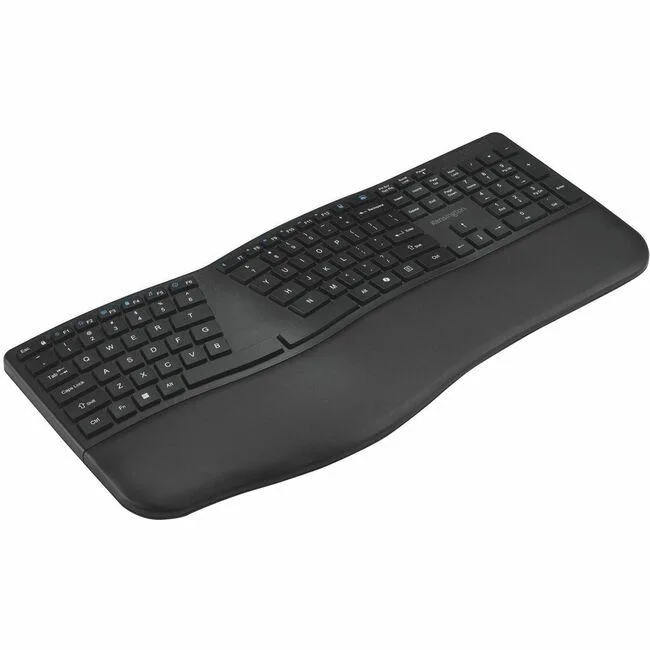
Kensington K72485NA Pro Fit Ergo KB680 EQ Rechargeable Keyboard
Wireless ergonomic keyboard with rechargeable lithium-ion battery, Bluetooth and 2.40 GHz RF connectivity, USB Type-A receiver, and a CoPilot hot key for Windows and Mac
- TypeStandard
- Power SourceLithium-ion Rechargeable Battery
- Ergonomic typing comfort with split-key design
- Dual wireless freedom via Bluetooth and 2.40 GHz RF
- Rechargeable lithium-ion battery eliminates disposable cells
- Dedicated CoPilot hot key for instant AI access
- Works with Windows and Mac systems
Kensington Pro Fit Ergo KB680
This Kensington keyboard is a standard-layout input device built for PC and Mac users who want a rechargeable wireless option. It connects through Bluetooth and 2.40 GHz RF using a USB Type A interface. A lithium-ion battery removes the need for disposable cells. A dedicated CoPilot hot key gives quick access to the Windows AI assistant.
Who Benefits and Who Does Not
Office workers and mobile professionals who value ergonomic shaping and cable-free desks will appreciate the wireless freedom and cross-platform support. Buyers who need a numeric keypad or programmable macro keys should look elsewhere because this model is a standard layout without those extras. Gamers requiring low-latency wired response or per-key RGB lighting will not find those features here.
Deciding Specification
The lithium-ion rechargeable battery is the single specification that decides fit; if you prefer replaceable alkaline cells or a wired-only connection, this keyboard will not match your workflow.
Highlights
- Ergonomic typing comfort with split-key design
- Dual wireless freedom via Bluetooth and 2.40 GHz RF
- Rechargeable lithium-ion battery eliminates disposable cells
- Dedicated CoPilot hot key for instant AI access
- Works with Windows and Mac systems
Specifications
| Brand | Kensington |
|---|---|
| Type | Standard |
| Power Source | Lithium-ion Rechargeable Battery |
| Shipping weight | 1.15 kg |
| Package size | 488 × 267 × 51 mm |
Questions about this item
Should I use the Bluetooth connection or the 2.40 GHz RF link?
Both are built in; the 2.40 GHz RF connection uses the included USB Type A receiver for a dedicated link, while Bluetooth pairs directly to the host without a dongle.
What does the CoPilot hot key do on this keyboard?
It launches the Windows CoPilot assistant with a single press, giving quick access to AI features on supported Windows versions.
How does the USB Type A interface work with the wireless keyboard?
The USB Type A receiver plugs into the computer and handles the 2.40 GHz RF link; no cable connects the keyboard itself to the port.
Also in this aisle
People compared these
Same shelf, same checkout — eight coins and a 30-minute rate lock.


Lenovo
Lenovo 42T3273 Black Replacement Keyboard for ThinkPad T60 T61
- Thinkpad T60 T61 Ke…
- Black
$29.99
0.00036224BTC
In stock