

Panorama Antennas
Panorama Antennas LG-IN2445 5G 71 Dome Wi-Fi adapter
- Accessories
$282.99
0.00328002BTC
In stockWe take cryptocurrency — so the coins you hold can buy real hardware.Pay in crypto, spend it on real hardware. Free insured shipping worldwide over $399. Plain, unbranded boxes, sent from Germany.Free insured shipping over $399. Your rate is locked for 30 minutes once checkout opens.Rate locked 30 minutes. Every item sealed, serial-checked and covered by a 24-month warranty.Sealed, 24-month warranty.
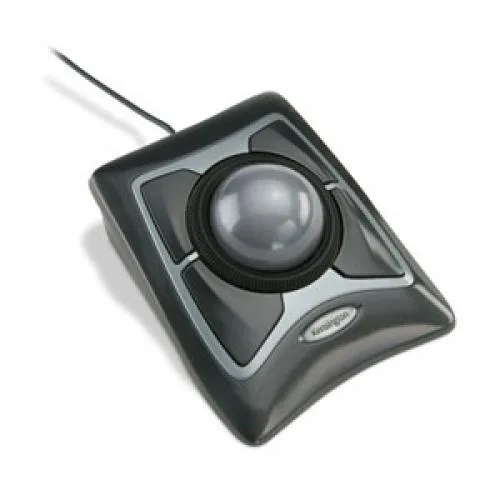
Kensington
A precise trackball with a fingertip scroll ring and included wrist rest, refined over 15 years for PC and Mac control
The Kensington Expert Mouse uses Diamond Eye optical technology for smooth, precise cursor movement. A large ball delivers the control that has defined the category for more than 15 years. It is built for anyone who prefers a stationary pointing device over a traditional mouse.
The award-winning Scroll Ring surrounds the ball so you can scroll without moving your hand. Optical tracking keeps motion consistent on most surfaces. No moving parts under the ball mean less friction and quiet operation during long sessions.
The supplied wrist rest supports the hand during extended use. Wired USB connectivity avoids batteries and pairing steps. The symmetrical shape suits left or right-handed users who want a fixed desktop footprint.
| Type | Accessories |
|---|
Connect the wireless adapter to a USB port, place the trackball on a flat surface, and install the KensingtonWorks software to enable the scroll ring and button customisation.
Remove the ball periodically and clean the three bearing points and the optical sensor window with a lint-free cloth to keep cursor movement smooth.
The two AA batteries will require replacement after several months of continuous operation.
Also in this aisle
Same shelf, same checkout — eight coins and a 30-minute rate lock.
What you pay in, and what you read prices in.
Sent from your wallet at checkout
Display only — the catalogue is priced in USD
No currency matches that.
Pick the language the site speaks to you in.
No language matches that.
New here?
Already have one?
There is no automatic reset: this shop sends no mail, so there is no one-time link to ask for. Leave the address on the account and it gets picked up by hand.
Request noted
Nothing is on its way to your inbox — this shop sends no mail at all. Someone picks these up by hand.
Remembered it?



