
Kensington
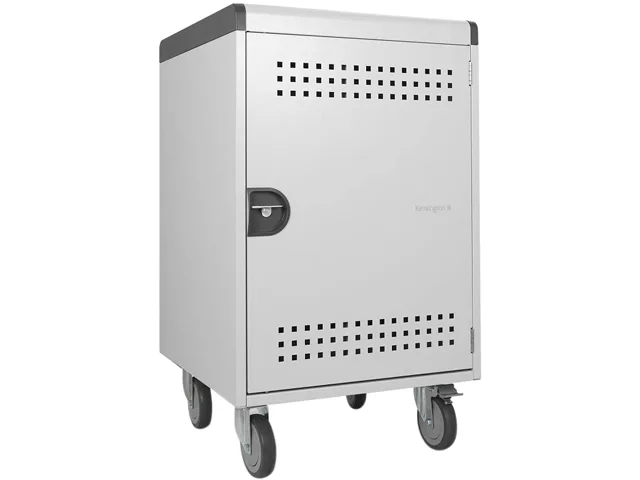
Kensington K62323NA 30-bay security charging cabinet
Steel cabinet securely stores and charges 30 tablets or notebooks with cable and padlock locking points
- Accessory TypeCharging Cabinet
- ColorWhite
- SpecificationsType: Cabinet unit Recommended Use: 30 tablets / notebooks M
- Secure storage for 30 devices with steel construction
- Lockable cabinet accepts security cable and padlocks
- White finish suits classroom or office environments
- Charges and organises 30 tablets or notebooks simultaneously
- New cabinet unit available from October 2024
30-bay charging cabinet for tablets and notebooks
The Kensington K62323NA is a steel cabinet unit designed to charge up to 30 tablets or notebooks simultaneously. Its white finish suits classroom, office or shared-workspace deployments where devices need secure overnight storage.
Lockable steel construction
The cabinet body is made from steel and includes integrated lock points for a security cable and padlocks, which are not supplied. The rigid enclosure protects stored devices from casual tampering while keeping cables organised inside the unit.
Freestanding unit requiring external power and locks
The cabinet sits on the floor or a sturdy shelf and needs a nearby mains supply to run its internal charging system. Buyers must provide their own padlocks and a security cable to activate the locking feature, and should allow space for the door swing when positioning the unit.
Highlights
- Secure storage for 30 devices with steel construction
- Lockable cabinet accepts security cable and padlocks
- White finish suits classroom or office environments
- Charges and organises 30 tablets or notebooks simultaneously
- New cabinet unit available from October 2024
Specifications
| Brand | Kensington |
|---|---|
| Model | K62323NA |
| Accessory Type | Charging Cabinet |
| Color | White |
| Specifications | Type: Cabinet unit Recommended Use: 30 tablets / notebooks Material: Steel Lockable: Yes Lock Type: Security cable, padlocks (not included) |
| Shipping weight | 60.00 kg |
| Package size | 1100 × 724 × 699 mm |
Questions about this item
How is the Kensington AC30 30-bay cabinet installed and what step is often missed?
Place the steel cabinet on a level surface, secure it to the floor or wall using the mounting points, then route a security cable through the lock slot; the step often missed is anchoring the cabinet before loading devices.
What maintenance or replacement will the Kensington AC30 cabinet need later?
The steel body requires no scheduled maintenance; only the padlocks and security cable — sold separately — may need replacement if keys are lost or the cable is cut.
What limit appears first when the Kensington AC30 cabinet runs continuously with 30 tablets?
The 30-bay capacity is the first limit; once all slots are filled, no further devices can be charged or secured until a bay becomes free.
Also in this aisle
People compared these
Same shelf, same checkout — eight coins and a 30-minute rate lock.


Kensington
Kensington Desk Mount Cable Anchor K64613WW accessory
- Black
- Provides a secure a…
$19.99
0.0002352BTC
In stock
Panasonic
Panasonic CF-VDR291U laptop cooling pad
- Optical Drive
- Buffer Size: 2 MB B…
$213.99
0.0025178BTC
In stock
eReplacements
eReplacements PB992A-ER laptop battery 14.4V
- Battery
- Lithium-Ion
$65.99
0.00077644BTC
In stock