


Kensington
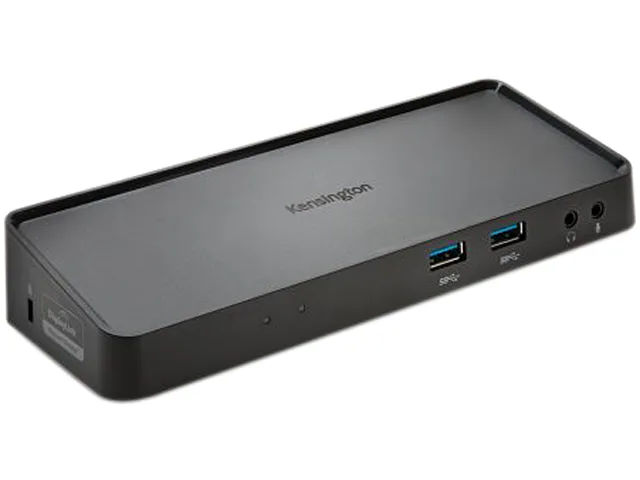
Kensington K33991WW SD3600 USB 3.0 Docking Station
Universal USB 3.0 docking station adds dual 1080p video, gigabit Ethernet and six USB ports through a single cable
- ColorBlack
- CompatibilitymacOS High Sierra 10.13 Windows 7 Windows 8 Windows 8.1 Wind
- Ports Spec1 x RJ-45 Ethernet (LAN) Female 2 x HD1080p DVI Out DVI-I to
- Weight1.65
- FeaturesDual 1080p HD video to external monitor via HDMI, VGA or DVI
- Connect two monitors at 1080p via HDMI, VGA or DVI
- Add high-speed peripherals through two front USB 3.0 ports at 5Gbps
- Keep keyboard and mouse tidy on four rear USB 2.0 ports
- Mount dock behind a display using VESA plate K33959WW sold separately
- Adjust screen layout easily with included display settings software
Universal USB 3.0 docking station
The Kensington K33991WW connects a laptop, two external monitors and multiple peripherals through a single USB-A cable. It supports dual 1080p output via HDMI, DVI or VGA using the included adapters. Compatible with Windows 7 through 10 and macOS 10.4 to 10.13. Ideal for professionals who move between meetings and a desk-based workstation.
Sustained connectivity across a full workday
The dock maintains stable video and data links during extended sessions without relying on short-burst performance. DisplayLink technology manages dual 1080p streams consistently while the two front USB 3.0 ports handle high-speed transfers at up to 5Gbps. Four rear USB 2.0 ports keep keyboards, mice and other accessories connected reliably throughout the day.
Quiet operation with minimal desk footprint
The unit runs silently with no active cooling, drawing power directly from the host USB 3.0 connection. A VESA mounting plate (sold separately) lets you attach the dock behind a monitor, removing it from the desktop entirely. Dimensions are 9.63 by 9.5 by 6.5 inches and weight is 1.65 pounds, making it unobtrusive in any workspace.
Highlights
- Connect two monitors at 1080p via HDMI, VGA or DVI
- Add high-speed peripherals through two front USB 3.0 ports at 5Gbps
- Keep keyboard and mouse tidy on four rear USB 2.0 ports
- Mount dock behind a display using VESA plate K33959WW sold separately
- Adjust screen layout easily with included display settings software
Specifications
| Brand | Kensington Technology Group |
|---|---|
| Model | K33991WW |
| Color | Black |
| Compatibility | macOS High Sierra 10.13 Windows 7 Windows 8 Windows 8.1 Windows 10 |
| Ports Spec | 1 x RJ-45 Ethernet (LAN) Female 2 x HD1080p DVI Out DVI-I to HDMI Adapter DVI-I to VGA Adapter HDMI Out Host Interface: USB 3.0 |
| Weight | 1.65 |
| Features | Dual 1080p HD video to external monitor via HDMI, VGA or DVI 2 front USB 3.0 ports that support high-speed data transfer up to 5Gbps 4 rear USB 2.0 ports for peripheral accessories like a keyboard and mouse VESA mounting plate (sold separately) allows the dock to be taken off the desktop and placed on the back of an external monitor Display settings software allow you to easily make changes to your preferences Headphone and microphone jacks with Audio 2.0 for enhanced sound quality Gigabit Ethernet port for wired connectivity to a network or the Internet |
| Shipping weight | 0.93 kg |
| Package size | 292 × 178 × 178 mm |
Questions about this item
Does the Kensington K33991WW run hot or make noise when driving two 1080p monitors all day?
The dock has no fan and uses a DisplayLink chip over USB 3.0, so it stays silent and only warms slightly under continuous dual-monitor load.
My laptop only has USB-A ports — will the Kensington K33991WW work without any extra adapters?
Yes, the host cable ends in a standard USB-A 3.0 plug, so any laptop with a USB-A port can connect directly.
Can I keep my older 1080p DVI monitor and add an HDMI screen at the same time on the Kensington K33991WW?
The dock provides one HDMI, one DVI-I and a DVI-to-HDMI adapter, letting you drive two 1080p displays in any HDMI/DVI/VGA combination.
Also in this aisle
People compared these
Same shelf, same checkout — eight coins and a 30-minute rate lock.


Kensington
Kensington Desk Mount Cable Anchor K64613WW accessory
- Black
- Provides a secure a…
$19.99
0.00023277BTC
In stock
Panasonic
Panasonic CF-VDR291U laptop cooling pad
- Optical Drive
- Buffer Size: 2 MB B…
$213.99
0.00249176BTC
In stock
eReplacements
eReplacements PB992A-ER laptop battery 14.4V
- Battery
- Lithium-Ion
$65.99
0.00076841BTC
In stock