


Jansicotek
Jansicotek TJ-A0126 2-Port USB-C KVM Switch 8K@60Hz DP 1.4
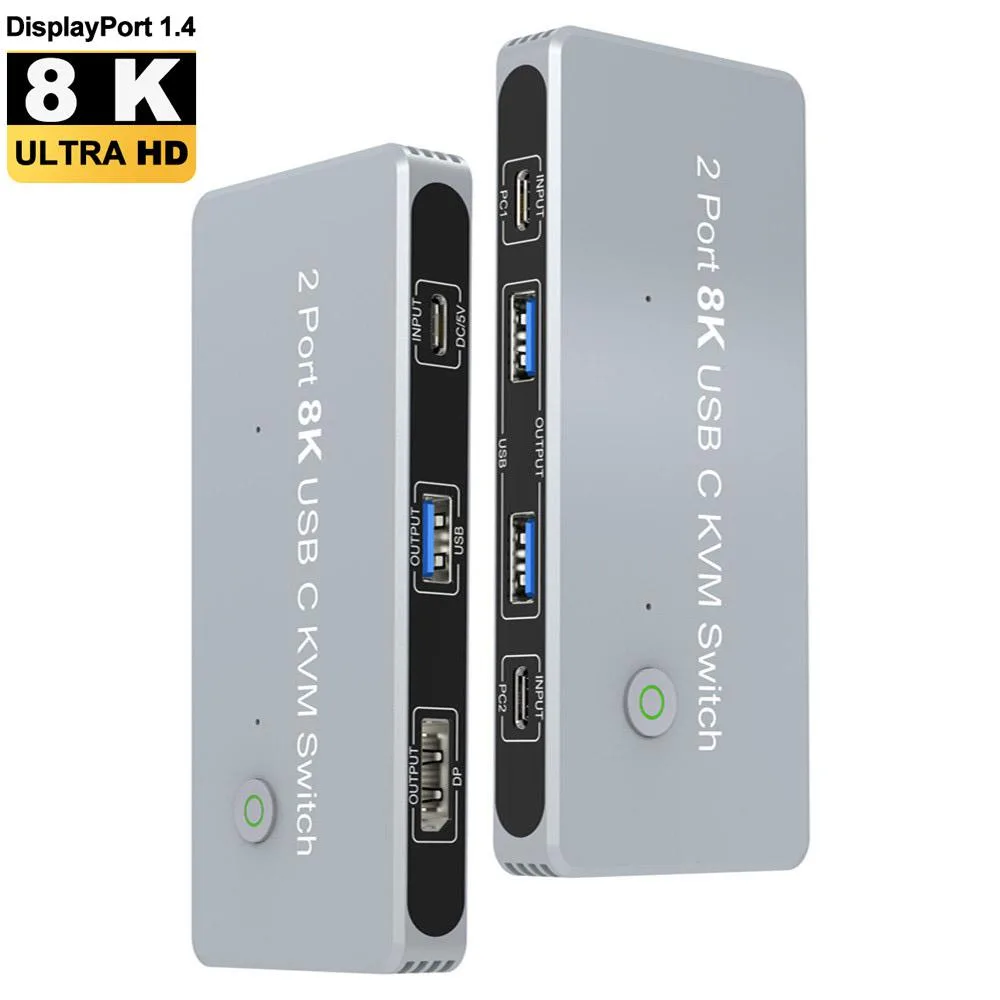
Lets two USB-C computers share one DisplayPort monitor at up to 7680×4320 resolution and three USB peripherals with push-button switching
- TypeDisplayPort, USB
- PC ConnectorsUSB-C cable
- Computer Connections2 Ports
- Monitor Connections1 Port
- Video Resolution7680×4320
- PC SelectionManual Switch
- Share two USB-C computers on one DisplayPort monitor
- Switch instantly with a front-panel button
- Drive 8K at 60 Hz or 4K at 144 Hz via DP 1.4
- Connect keyboard, mouse and storage through three USB 2.0 ports
- Power the unit with the included USB-A to USB-C cable
Two-Port USB-C KVM for Dual Workstations
The Jansicotek TJ-A0126 lets two USB-C laptops or PCs share one DisplayPort 1.4 monitor and a set of USB peripherals. It targets professionals who hot-desk between a work machine and a personal rig, or streamers running a gaming PC alongside a capture laptop. Switching is manual via a front button, with an optional 3-second auto-scan mode for unattended monitoring.
USB-C Inputs and Three USB-A Outputs
Each computer connects through a supplied USB-C Gen-2 cable that carries both video and data. The switch adds three USB-A ports for a keyboard, mouse, printer or storage, all of which follow the active PC without re-plugging. A USB-C to USB-A power cable must remain connected to keep the unit running. LED indicators show the selected port at a glance.
8K60 Video Bandwidth and Low-Power Operation
DisplayPort 1.4 provides 32.4 Gbps throughput, enabling 7680×4320 at 60 Hz or 4K at 144 Hz with HDR. The USB hub portion operates at 480 Mbps under the 2.0 spec. Because the device draws power from an external USB-A source, it adds negligible load to either computer and runs silently with no fan.
Highlights
- Share two USB-C computers on one DisplayPort monitor
- Switch instantly with a front-panel button
- Drive 8K at 60 Hz or 4K at 144 Hz via DP 1.4
- Connect keyboard, mouse and storage through three USB 2.0 ports
- Power the unit with the included USB-A to USB-C cable
Specifications
| Brand | Jansicotek |
|---|---|
| Series | TJ-A0126 |
| Model | TJ-A0126 |
| Type | DisplayPort, USB |
| PC Connectors | USB-C cable |
| Computer Connections | 2 Ports |
| Monitor Connections | 1 Port |
| Video Resolution | 7680×4320 |
| PC Selection | Manual Switch |
| AutoScan Interval | 3 seconds |
| Bandwidth | DP 1.4: 32.4Gbps/USB 2.0: 480Mbps |
| LED Indicators | Yes |
| Application | 2PC Share 1 Monitor and One Keyboard Mouse,KVM Switch Displayport,Support 8K@60Hz 4K@144Hz 3D 1080P |
| Features | 2xUSB-C 8K KVM Switch with one DisplayPort 1.4 Port for Video,with this 2 Port 8K KVM Switcher,you are able to connect from the switcher's two PC Input Port to your USB-C PC/Laptops via two standard USB-C Gen-2 Cable,then connect from the switcher's Standard DP 1.4 Port to your DisplayPort Monitors via your own displayport 8k Standard Cable,you can press the "select"button to switch between two of your PCs.Note:You must plug our USB C to USB A cable to power the switcher while working With 3xUSB2.0 Output Port,two Computers share one set,you can connect 3xUSB2.0 Output to your USB Mo |
| Dimensions | 5.43 x 5.35 x 1.46 inches |
| Weight | 9.52 Ounces |
| Package Contents | 1 x DP KVM Switch, 2 x USB-C Cable, 1 x USB-A to USB-C power cable |
Questions about this item
What bandwidth does the DisplayPort 1.4 interface provide on this switch?
The DisplayPort 1.4 port delivers 32.4 Gbps bandwidth, enabling 8K at 60 Hz and 4K at 144 Hz output to a single monitor.
What are the physical dimensions and weight of the TJ-A0126 unit?
The switch measures 5.43 by 5.35 by 1.46 inches and weighs 9.52 ounces, so it fits on a typical desk without special mounting hardware.
How do I power the KVM switch and connect the two computers?
Plug the included USB-A to USB-C power cable into a USB port or adapter, then connect each computer to the two USB-C input ports using the supplied USB-C Gen-2 cables.
Also in this aisle
People compared these
Same shelf, same checkout — eight coins and a 30-minute rate lock.


Black Box Corporation
Black Box Corporation 4K60 HDMI Dual-Head KVM Switch 4 Port
$774.99
0.00930092BTC
In stock