


Jansicotek
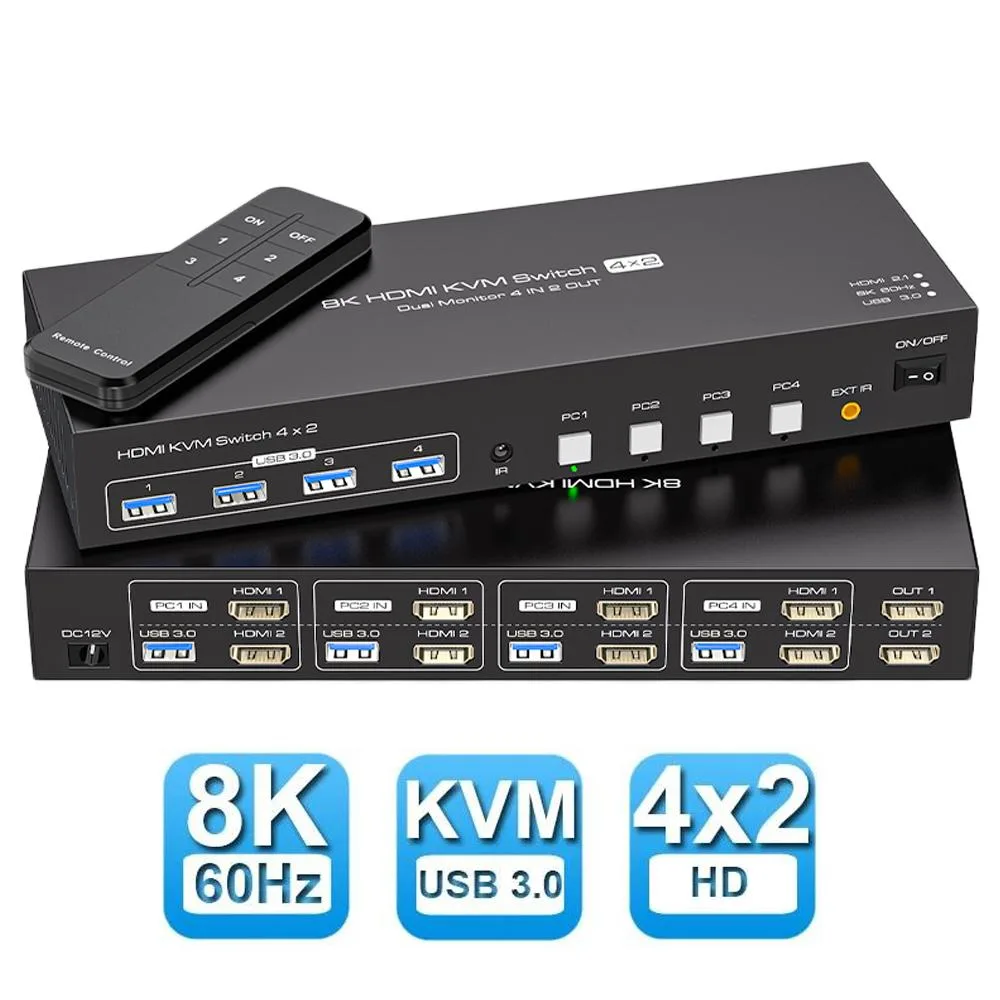
Jansicotek SW243-2HD 8K 60Hz 4×2 HDMI KVM Switch
Connects four computers to two monitors at 8K 60Hz with USB 3.0 sharing and push-button or remote switching
- TypeHDMI, USB
- PC ConnectorsHDMI and USB
- Computer Connections2 Ports
- Monitor Connections2 Ports
- Video Resolution8K 60Hz
- PC SelectionPush Buttons/Desktop Controller
- Control four computers with one keyboard and mouse set
- Connect two HDMI monitors supporting duplicate and extend modes
- Share four USB 3.0 peripherals across all connected systems
- Switch instantly using front buttons or included IR remote
- Powered by 12V supply for stable high-resolution operation
4×2 HDMI KVM Switch for Four Computers
The Jansicotek SW243-2HD lets four computers or laptops share one keyboard, one mouse and two HDMI monitors. It is built for users who need simultaneous access to multiple systems without duplicating peripherals. Plug-and-play operation works across Windows, macOS, Linux and Unix platforms. The unit includes a desktop controller and an IR remote for convenient switching.
8K 60Hz Video with Dual-Monitor Modes
The switch passes video up to 8K at 60 Hz and handles 4K at 120 Hz or 144 Hz for high-refresh workflows. Both monitors can run in duplicate mode showing identical content or in extend mode for a continuous desktop across screens. Extended mode requires the connected computer’s graphics card to support the feature. HDMI 2.1 and HDCP 2.3 compliance ensures compatibility with protected content streams.
Four USB 3.0 Ports and Bundled Cables
Four integrated USB 3.0 ports let attached computers share scanners, external drives or other peripherals alongside the keyboard and mouse. The package supplies four USB 3.0 A-to-A cables, a 12 V 1 A power adapter, an IR receiver cable, a remote control and a user manual. The external power supply maintains stable operation when high-draw USB devices are connected.
Highlights
- Control four computers with one keyboard and mouse set
- Connect two HDMI monitors supporting duplicate and extend modes
- Share four USB 3.0 peripherals across all connected systems
- Switch instantly using front buttons or included IR remote
- Powered by 12V supply for stable high-resolution operation
Specifications
| Brand | Jansicotek |
|---|---|
| Series | SW243-2HD |
| Model | SW243-2HD |
| Type | HDMI, USB |
| PC Connectors | HDMI and USB |
| Computer Connections | 2 Ports |
| Monitor Connections | 2 Ports |
| Video Resolution | 8K 60Hz |
| PC Selection | Push Buttons/Desktop Controller |
| AutoScan Interval | 3 seconds |
| LED Indicators | Yes |
| USB Features | with USB support |
| Application | [HDMI KVM USB switch dual monitor]: KVM Switch allows control 4 computer with one set of controls (keyboard and mouse) and two display screen. Realizes 4 in and 2 out free selection synchronous switching. You can centrally control and manage hosts laptop or game console without having to move from one workstation to another. ? |
| Features | USB3.0 HDMI Displayport KVM Switch 4 ports dual monitor Product Features: 4 computers/laptops share one set of keyboard, mouse and dual monitors, and more USB 3.0 peripherals; Support maximum resolution up to 4K 144Hz Dual monitors output support up to 8K@60Hz/4K@144Hz,2K@165Hz/1080P@240Hz for extended and mirrored display; Compatible with Windows 11/10/7/2000/XP/Vista, Linux, UNIX, Ubuntu, Fedora, and other systems; Advanced switching modes: push button and IR remote control;No complicated installation is required, and non-professionals can easily operate it; The ports that need to |
| Dimensions | 5.43 x 5.35 x 1.46 inches |
| Weight | 9.52 Ounces |
| Package Contents | The package includes 1*4 in 2 out KVM switcher, 4*USB 3.0 A to A cables, 1*12V1A external power adapter, 1* IR cable, 1*remote control (batteries not included), and 1*user manual. |
Questions about this item
Will this 8K@60Hz KVM work with my older 4K@60Hz monitors and USB 2.0 keyboard?
Yes, the switch is backward compatible with lower resolutions and USB 2.0 peripherals, so your existing monitors and keyboard will function normally.
How can I confirm the switch is passing 8K@60Hz or 4K@144Hz to both screens after I connect everything?
Check each monitor's on-screen display or OS display settings to verify the active resolution and refresh rate match the expected 8K@60Hz or 4K@144Hz signal.
Which cables and power items are included, and do I need to buy extra HDMI or USB leads for four computers?
The box contains the KVM, four USB 3.0 A-to-A cables, a 12V 1A power adapter, IR cable, remote (no batteries) and manual; you must supply four HDMI cables yourself.
Also in this aisle
People compared these
Same shelf, same checkout — eight coins and a 30-minute rate lock.


Black Box Corporation
Black Box Corporation 4K60 HDMI Dual-Head KVM Switch 4 Port
$774.99
0.00913752BTC
In stock