


Jansicotek
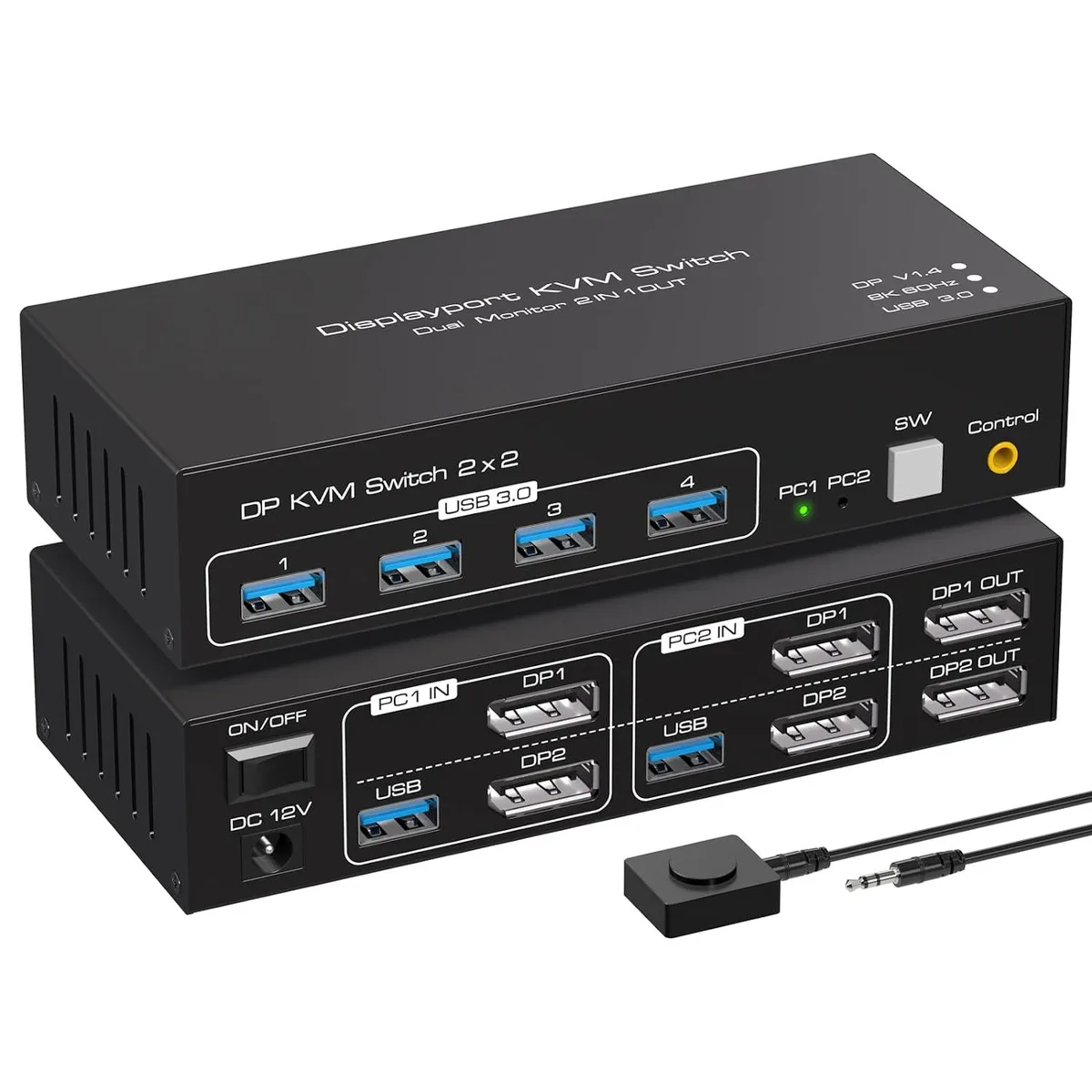
Jansicotek SW223-2DP 2x2 DP 1.4 KVM Switch 8K60 4K120
A dual-monitor KVM switch connects two computers to two DisplayPort 1.4 displays at up to 8K 60 Hz or 4K 120 Hz, adds four USB 3.0 ports for peripherals.
- TypeDP USB
- PC ConnectorsDP USB
- Computer Connections2 Ports
- Monitor Connections2 Ports
- Video Resolution8K 60Hz
- PC SelectionPush Buttons/Desktop Controller
- Switch two PCs with one keyboard and mouse via push-button or external controller
- Drive dual monitors at 8K 60 Hz or 4K 120 Hz through DisplayPort 1.4
- Expand connectivity with four USB 3.0 ports for peripherals and high-current drives
- Aluminium-alloy chassis resists rust, corrosion and interference
- Compact 150 × 65 × 35 mm design fits any desk setup
Dual-computer dual-monitor KVM
The Jansicotek SW223-2DP connects two computers to two DisplayPort monitors and four USB 3.0 peripherals. It switches both video and USB focus with a front-panel button or the included desktop controller. The aluminium-alloy enclosure houses a single-chip design that requires no driver installation on Windows, macOS or Linux systems.
DisplayPort 1.4 bandwidth limits
The switch passes DisplayPort 1.4 signals with HDCP 2.3, so 8K at 60 Hz or 4K at 120 Hz RGB 4:4:4 are supported when the source and display also comply. Higher refresh rates such as 1080p at 240 Hz or 2K at 165 Hz fit within the same link budget, but any mode exceeding the 1.4 specification will not function.
Two-computer two-monitor constraint
This unit only manages two upstream computers and two downstream displays; a third computer or a third monitor cannot be accommodated. Buyers who need more ports must select a different KVM model.
Highlights
- Switch two PCs with one keyboard and mouse via push-button or external controller
- Drive dual monitors at 8K 60 Hz or 4K 120 Hz through DisplayPort 1.4
- Expand connectivity with four USB 3.0 ports for peripherals and high-current drives
- Aluminium-alloy chassis resists rust, corrosion and interference
- Compact 150 × 65 × 35 mm design fits any desk setup
Specifications
| Brand | Jansicotek |
|---|---|
| Series | SW223-2DP |
| Model | SW223-2DP |
| Type | DP USB |
| PC Connectors | DP USB |
| Computer Connections | 2 Ports |
| Monitor Connections | 2 Ports |
| Video Resolution | 8K 60Hz |
| PC Selection | Push Buttons/Desktop Controller |
| AutoScan Interval | 3 seconds |
| LED Indicators | Yes |
| USB Features | with USB support |
| Features | 2 In 2 Out 4K 120Hz USB 3.0 DP KVM Switch Box dual monitor for 2 PC Sharing Keyboard Mouse Printer Plug Play Video 2 Display USB Switch Splitter - Product Type: 8K DP USB 3.0 KVM Switch (2 in 2 out) - Input Port: 4XDP 1.4 ,USB 3.0 data x2, USB 3.0 x 4 - Output Port: 2XDP 1.4 - Dimensions: 150x65x35mm - Material: Aluminum Alloy shellanti-rust, anti-corrosion, anti-interference, fast transmission, surtace oxidation Features - Support Displayport 1.4 HDCP 2.3 - Resolution: Support 1080P/1080@144/165/240Hz, 2K@120/144Hz, 4K@60/120Hz,8K@60Hz resolution, adaptive screen resolution - Suppor |
| Dimensions | 5.43 x 5.35 x 1.46 inches |
| Weight | 9.52 Ounces |
| Package Contents | 1 x DP KVM USB Switch, 2 x USB 3.0 data cable, 1x DC power adapter,1 x User Manual. |
Questions about this item
Should I pick the SW223-2DP for 8K 60 Hz or 4K 120 Hz workflows?
The SW223-2DP handles both; it passes 8K at 60 Hz and 4K at 120 Hz over its DisplayPort 1.4 links, so choose based on the resolution and refresh rate your monitors and GPUs actually run.
What does the 8K 60 Hz rating mean when I connect two 4K 144 Hz gaming monitors?
Each DP 1.4 output can deliver 4K at 144 Hz with full RGB 4:4:4 colour, so both screens run at their native high-refresh rate without chroma subsampling.
How does the DisplayPort 1.4 interface limit my USB 3.0 peripherals?
Video travels over the four DP 1.4 lanes while USB 3.0 data uses the two dedicated 5 Gbps cables, so peripheral bandwidth is not shared with the display link.
Also in this aisle
People compared these
Same shelf, same checkout — eight coins and a 30-minute rate lock.


Black Box Corporation
Black Box Corporation 4K60 HDMI Dual-Head KVM Switch 4 Port
$774.99
0.0091535BTC
In stock