


Jansicotek
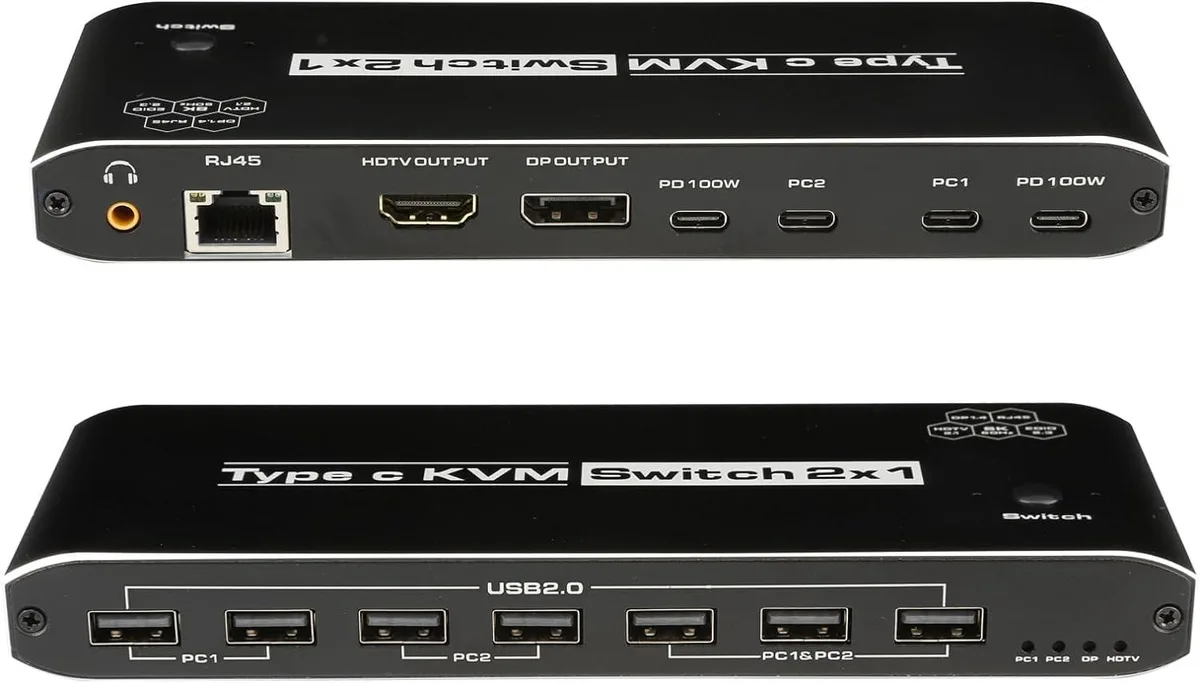
Jansicotek OZK8 2×1 USB-C KVM Switch 8K 100W PD
Shares one 8K monitor, seven USB 2.0 peripherals, audio, and Ethernet between two USB-C computers with 100 W power delivery
- TypeUSB C
- PC ConnectorsUSB-C
- Computer Connections2 Ports
- Monitor Connections1 Port
- Video Resolution7680*4320
- PC SelectionPush Buttons
- Share one monitor and peripherals across two USB-C computers with push-button switching
- 8K 60 Hz video via DisplayPort 1.4 or HDMI 2.1 with DSC support
- 100 W Power Delivery on each USB-C input keeps both laptops charged while working
- Seven USB 2.0 ports plus 3.5 mm audio and 100 Mbps Ethernet consolidate desk connections
- Compact 5.43 × 5.35 × 1.46 in unit includes two 1.2 m USB-C Gen 2 cables for immediate setup
Two-computer USB-C KVM switch
The Jansicotek OZK8 lets two USB-C computers share one HDMI 2.1 or DisplayPort 1.4 monitor, seven USB 2.0 devices, a 3.5 mm audio jack and a 100 Mbps Ethernet port. It is aimed at users who move between a laptop and a desktop or a game console without replugging peripherals.
Single-cable docking with 100 W power delivery
Each computer connects through one USB-C Gen 2 cable that carries video, data and up to 100 W of charging power, so the switch needs no separate power brick. The 1.2 metre cables supplied reach across a typical desk, freeing the user from hunting for extra adapters or longer leads.
Manual switching with steady 8K output
A push button on the top toggles the active system; an automatic scan mode changes every 3 seconds if preferred. The switch passes 7680 × 4320 at 30 Hz natively or 60 Hz with DSC, and maintains 4K at 144 Hz or 1080p at 165 Hz without frame drops during extended sessions.
Highlights
- Share one monitor and peripherals across two USB-C computers with push-button switching
- 8K 60 Hz video via DisplayPort 1.4 or HDMI 2.1 with DSC support
- 100 W Power Delivery on each USB-C input keeps both laptops charged while working
- Seven USB 2.0 ports plus 3.5 mm audio and 100 Mbps Ethernet consolidate desk connections
- Compact 5.43 × 5.35 × 1.46 in unit includes two 1.2 m USB-C Gen 2 cables for immediate setup
Specifications
| Brand | Jansicotek |
|---|---|
| Series | OZK8 |
| Model | OZK8 |
| Type | USB C |
| PC Connectors | USB-C |
| Computer Connections | 2 Ports |
| Monitor Connections | 1 Port |
| Video Resolution | 7680*4320 |
| PC Selection | Push Buttons |
| AutoScan Interval | 3 seconds |
| LED Indicators | Yes |
| USB Features | with USB support |
| Application | Widely used in many occasions:Our This USB-C Switch is easy to use and can be widely used in Studying, Entertainment, Work and other Occasions, ultra-High-Definition Smooth Video and Picture Quality Experience, Multi-source Switching, providing multiple possibilities for work and entertainment |
| Features | 2 x USB-C 8K KVM Switch with one DisplayPort 1.4 or HDMI 2.1 Port for Video,with this 2 Port 8K KVM Switcher,you are able to connect from the switcher's two PC Input Port to your USB-C PC/Laptops via two standard USB-C Gen-2 Cable,then connect from the switcher's Standard DP 1.4 /HDMI 2.1 port to your Monitors via your own displayport 8K Standard Cable,you can press the "Switch"button to switch between two of your PCs. 2in 1out USB C KVM 8K Switcher: 2 x USB-C PC Input Ports, 2 x 100W PD Charge 1 x RJ45,two computers online at the same time 1 x 3.5mm jack,audio extractor 7x USB Ports |
| Dimensions | 5.43 x 5.35 x 1.46 inches |
| Weight | 9.52 Ounces |
| Package Contents | 1 x USB C Thunderbolt 4 KVM Switch 2 x 1.2 meter USB Gen 2 Cable(Type C to Type C) 1 x User Manual |
Questions about this item
Will the 8K 60 Hz DSC signal hold up during long sessions without bandwidth throttling?
The DP 1.4 link runs at 32.4 Gbps and HDMI 2.1 at 48 Gbps, both rated for 8K 60 Hz DSC, so sustained throughput stays within spec.
How much heat or fan noise appears when the switch powers two laptops at 100 W each all day?
The unit has no fan; it draws 100 W per USB-C port for power delivery and runs silently, warming only to normal operating temperature.
Which cables must I already own to get video and 100 W charging on both computers?
You need two USB-C Gen 2 cables that support 100 W PD and DisplayPort Alt Mode, plus one DP 1.4 or HDMI 2.1 cable for the monitor.
Also in this aisle
People compared these
Same shelf, same checkout — eight coins and a 30-minute rate lock.


Black Box Corporation
Black Box Corporation 4K60 HDMI Dual-Head KVM Switch 4 Port
$774.99
0.00920963BTC
In stock