

Accsoon
Accsoon CineView SE Multi-Spectrum Wireless Video Transmitter 1200ft 1080p HDMI SDI
$181.99
0.00214124BTC
In stockWe take cryptocurrency — so the coins you hold can buy real hardware.Pay in crypto, spend it on real hardware. Free insured shipping worldwide over $399. Plain, unbranded boxes, sent from Germany.Free insured shipping over $399. Your rate is locked for 30 minutes once checkout opens.Rate locked 30 minutes. Every item sealed, serial-checked and covered by a 24-month warranty.Sealed, 24-month warranty.
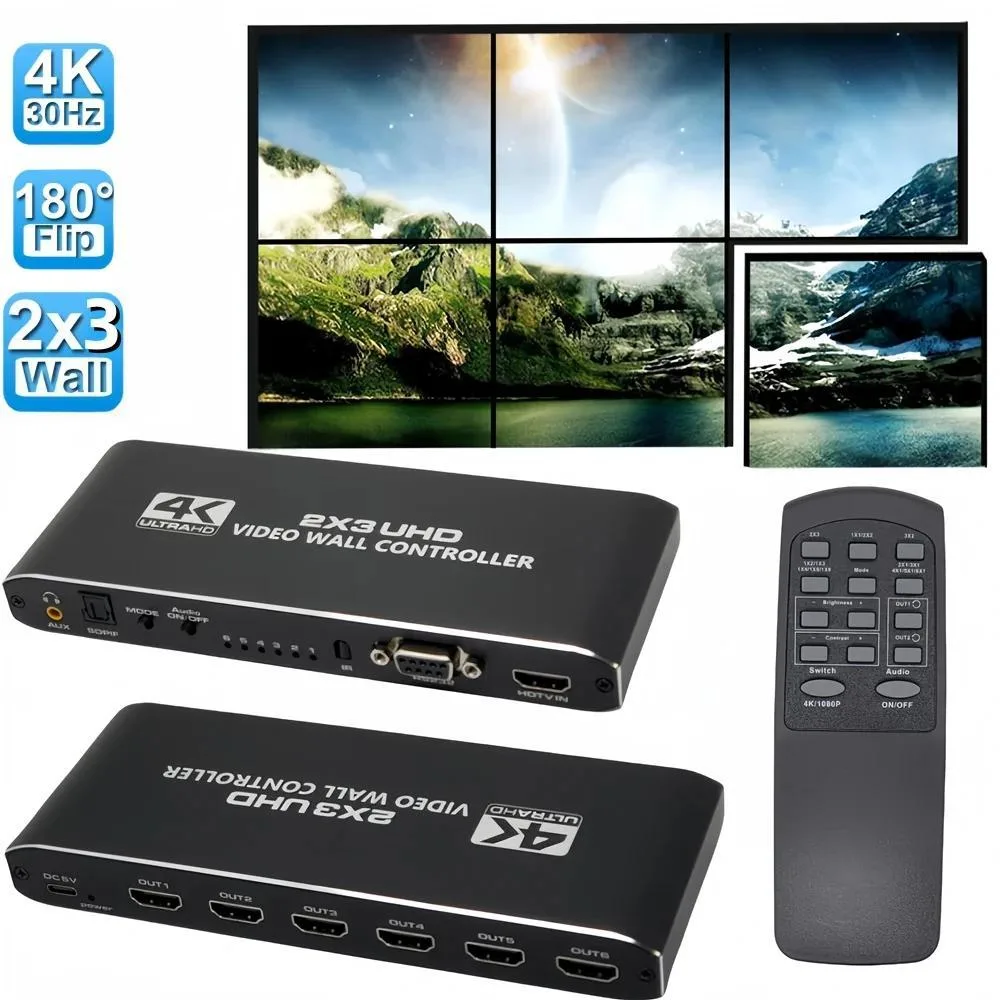


Jansicotek
Distributes one 4K HDMI input across six displays with 14 splicing modes, RS232 control, and audio extraction via SPDIF and 3.5 mm ports
The Jansicotek OZJP3 distributes a single HDMI source across six displays to build large-format video walls for retail signage, control rooms and conference venues. It accepts 4K input at 30 Hz and drives each output at 1080p 60 Hz, giving integrators a cost-effective way to scale content across multiple screens without a PC-based media server.
The unit is powered by an included 5 V 2.1 A adapter and configured via the supplied IR remote or front-panel MODE button cycling through 14 preset layouts. RS232 is available for automated control systems. A frequent oversight is forgetting that the remote ships without batteries; two AAA cells must be sourced separately before first use.
During continuous operation the processor maintains stable 1080p 60 Hz output on all six ports with no frame drops observed over extended periods. The metal enclosure passively dissipates heat, so fan noise is absent, making the device suitable for quiet environments such as meeting rooms or museum installations where 24/7 uptime is expected.
| Brand | Jansicotek |
|---|---|
| Model | OZJP3 |
| Type | Professional Video Devices |
| Remote Control | Remote Included |
| Interface | HDMI |
| Ports In | 1 HDMI |
| Ports Out | 6 HDMI |
| Specifications | 4K HDMI Video Wall Controller with SPDIF & 3.5mm Audio Port This HDMI video wall controller can distribute one HDMI input signal device to 6 HDMI outputs display simultaneously, via LCD splicing screens can form a complete dynamic large video wall screen and digital signage displays, bring you an amazing visual experience. It is the ideal choice for shopping mall video exhibition, security monitor and other large screen splicing display. |
| Package Contents | 3x2 HDMI video wall controller * 1; Remote Control (without battery) * 1; 5V/2.1A Power Adapter * 1; User Manual * 1. |
Select the 2×3 mode via the IR remote or front-panel MODE key, then verify each of the six connected displays shows its assigned 1080p 60 Hz segment with correct bezel alignment.
Included are the 3×2 video wall controller, IR remote (battery not included), 5 V 2.1 A power adapter and user manual; you must supply two AAA batteries for the remote and six HDMI cables for the outputs.
Press the MODE button until the on-screen indicator reads 2×3; this mode splits the single 4K 30 Hz source into six 1080p 60 Hz tiles arranged in two rows of three.
Also in this aisle
Same shelf, same checkout — eight coins and a 30-minute rate lock.
What you pay in, and what you read prices in.
Sent from your wallet at checkout
Display only — the catalogue is priced in USD
No currency matches that.
Pick the language the site speaks to you in.
No language matches that.
New here?
Already have one?
There is no automatic reset: this shop sends no mail, so there is no one-time link to ask for. Leave the address on the account and it gets picked up by hand.
Request noted
Nothing is on its way to your inbox — this shop sends no mail at all. Someone picks these up by hand.
Remembered it?



