

Accsoon
Accsoon CineView SE Multi-Spectrum Wireless Video Transmitter 1200ft 1080p HDMI SDI
$181.99
0.00216993BTC
In stockWe take cryptocurrency — so the coins you hold can buy real hardware.Pay in crypto, spend it on real hardware. Free insured shipping worldwide over $399. Plain, unbranded boxes, sent from Germany.Free insured shipping over $399. Your rate is locked for 30 minutes once checkout opens.Rate locked 30 minutes. Every item sealed, serial-checked and covered by a 24-month warranty.Sealed, 24-month warranty.
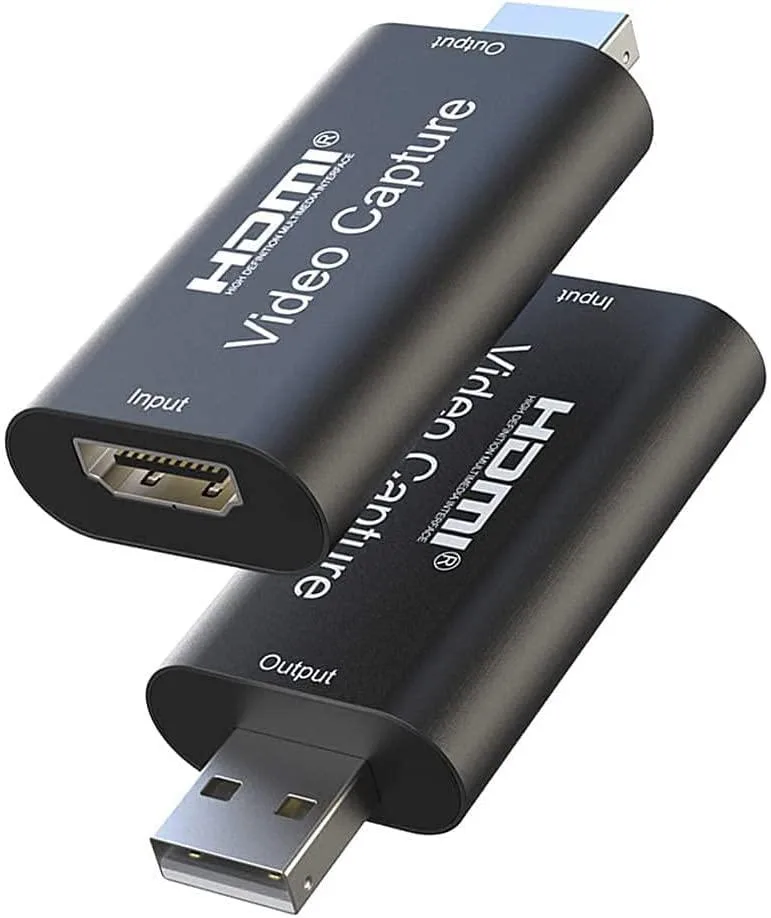


Jansicotek
Captures 4K input at 60 Hz and delivers 1080p output via USB 2.0 for streaming with OBS, VLC or Amcap on Windows, macOS or Linux
The Jansicotek OZC1 captures HDMI video at up to 4K 60 Hz input and delivers 1080p 60 Hz output over USB 2.0. It is aimed at streamers, educators and professionals who need to bring a DSLR, camcorder or game console feed into Windows, Mac or Linux without installing drivers.
The device draws a maximum of 0.4 A at 5 V DC from the USB bus, so it runs without an external power adapter and stays cool during extended sessions. No fan is present, making operation completely silent in quiet studios or meeting rooms.
A USB extension cable and a printed user manual are included in the box. The hardware conforms to UVC and UAC standards, so it works immediately with OBS, VLC, Amcap and other common acquisition tools without proprietary drivers or extra configuration.
| Brand | Jansicotek |
|---|---|
| Series | OZC1 |
| Model | OZC1 |
| Interface | USB 2.0 |
| Format | YUV / JPEG; Support audio format: L-PCM |
| Resolution Support | 1080P |
| Camera Resolution | Up to 1080p Video |
| Color | Black |
| HDMI | 1 In |
| USB Port | 1 |
| Software | Support most acquisition software, such as VLC / OBS / Amcap, etc |
| Compatibility | Compatible with Windows, Mac, and Linux. Easily connect your DSLR, camcorder, or action camera to your PC or Mac. Makes it easier for you to have real-time streaming for Twitch, Youtube, OBS, Potplayer and VLC |
| System Requirements | Connect your DSLR, camcorder or action camera to your Windows, MacOS and Linux. |
| Specification | Support Output Resolution: 1080P@60Hz Max Support Input Resolution: 4K @60Hz Max Support Color: 8/10/12bit deep color Support Cable: AWG26 HDMI standard cable, input up to 15 meters (1080P and below resolution); Video Output Format: YUV / JPEG; Support audio format: L-PCM Max Working Current: 0.4A/5V DC Operating Temperature Range: -10 to +55? Dimension: 64x28x13 (mm); Weight: 21.4g |
| Feature | HDMI audio and video signals can be transmitted to the computer and smartphone for preview and storage, now you can enjoy stunning real-time video streaming. It support HDMI input 3840x2160P and USB output (capture) 1920x1080P video and stereo sound. Connect (SLR camera, camcorder or motion camera) to (Windows, MacOS, Android or Linux) to easily get real-time streaming media from software such as OBS Studio, Zoom, Potplayer, Twitch, Youtube, and VLC. No driver or external power supply, suitable for high-definition acquisition, teaching recoding, Gaming, medical imaging, live streamin |
| Dimensions | 5.71 x 4.57 x 0.59 inches |
| Weight | 1.76 ounces |
| Package Content | Audio Video Capture Cards 1PCSUser Manual 1PCS |
| Option | HDMI and USB - 1080p |
Connect the HDMI source to the single input, plug the USB 2.0 end into the computer, and select the device in OBS, VLC or Amcap; the step often missed is setting the capture software to 1920×1080 at 30 Hz so the 4K input down-scales correctly.
No moving parts or firmware updates are required; only the supplied USB extension cable or an AWG26 HDMI cable up to 15 metres may need replacing if damaged.
The USB 2.0 bandwidth caps capture at 1080p 30 Hz even though the HDMI input accepts 3840×2160 at 60 Hz, so sustained use is limited by the output resolution and frame rate.
Also in this aisle
Same shelf, same checkout — eight coins and a 30-minute rate lock.
What you pay in, and what you read prices in.
Sent from your wallet at checkout
Display only — the catalogue is priced in USD
No currency matches that.
Pick the language the site speaks to you in.
No language matches that.
New here?
Already have one?
There is no automatic reset: this shop sends no mail, so there is no one-time link to ask for. Leave the address on the account and it gets picked up by hand.
Request noted
Nothing is on its way to your inbox — this shop sends no mail at all. Someone picks these up by hand.
Remembered it?



