


Jansicotek
Jansicotek 4K 144Hz DisplayPort to Dual DisplayPort Splitter Adapter
Splits one DisplayPort signal to two monitors at up to 3840x2160@144Hz with MST extended mode and mirror modes, powered by 5V/2A
- TypeDisplayPort Splitters
- Changer TypeDisplay Extenders
- Ports2
- AudioYes
- ColorBlack
- Specifications* Power Supply: 5V/2A *Video format: 3840x2160@144Hz *Using
- Drives two 4K monitors at 144 Hz from one DisplayPort output
- Extends or mirrors desktop across both screens in Windows and Linux
- Delivers 32.4 Gbps bandwidth for lossless 3840 × 2160 video
- Powers through included 5 V 2 A adapter for stable 10 m cable runs
- Compact 74 × 74 × 14 mm aluminium housing weighs only 35 g
What this adapter does
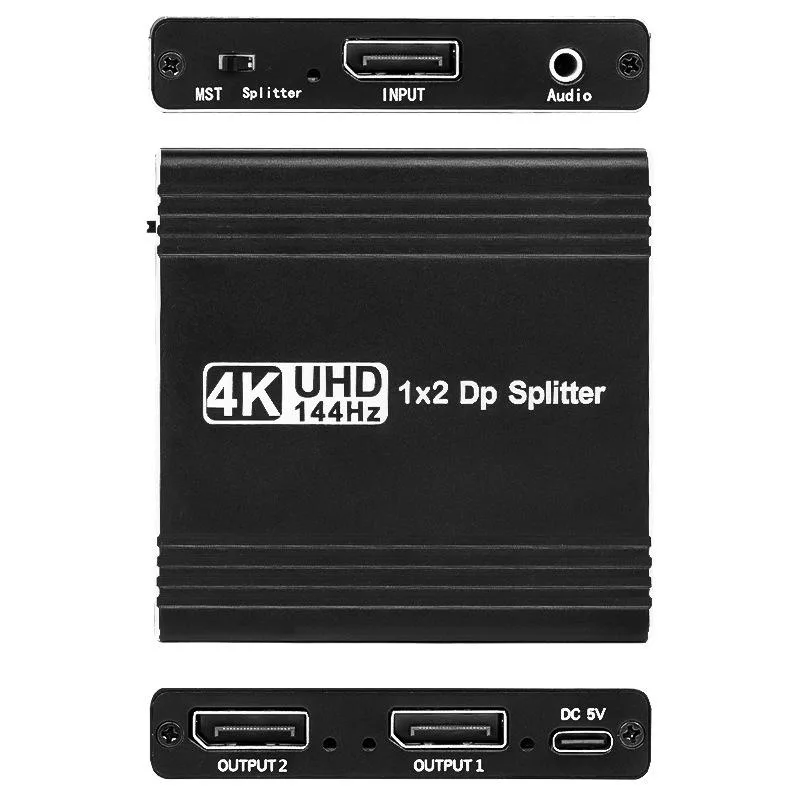
The Jansicotek DisplayPort splitter takes one DP 1.4 source and sends the same signal to two DP monitors simultaneously. It supports SST mirroring and MST extended modes up to 3840x2160 at 144 Hz, with 32.4 Gbps bandwidth and audio pass-through. Windows and Linux can use both modes; macOS is limited to SST mirroring only.
Check your hardware first
Your graphics output must be DisplayPort 1.4 and the cables must be rated for the target resolution and refresh rate. Most integrated GPUs will only mirror, so extended desktop requires a discrete GPU with MST support. The unit needs the included 5 V/2 A power adapter and USB-C cable connected to work.
Build and daily use
The black enclosure measures 74 by 74 by 14 mm and weighs 35 g, making it easy to tuck behind a monitor or laptop. One female DP input and two female DP outputs are clearly labelled, and the package includes a 10 metre DP cable example for long runs. Plug-and-play operation means no driver installation on Windows, Linux or macOS.
Highlights
- Drives two 4K monitors at 144 Hz from one DisplayPort output
- Extends or mirrors desktop across both screens in Windows and Linux
- Delivers 32.4 Gbps bandwidth for lossless 3840 × 2160 video
- Powers through included 5 V 2 A adapter for stable 10 m cable runs
- Compact 74 × 74 × 14 mm aluminium housing weighs only 35 g
Specifications
| Brand | Jansicotek |
|---|---|
| Series | OZFD |
| Model | OZFD |
| Part Number | OZFD |
| Type | DisplayPort Splitters |
| Changer Type | Display Extenders |
| Ports | 2 |
| Audio | Yes |
| Color | Black |
| Specifications | * Power Supply: 5V/2A *Video format: 3840x2160@144Hz *Using cable instance: 10 meter DisplayPort cable * Length x Width x Height: 74 *74 *14 (mm) * Weight: 35g |
| Input Connector | 1x DisplayPort female |
| Output Connector | 2x DisplayPort female |
| Maximum Resolutions | 3840 x 2160 |
| Bandwidth | 32.4Gbps |
| Features | 1. 1 DP input and 2 DP output simultaneously; 2. DisplayPort 1.4 specification standard. 3. The highest video resolution is 3840x2160@144Hz. 4. Supports up to 3840x2160@120Hz for MST mode. 5. Transfer rates up to 32.4Gbps. 6. Can drive 10 meter DisplayPort cable. |
| Dimensions | 5.31 x 3.11 x 0.87 inches |
| Weight | 2.12 Ounces |
| Package Quantity | 1 |
| Package Contents | 1* DisplayPort Splitter, 1x Power Adapter, 1* USB to Type-C Power cable (5V/2A), 1*User Manual. |
Questions about this item
What cables and power accessories come in the box with the Jansicotek 4K 144Hz DisplayPort splitter?
The package includes the splitter, a 5V/2A power adapter, a USB to Type-C power cable, and a user manual. You must supply your own DisplayPort cables for the input and both outputs.
When should I choose SST mode versus MST mode on this DisplayPort 1.4 splitter?
Use SST mode for mirroring identical content on both screens at up to 3840x2160@144Hz. Choose MST mode for extended desktop across two monitors, limited to 3840x2160@120Hz per display.
What does the 32.4Gbps bandwidth figure mean for real-world 4K gaming on this adapter?
It provides enough throughput for 3840x2160@144Hz on a single stream or 3840x2160@120Hz per stream in MST, provided your GPU, monitors, and cables all support those rates.
New to this? Which coin should you pay with — what to check, what it costs to pay, and what is never asked for.
Also in this aisle
People compared these
Same shelf, same checkout — eight coins and a 30-minute rate lock.



Black Box Corporation
Black Box Corporation CAT6 EZ-RJ45 Modular Plugs 100-Pack
$95.99
0.00115078BTC
In stock
