
Intel
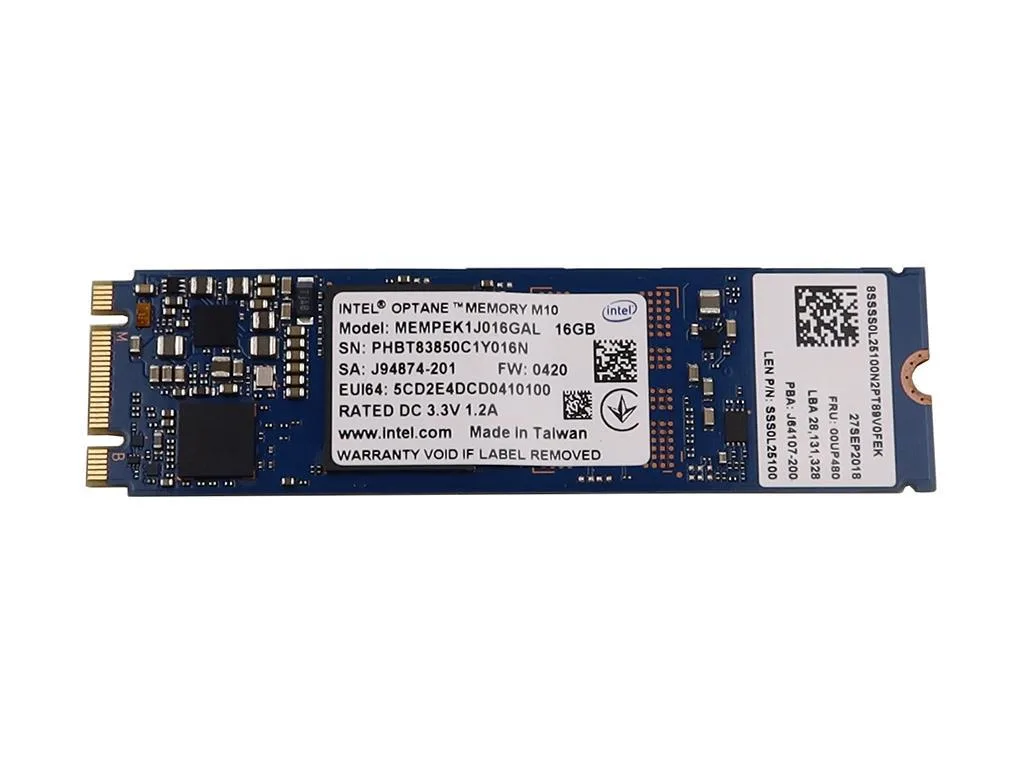
Intel MEMPEK1J016GAL M10 16GB laptop replacement part
16 GB M.2 2280 Optane Memory module using PCI-Express 3.0 x2 Nvme interface
- 16GB Optane memory accelerates system responsiveness
- PCIe 3.0 x2 interface delivers fast data transfer
- M.2 2280 form factor fits compatible laptop slots
- New condition ensures reliable replacement part
- Matches part numbers 00UP480 J64107-200 J94874-200 J94874-201 11S00UP480
Intel M10 16GB Optane Memory
This Intel M10 module provides 16GB of Optane memory in an M.2 2280 form factor. It connects via a PCI-Express 3.0 x2 interface using the NVMe protocol. The part is intended as a direct replacement for compatible laptop motherboards that support this specific caching technology.
New OEM module without accessories
The unit arrives as a standalone circuit board with no cables, brackets or manuals included. Its M.2 2280 keying fits the corresponding slot on supported laptop mainboards. Builders must verify the original part number against the compatible list before installation to ensure correct fitment.
Caching accelerator not a boot drive
Optane memory functions as a system accelerator rather than primary storage, so the 16GB capacity cannot hold an operating system or user files. The PCI-Express 3.0 x2 link limits peak throughput compared to four-lane NVMe SSDs. Buyers needing a standalone boot or data drive should select a standard NVMe SSD instead.
Highlights
- 16GB Optane memory accelerates system responsiveness
- PCIe 3.0 x2 interface delivers fast data transfer
- M.2 2280 form factor fits compatible laptop slots
- New condition ensures reliable replacement part
- Matches part numbers 00UP480 J64107-200 J94874-200 J94874-201 11S00UP480
Specifications
No published specifications for this item yet.
Questions about this item
What does the PCIe 3.0 x2 interface cap in practice for this Optane module?
The x2 lane width limits peak throughput to two lanes of PCIe 3.0 bandwidth.
What physical slot and length does the M.2 2280 form factor require?
It fits a standard M.2 key-M slot and measures 80 mm in length.
How is the drive installed and what step is often missed?
Insert at an angle into the M.2 socket, press flat, and secure with the retention screw; the screw step is frequently skipped.
Also in this aisle
People compared these
Same shelf, same checkout — eight coins and a 30-minute rate lock.


Kensington
Kensington Desk Mount Cable Anchor K64613WW accessory
- Black
- Provides a secure a…
$19.99
0.00023785BTC
In stock
Panasonic
Panasonic CF-VDR291U laptop cooling pad
- Optical Drive
- Buffer Size: 2 MB B…
$213.99
0.00254617BTC
In stock
eReplacements
eReplacements PB992A-ER laptop battery 14.4V
- Battery
- Lithium-Ion
$65.99
0.00078518BTC
In stock