


IHDAPP
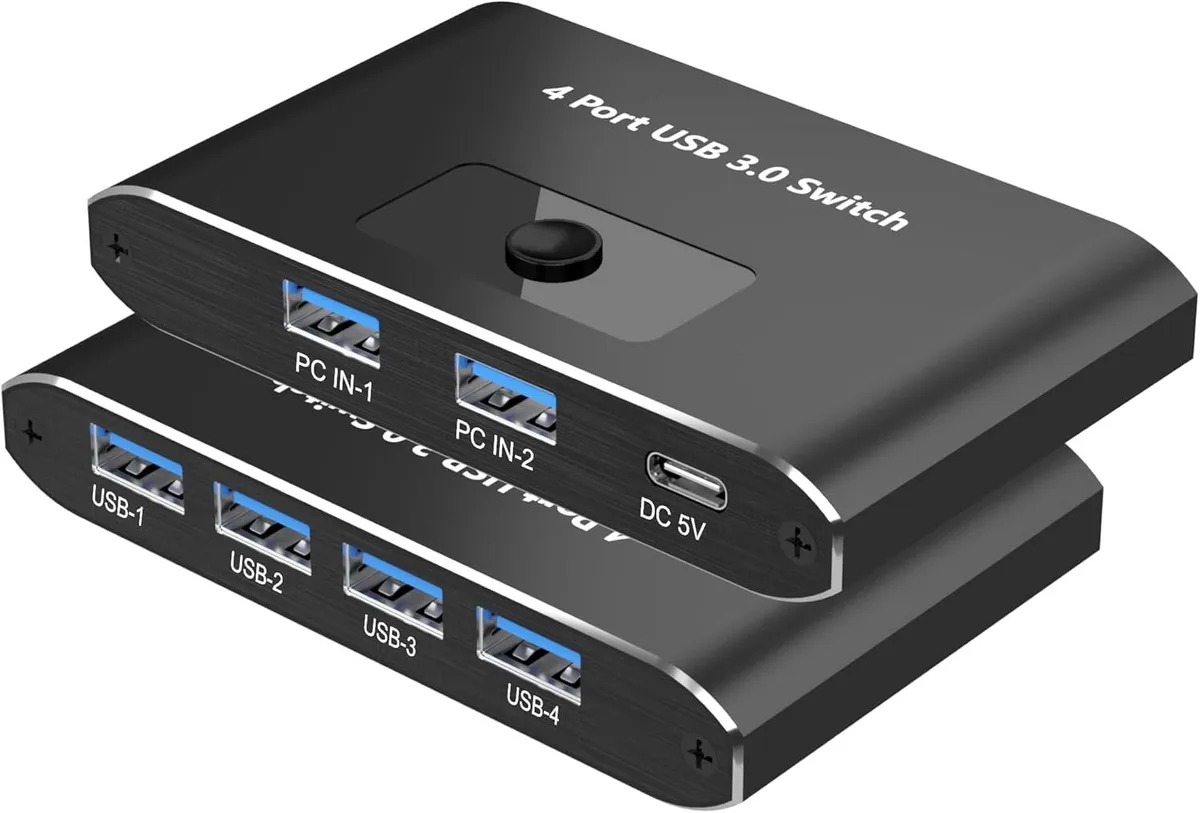
IHDAPP USB 3.0 KVM Switch 2 Computers 4 Devices
Lets two computers share four USB peripherals with push-button switching and 5 Gbps USB 3.0 speeds
- TypeUSB
- PC ConnectorsUSB 3.0
- Computer Connections2 Ports
- PC SelectionPush Buttons
- LED IndicatorsYes
- Power FeaturesRequires no additional power supply
- Share four USB peripherals between two computers without swapping cables
- Switch instantly with a single push button
- USB 3.0 speed up to 5 Gbps, backward compatible with USB 1.0 / 1.1
- Works with Windows, macOS, Linux and Chrome OS, no drivers needed
- Compact aluminum housing measures 4 x 2.5 x 0.7 inches
Two-computer USB sharing hub
This IHDAPP USB 3.0 switch lets two computers share four USB peripherals such as a mouse, keyboard, printer, scanner, card reader or flash drive. It removes the need to unplug and reconnect cables each time you change machines. The unit works with Windows, macOS, Linux and Chrome OS and supports hot-swap operation. No driver installation is required for basic use.
Passive thermal design and bus power
The aluminium enclosure dissipates heat without a fan, so the switch runs silently during normal use. It draws power from the connected computers through the supplied USB-A to C cable and requires no external power adapter. USB 3.0 signalling at 5 Gbps is supported while remaining backward compatible with USB 1.0 and 1.1 devices.
Included cables enable immediate setup
Two USB-A to USB-A 3.0 cables connect the host computers to the switch, and one USB-A to C cable provides the power link. A printed user manual explains the front-panel push-button and LED indicators for port selection. All necessary cables are in the box so the switch works straight away.
Highlights
- Share four USB peripherals between two computers without swapping cables
- Switch instantly with a single push button
- USB 3.0 speed up to 5 Gbps, backward compatible with USB 1.0 / 1.1
- Works with Windows, macOS, Linux and Chrome OS, no drivers needed
- Compact aluminum housing measures 4 x 2.5 x 0.7 inches
Specifications
| Type | USB |
|---|---|
| PC Connectors | USB 3.0 |
| Computer Connections | 2 Ports |
| PC Selection | Push Buttons |
| LED Indicators | Yes |
| Power Features | Requires no additional power supply |
| USB Features | with USB support |
| Application | This USB 3.0 switcher allows two computers to share four USB peripherals, such as mouse, keyboard, printer, scanner, card reader, USB flash drive, and more. It is easy to switch device connections without frequent cable insertion and removal, improving work efficiency. |
| Features | One-button switch, simple operation |
| Dimensions | 4 x 2.5 x 0.7 inches |
| Weight | 4 ounces |
| Package Contents | USB 3.0 Switch*1 USB-A to A 3.0 Cable*2 USB-A to C power cable *1 User Manual*1 |
Questions about this item
How do I connect the two included USB-A to A 3.0 cables to link both computers?
Plug one end of each cable into a computer USB 3.0 port and the other end into the two upstream ports on the switch; then connect your four peripherals to the downstream ports and press the button to toggle.
When should I use the supplied USB-A to C power cable?
Connect it to a 5 V USB-C charger or port if the switch loses connection with power-hungry devices such as external hard drives; the unit otherwise draws power from the host computers.
What throughput ceiling will I hit first when transferring large files continuously?
The USB 3.0 interface caps sustained throughput at 5 Gbps, and real-world speeds will be lower due to protocol overhead and the host controller.
Also in this aisle
People compared these
Same shelf, same checkout — eight coins and a 30-minute rate lock.


Black Box Corporation
Black Box Corporation 4K60 HDMI Dual-Head KVM Switch 4 Port
$774.99
0.00894371BTC
In stock