


IHDAPP
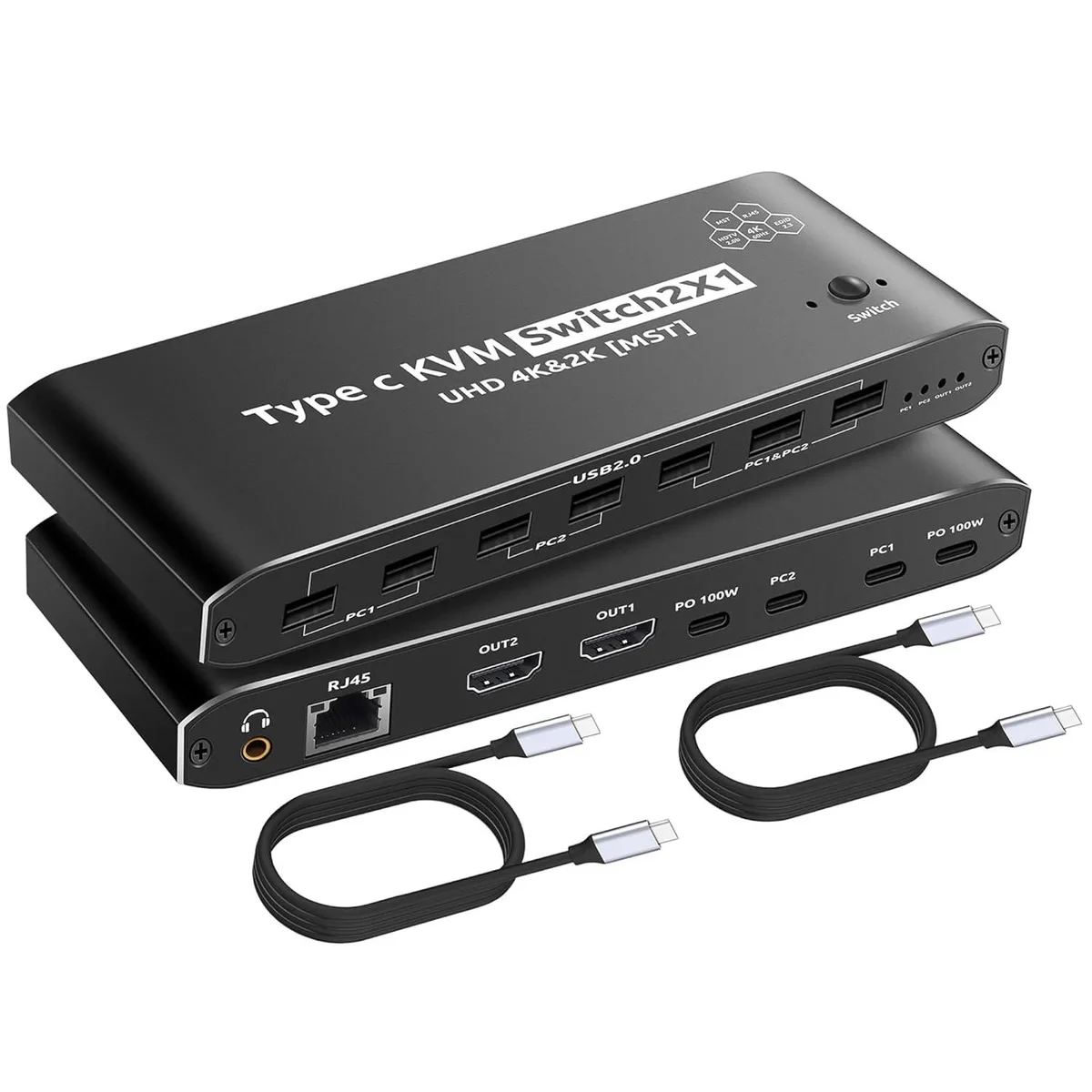
IHDAPP Thunderbolt KVM Switch 2×1 4K@60Hz 7 USB-A RJ45 PD 100W 40Gbps cables
Two-computer KVM switch drives one 4K display at 60 Hz with seven USB-A ports, RJ45, 100 W power delivery and 40 Gbps Thunderbolt cables
- TypeType C, HDMI
- PC ConnectorsType C, HDMI
- Computer Connections2 Ports
- Monitor Connections1 Port
- Video Resolution4K@60Hz
- PC SelectionManual Switch
- Switch two computers with one monitor at 4K 60Hz
- Expand a single Thunderbolt port to dual displays via MST
- Seven USB 2.0 Type-A ports connect keyboards, mice and drives
- Gigabit-class RJ45 port adds wired networking to each system
- Two 40Gbps Thunderbolt cables included for immediate setup
Two-PC Thunderbolt KVM with Dual 4K Output
This IHDAPP KVM switch connects two Thunderbolt-equipped computers to a single monitor running at 4K@60Hz. It provides seven USB 2.0 Type-A ports, one RJ45 port at 100Mbps, two HDMI 2.0 inputs and two Thunderbolt ports that each deliver up to 100W power delivery. The unit draws power from the attached hosts and requires no separate supply.
Replaces Separate Docks and Manual Cable Swaps
If you currently unplug a Thunderbolt dock and replug it between machines, this switch removes that wear and the cable clutter. The jump is worth it when both systems have genuine Thunderbolt ports and you need simultaneous charging, wired networking and peripheral sharing without rebooting. It will not function on standard USB-C ports that lack Thunderbolt signalling.
Desktop Install with Included 40Gbps Cables
Two 40Gbps Type-C-to-Type-C cables and a manual button are supplied, so setup is a matter of connecting each computer and the monitor then pressing to switch. The enclosure measures 6.93 in x 2.53 in x .86 in and weighs 3.2 ounces, fitting easily beside a display. The only common issue is attempting to use it with non-Thunderbolt USB-C ports, which the hardware cannot support.
Highlights
- Switch two computers with one monitor at 4K 60Hz
- Expand a single Thunderbolt port to dual displays via MST
- Seven USB 2.0 Type-A ports connect keyboards, mice and drives
- Gigabit-class RJ45 port adds wired networking to each system
- Two 40Gbps Thunderbolt cables included for immediate setup
Specifications
| Type | Type C, HDMI |
|---|---|
| PC Connectors | Type C, HDMI |
| Computer Connections | 2 Ports |
| Monitor Connections | 1 Port |
| Video Resolution | 4K@60Hz |
| PC Selection | Manual Switch |
| LED Indicators | Yes |
| Audio Features | with Audio |
| Power Features | Requires no additional power supply |
| USB Features | with USB support |
| Application | Type-C KVM Switch supports MST technology, allowing the screen of a computer to be outputted in expansion mode to two screens through a single Thunderbolt cable, eliminating the need for complex HDMI or USB cables to be connected to the computer. Simultaneously, it supports duplicating the display content of a computer. The maximum supported resolution of the HDMI KVM Switch is 4K@60Hz, meeting most of your requirements. |
| Features | KVM docking station supports multiple interfaces with excellent expandability. KVM switch has the following interfaces: 7 x USB 2.0 Type-A, 2 x Thunderbolt, 2 x USB Type-C PD 100W, 2 x HDMI 2.0, RJ45 (100Mbps), 3.5mm Audio Aux Jack. It can meet most of your expansion needs. KVM switch USB C supports all Windows systems and macOS systems released since Windows 7 and Mac OS X 9.0. |
| Dimensions | 6.93 in x 2.53 in x 0.86in |
| Weight | 3.2 ounces |
| Package Contents | 1 x USB C HDMI KVM Switch, 2 x USB 40Gbps Cables (Type C to Type C), and 1 x User Manual |
Questions about this item
How much desk space does the 6.93 in × 2.53 in × 0.86 in unit need?
The switch measures 6.93 in wide, 2.53 in deep and 0.86 in high, so it fits in a small footprint on any desk or shelf.
Which cable do I plug in first to avoid a blank screen on the second computer?
Connect both Thunderbolt 40Gbps cables to the host computers before powering on the switch; the LED indicators then show the active port and the manual button toggles cleanly.
When should I expect to replace the included 40Gbps Thunderbolt cables?
The supplied Thunderbolt cables are rated for 40Gbps; replace them only if physical damage occurs or if a future host requires a longer reach than the bundled length.
Also in this aisle
People compared these
Same shelf, same checkout — eight coins and a 30-minute rate lock.


Black Box Corporation
Black Box Corporation 4K60 HDMI Dual-Head KVM Switch 4 Port
$774.99
0.00929289BTC
In stock