


IHDAPP
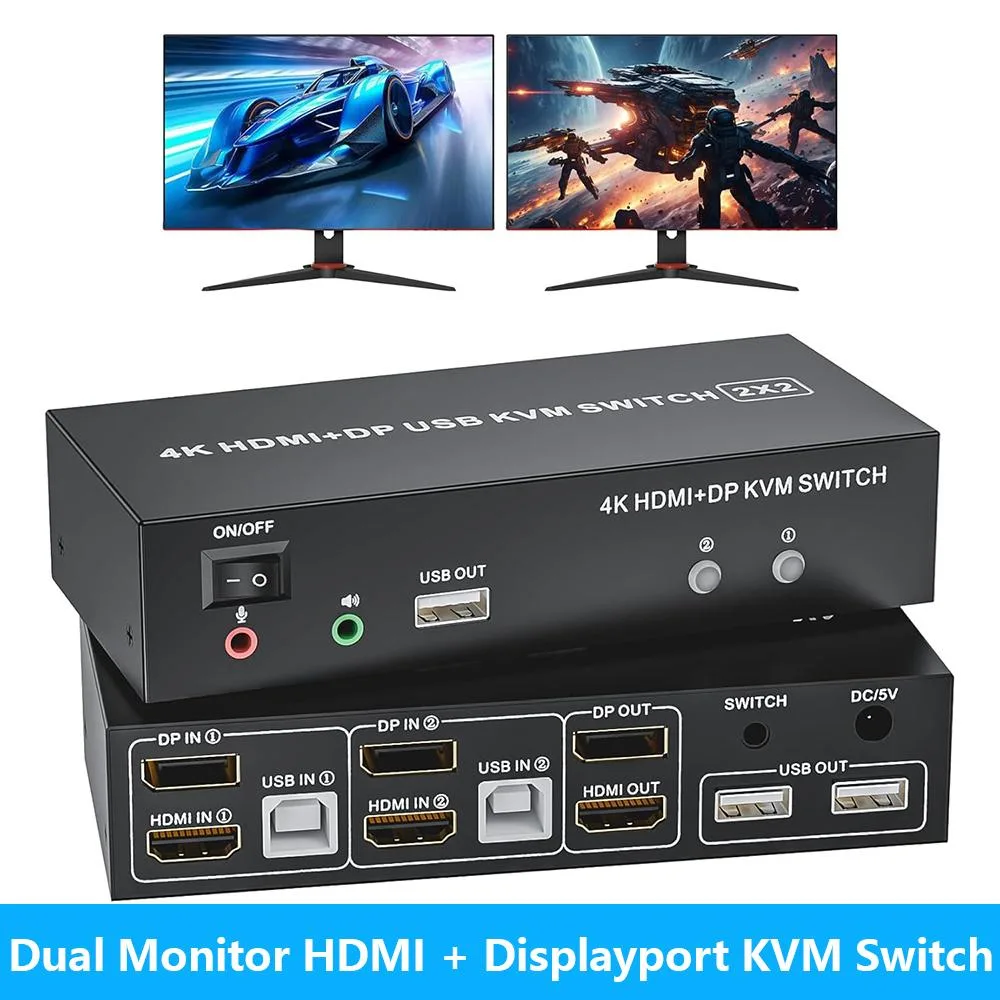
IHDAPP Dual Monitor KVM Switch 2×HDMI 2×DP 4K 60Hz
Share dual 4K 60Hz monitors, keyboard, mouse, printer and audio between two computers via HDMI and DisplayPort with push-button or wired remote switching
- TypeHDMI+Displayport KVM Switch 2 Monitors 2 Computer
- PC ConnectorsHDMI, Displayport
- Computer Connections2 Ports
- Monitor Connections2 Ports
- Video ResolutionUSB HDMI KVM switch supports maximum resolution up to 4K@60H
- PC SelectionPush Buttons and Wired Controller
- Control two computers with one keyboard and mouse
- Dual 4K 60Hz output via HDMI and DisplayPort
- Wired remote and push-button switching included
- Five USB 2.0 ports for peripherals and printer
- Separate stereo audio and microphone support
Dual Monitor KVM Switch
The IHDAPP KVM switch lets two computers or laptops share one set of wired keyboard, mouse and dual monitors. It provides two HDMI and two DisplayPort inputs with two video outputs, supporting resolutions up to 4K at 60 Hz. Five USB 2.0 ports handle keyboard, mouse, printer and extra peripherals. Switching is done by push buttons or the wired remote.
Home office and multi-PC users
This unit suits anyone who needs to control two systems from a single desk without unplugging cables. It is not for users who require automatic EDID emulation, as manual display settings may be needed after switching. It is also not for setups that rely on wireless keyboards or mice, because a standard 104-key wired USB keyboard and wired USB mouse are recommended.
4K at 60 Hz video support
The decisive specification is the maximum video resolution of 4K at 60 Hz over HDMI 2.0 and DisplayPort, with HDCP 2.2 compliance. Buyers whose monitors or graphics outputs cannot reach this resolution should verify compatibility before purchase.
Highlights
- Control two computers with one keyboard and mouse
- Dual 4K 60Hz output via HDMI and DisplayPort
- Wired remote and push-button switching included
- Five USB 2.0 ports for peripherals and printer
- Separate stereo audio and microphone support
Specifications
| Type | HDMI+Displayport KVM Switch 2 Monitors 2 Computer |
|---|---|
| PC Connectors | HDMI, Displayport |
| Computer Connections | 2 Ports |
| Monitor Connections | 2 Ports |
| Video Resolution | USB HDMI KVM switch supports maximum resolution up to 4K@60Hz, and backwards compatible with 1080P, 720P, 480P, etc. |
| PC Selection | Push Buttons and Wired Controller |
| Monitors Supported | HDMI, Displayport |
| LED Indicators | Yes |
| Audio Features | with Audio |
| USB Features | The 2-port DP HDMI KVM Switch comes with 5 USB ports. 2 USB ports in, 2 USB 2.0 ports for mouse and keyboard, the extra USB 2.0 standby ports for more useful connections, like printer |
| Application | This KVM switch 2 computers 2 monitors help you to control 2 computers or laptops by only one set of wired keyboard and mouse. 2 PCs sharing a printer, keyboard, mouse, microphone and audio. Additional USB 2.0 x3 for printer, keyboard and mouse |
| Features | No complicated installation is required, and non-professionals can easily operate it; Share one set of keyboard, mouse and dual monitors between 2 computers or laptops; Dual monitors output support up to 4K@60Hz for extended,mirrored or spliced display(Depends on your computer's graphics card.); Cross support major operation systems including Windows, Linux, Mac and more; With extra 3 USB 2.0 and Audio Microphone output; The ports that need to plug in HDMI/USB cables are all hidden behind the KVM, so the desktop doesn't get cluttered; Switching modes: Buttons on the front panel and w |
| Dimensions | 3.94 x 1.97 x 1.18 inches |
| Package Contents | 1 x Dual Monitor KVM Switch, 2 x USB Cable, 1 x Wired Remote, 1 x Power Adapter, 1 x User Manual |
Questions about this item
Does the KVM switch overheat or get loud when running two 4K 60 Hz monitors all day?
The unit is a compact desktop device without fans, so it runs silently and produces minimal heat during continuous operation.
What keyboard and mouse should I already own for reliable switching?
A standard 104-key wired USB keyboard and a standard wired USB mouse are recommended for best compatibility.
Which video cables must I provide to connect both computers and both monitors?
You need two HDMI cables and two DisplayPort cables — one of each type per computer — to match the dual HDMI and dual DisplayPort ports on the switch.
Also in this aisle
People compared these
Same shelf, same checkout — eight coins and a 30-minute rate lock.


Black Box Corporation
Black Box Corporation 4K60 HDMI Dual-Head KVM Switch 4 Port
$774.99
0.00924445BTC
In stock