


IHDAPP
IHDAPP 8K@60Hz DisplayPort KVM Switch 2 Monitors 2 Computers 3 USB 3.0 Ports Audio
Controls two computers across dual monitors up to 8K@60Hz with three USB 3.0 ports and audio
- TypeDisplayport KVM Switch 2 Monitors 2 Computers
- PC ConnectorsDP1.4, USB 3.0
- Computer Connections2 Ports
- Monitor Connections2 Ports
- Video Resolutionsupports resolutions and refresh rates up to 8K@60Hz (Downwa
- PC SelectionPush Buttons and Wired Remote
- Controls two PCs with one keyboard, mouse and dual monitors
- Switch instantly via front buttons or wired remote
- Drives two 8K@60Hz displays through DP 1.4 inputs
- Adds three USB 3.0 ports plus audio/mic pass-through
- Works with Windows, Linux and macOS out of the box
2-Port 8K@60Hz DP KVM Switch
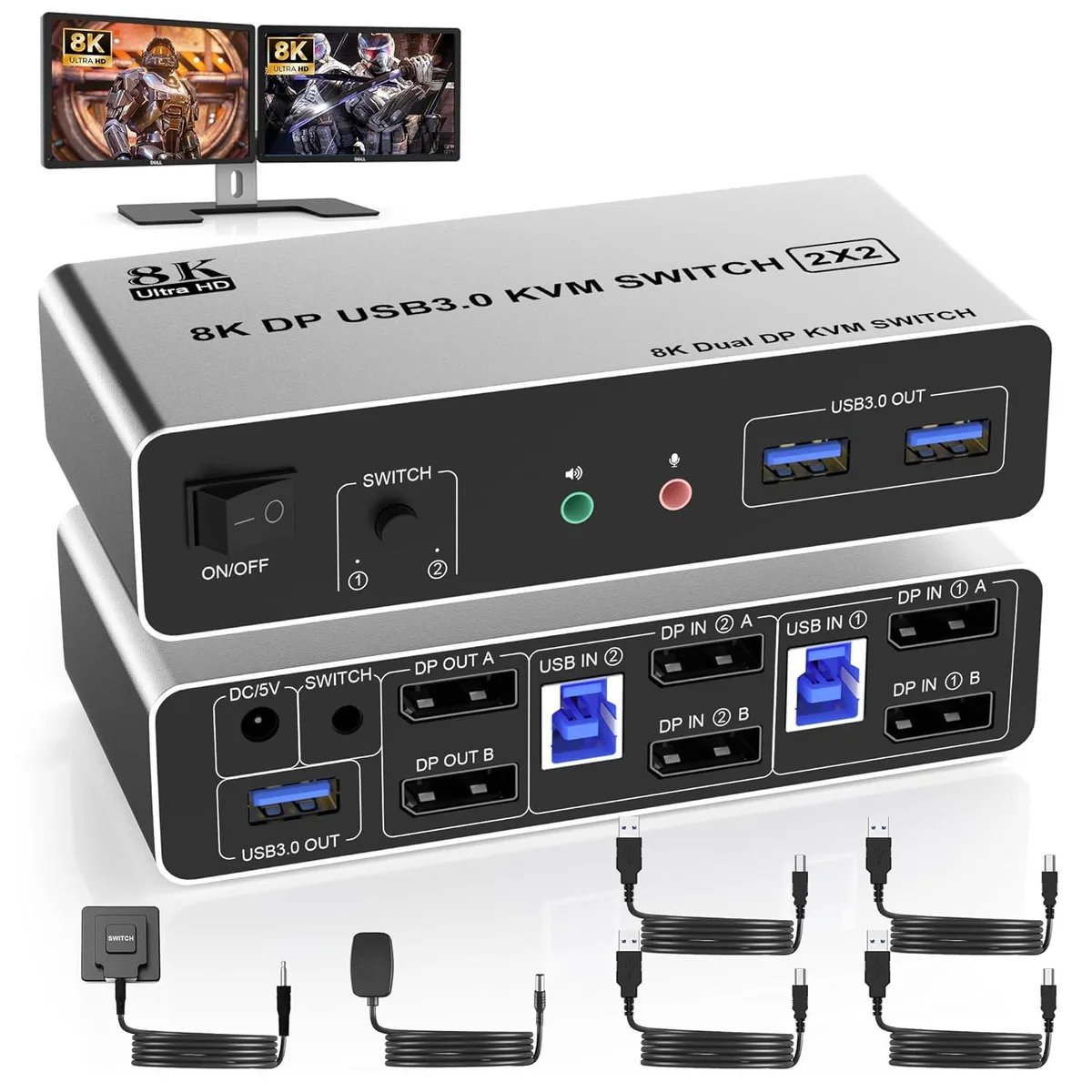
The IHDAPP KVM switch lets two computers share one keyboard, one mouse and two DisplayPort monitors at resolutions up to 8K@60Hz. It provides dual-monitor output with both mirrored and extended desktop modes. A wired remote and front-panel buttons give two ways to switch the active system. The unit includes a DC power adapter and two USB 3.0 cables for the host connections.
For dual-monitor workstations only
This switch suits users who already run two DisplayPort screens on each computer and want a single console to control both. It is not for setups with only one monitor per PC, nor for systems that output video over HDMI, USB-C or VGA unless an active adapter is used. Buyers who need more than two computer ports or more than two monitor ports should look at a larger matrix switch.
Requires two DP outputs per computer
The decisive specification is that each connected computer must supply two DisplayPort 1.4 outputs — labelled DP IN1 A/B and DP IN2 A/B — plus a matching USB 3.0 link. Without dual DP sources the switch cannot deliver its promised extended or mirrored desktop across both screens.
Highlights
- Controls two PCs with one keyboard, mouse and dual monitors
- Switch instantly via front buttons or wired remote
- Drives two 8K@60Hz displays through DP 1.4 inputs
- Adds three USB 3.0 ports plus audio/mic pass-through
- Works with Windows, Linux and macOS out of the box
Specifications
| Type | Displayport KVM Switch 2 Monitors 2 Computers |
|---|---|
| PC Connectors | DP1.4, USB 3.0 |
| Computer Connections | 2 Ports |
| Monitor Connections | 2 Ports |
| Video Resolution | supports resolutions and refresh rates up to 8K@60Hz (Downward Compatible). |
| PC Selection | Push Buttons and Wired Remote |
| Monitors Supported | Displayport, Displayport |
| LED Indicators | Yes |
| Audio Features | with Audio |
| Power Features | DC Power Adapter |
| USB Features | The KVM Switch Displayport has 3 USB 3.0 ports and audio microphone output, which can support compatibility with a variety of USB 3.0 devices, such as sharing USB hard drives, scanners, printers, U disk or gamepad, etc. Supports ultra-fast USB 3.0 data transfer up to 5Gbps. |
| Application | USB 3.0 displayport kvm can control 2 monitors 2 computers with 1 set of keyboard and mouse, and support 2 monitors mirror desktop or extended desktop. NOTE: It requires each computer has 2 displayport output interfaces and support extended display, otherwise this dual monitor DP kvm can not be realized dual monitor extended display. |
| Features | 1. 2 computers share one set of keyboard, mouse and 2 monitors 2. Dual monitors output support and mirrored and extended display 3. Switching modes: Button switch and wired remote 4. Cross support most major OS including Windows, Linux, Mac 6. With extra USB 3.0 ports and audio output. 7. Support max up resolution 8K@60Hz,downward compatible. |
| Dimensions | 17.81 x 12.8 x 5.89 cm |
| Weight | 490g |
| Package Contents | 1* 8K Displayport Dual Monitor KVM Switch, 2* USB cable , 1* wired remote, and 1* power adapter |
Questions about this item
Do I need two DisplayPort outputs on each computer to use the dual-monitor feature?
Yes, each computer must provide two DisplayPort outputs that connect to the DP IN1 A and DP IN1 B ports for PC1 or DP IN2 A and DP IN2 B for PC2.
Will my existing DisplayPort 1.2 monitors and cables work with this 8K@60Hz switch?
The switch is downward compatible, so DisplayPort 1.2 monitors and cables will function at their native resolutions and refresh rates.
How can I confirm the switch is passing video and USB correctly after I connect everything?
Press the front button or wired remote to change the active computer; the LED indicator moves and both monitors should instantly show the other system's desktop while keyboard, mouse and USB 3.0 devices follow the switch.
Also in this aisle
People compared these
Same shelf, same checkout — eight coins and a 30-minute rate lock.


Black Box Corporation
Black Box Corporation 4K60 HDMI Dual-Head KVM Switch 4 Port
$774.99
0.00921017BTC
In stock