


IHDAPP
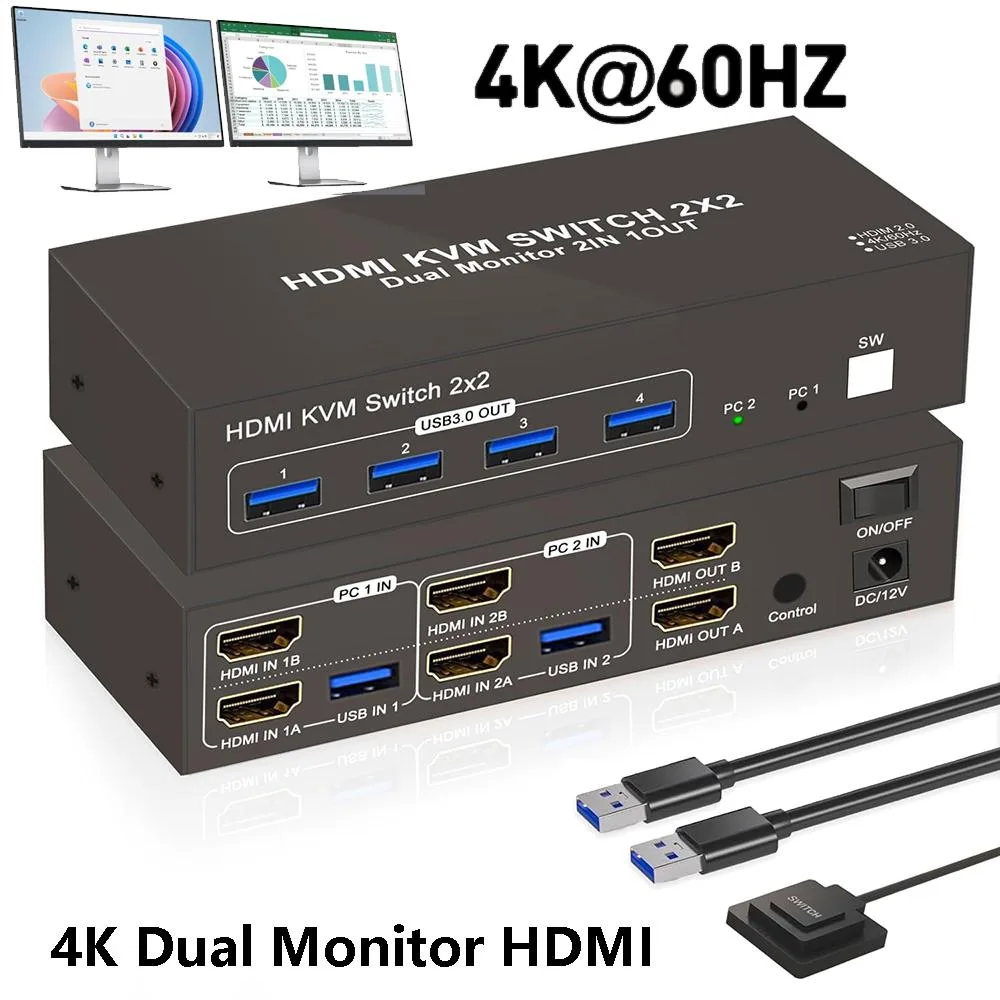
IHDAPP 2-Port HDMI KVM Switch 4K@60Hz 4 USB 3.0
Share two computers across dual 4K monitors at 60Hz with four USB 3.0 ports and push-button or desktop switching
- TypeHDMI KVM Switch 2 Computer 2 Monitors
- PC ConnectorsHDMI, USB 3.0
- Computer Connections2 Port HDMI+HDMI
- Monitor Connections2 Ports HDMI
- Video Resolutionup to 4K:3840*2160@60Hz
- PC SelectionPush Buttons and Desktop Controller
- Share two PCs across dual 4K monitors at 60 Hz
- Switch instantly via push button or desktop controller
- Four USB 3.0 ports share keyboard, mouse and peripherals
- Extended and copy display modes expand workspace flexibility
- Compact 5.4 × 2.5 × .6 inch unit includes power adapter
Dual-PC Dual-Monitor KVM Switch
This IHDAPP KVM switch lets two computers share two HDMI monitors, a keyboard, a mouse and up to four USB 3.0 peripherals such as a printer or storage drive. It supports video up to 3840x2160 at 60 Hz and includes a desktop controller alongside front push buttons for quick PC selection. LED indicators show the active port at a glance. The unit measures 5.4 x 2.5 x .6 inches and weighs 8.96 ounces. A DC power adapter is supplied for stable operation.
Replaces Separate Peripheral Sets
Instead of keeping duplicate keyboards, mice and USB devices for each workstation, this switch consolidates them into one shared set. The jump is worth it when you regularly move between two PCs and want to reclaim desk space without unplugging cables. It also removes the need for a separate USB hub because four USB 3.0 ports are built in. Buyers who only ever use a single computer will not benefit from the switching function.
Build Integration Requirements
Each computer must provide two HDMI outputs and one USB 3.0 connection to drive both monitors and the shared peripherals. Both monitors need HDMI inputs that match the switch outputs — HDMI IN A maps to HDMI OUT A and HDMI IN B to HDMI OUT B. Your operating systems must support extended or mirrored desktop modes; the switch only passes the signals through. The included power adapter must be connected for reliable switching, and the button extension module allows the selector to be placed within easy reach.
Highlights
- Share two PCs across dual 4K monitors at 60 Hz
- Switch instantly via push button or desktop controller
- Four USB 3.0 ports share keyboard, mouse and peripherals
- Extended and copy display modes expand workspace flexibility
- Compact 5.4 × 2.5 × .6 inch unit includes power adapter
Specifications
| Type | HDMI KVM Switch 2 Computer 2 Monitors |
|---|---|
| PC Connectors | HDMI, USB 3.0 |
| Computer Connections | 2 Port HDMI+HDMI |
| Monitor Connections | 2 Ports HDMI |
| Video Resolution | up to 4K:3840*2160@60Hz |
| PC Selection | Push Buttons and Desktop Controller |
| Monitors Supported | HDMI, HDMI |
| LED Indicators | Yes |
| Power Features | Come with DC Power Adapter |
| USB Features | Featuring 4 USB 3.0 ports |
| Application | Achieve seamless multitasking with this HDMI KVM switch, allowing two PCs to share two monitors along with a keyboard and mouse setup. |
| Features | Support Extended & Copy Mode: Elevate your multitasking capabilities with Extended Mode and Copy Mode features. Extended Mode expands your desktop across multiple screens, providing ample workspace for efficient multitasking, while Copy Mode duplicates content on all connected displays, perfect for presentations and collaborative work environments. Enjoy unparalleled versatility and productivity with these advanced modes, tailored to suit your unique workflow needs. When switching between two computers, the display will go black for a few seconds. High-Speed USB3.0 for Efficient Tran |
| Dimensions | 5.4 x 2.5 x 0.6 inches |
| Weight | 8.96 ounces |
| Package Contents | 1 x HDMI USB3.0 kvm switch; 2 x USB cables; 1 x Power Adapter; 1 x Button extension module; 1 x User manual. |
Questions about this item
What are the exact dimensions of the switch so I can check desk clearance?
The unit measures 5.4 by 2.5 by 0.6 inches and weighs 8.96 ounces, making it compact enough for most desktop setups.
How do I connect two PCs and two monitors using the supplied cables and the button extension module?
Link each PC with one HDMI cable and one USB 3.0 cable to the matching IN ports, connect both monitors to the OUT ports, plug in the DC power adapter, then attach the button extension module for convenient switching.
Does the included power adapter need to stay connected for reliable operation?
Yes, the supplier notes that connecting the supplied DC power adapter is required for stable performance, especially when running dual 4K displays at 60 Hz.
Also in this aisle
People compared these
Same shelf, same checkout — eight coins and a 30-minute rate lock.


Black Box Corporation
Black Box Corporation 4K60 HDMI Dual-Head KVM Switch 4 Port
$774.99
0.00920744BTC
In stock