


IHDAPP
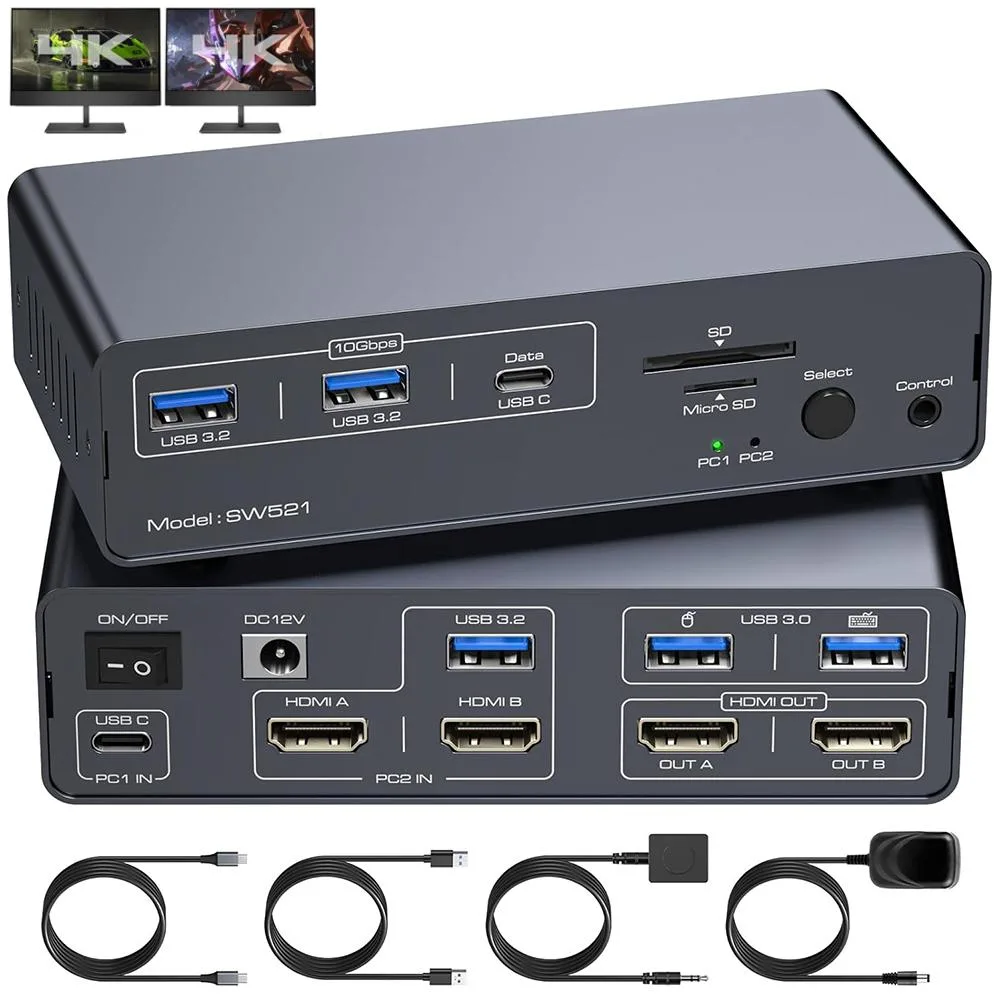
IHDAPP 13-in-1 USB-C HDMI KVM Switch 2 Computers 2 Monitors 4K60Hz
A 13-in-1 USB-C and HDMI KVM switch lets one laptop and one desktop share two 4K 60 Hz monitors, keyboard, mouse, SD cards and 10 Gbps USB 3.2 ports
- TypeUSB C, HDMI
- PC ConnectorsUSB C, HDMI
- Computer Connections2 Ports
- Monitor Connections2 Ports HDMI
- Video Resolutionup to 4K@60Hz and can transmit impressive high-quality high-
- PC SelectionPush Buttons and Wired Remote
- Share one keyboard, mouse and two monitors between two computers
- 4K 60 Hz video with EDID for crisp, stable picture quality
- 13-in-1 dock adds SD, microSD and USB 3.2 10 Gbps ports
- Push-button and wired remote give instant PC selection
- 12 V DC adapter powers the switch and connected peripherals
13-in-1 USB-C HDMI KVM Switch for Two Computers
This KVM switch lets one laptop and one desktop share two HDMI monitors, a keyboard, a mouse, two USB 3.2 ports, an SD card reader and a microSD card reader through a single 13-in-1 dock. It connects the laptop via USB-C and the desktop via two HDMI ports plus a USB-A link. Users switch between machines with front-panel push buttons or the included wired remote. The unit supports copy and extended display modes, though macOS does not allow extended mode.
Passive Cooling with External 12V Power Adapter
The switch draws power from an included 12V DC adapter and has no internal fans, so it runs silently during normal operation. LED indicators show which computer is active on each monitor. Typical power consumption stays low because the device only routes video and USB signals rather than driving heavy processing loads. The compact 5 by 2 by 1.2 inch enclosure weighs 1.28 pounds and fits easily on a desk.
Replaces Separate Dock, Monitor Switch and USB Hub
This product consolidates a laptop docking station, a dual-monitor KVM and a 10 Gbps USB 3.2 hub into one box, removing cable clutter and the need to replug peripherals when changing computers. The upgrade is worthwhile when you regularly move between a USB-C laptop and an HDMI desktop while keeping two 4K 60 Hz displays, an SD card workflow and high-speed USB storage connected. It does not suit setups that require more than two computers, DisplayPort monitors or Thunderbolt daisy-chaining.
Highlights
- Share one keyboard, mouse and two monitors between two computers
- 4K 60 Hz video with EDID for crisp, stable picture quality
- 13-in-1 dock adds SD, microSD and USB 3.2 10 Gbps ports
- Push-button and wired remote give instant PC selection
- 12 V DC adapter powers the switch and connected peripherals
Specifications
| Type | USB C, HDMI |
|---|---|
| PC Connectors | USB C, HDMI |
| Computer Connections | 2 Ports |
| Monitor Connections | 2 Ports HDMI |
| Video Resolution | up to 4K@60Hz and can transmit impressive high-quality high-definition video.Downward compatible with 2K@144Hz, 1080P, etc. |
| PC Selection | Push Buttons and Wired Remote |
| Monitors Supported | HDMI, HDMI |
| LED Indicators | Yes |
| Power Features | 12V DC Power Adapter |
| USB Features | with USB support |
| Application | This KVM Switch 2 Computers 2 Monitors supports one laptop and one PC to share a 13-in-1 docking station;it includes two monitors with HDMI ports,mouse,keyboard,USB flash drive,SD card and other devices;seamless switching,saving space,improving efficiency and usage experience. |
| Features | 4K 60Hz Switch and EDID Function;USB 3.2 Switch with SD Card Reader;Easy Switching |
| Dimensions | 5 x 2 x 1.2 inches |
| Weight | 1.28 Pounds |
| Package Contents | • 1 x USB C Thunderbolt 3 KVM Switch • 1 x 1 meter USB Gen 2 Cable(Type C to Type C) • 1 x 1 meter USB 3.0 Cable • 1 x 12V Power Adapter • 1 x Destop Control Kit • 1 x User Manual |
Questions about this item
How do I connect my laptop and desktop so both can use the two HDMI monitors, keyboard, and mouse through the 13-in-1 dock?
Connect the laptop via the supplied USB-C Gen 2 cable to the USB-C upstream port, and the desktop using one HDMI cable plus the USB 3.0 cable to its HDMI and USB-A ports; plug both monitors into the two HDMI outputs, then attach keyboard and mouse to the front USB ports.
Will the SD and Micro-SD card slots or the USB 3.2 ports need any driver updates or firmware flashes down the line?
No driver or firmware updates are required; the card readers and both USB 3.2 ports are fully plug-and-play and will continue to work as long as the host computers support standard mass-storage and USB 3.2 protocols.
At what resolution and refresh rate will the dual-monitor setup hit its bandwidth ceiling during long work sessions?
The switch caps video at 4K 60 Hz per HDMI output; pushing both displays to that rate simultaneously is the first limit you will reach under sustained use.
Also in this aisle
People compared these
Same shelf, same checkout — eight coins and a 30-minute rate lock.


Black Box Corporation
Black Box Corporation 4K60 HDMI Dual-Head KVM Switch 4 Port
$774.99
0.00922399BTC
In stock