Corn Electronics
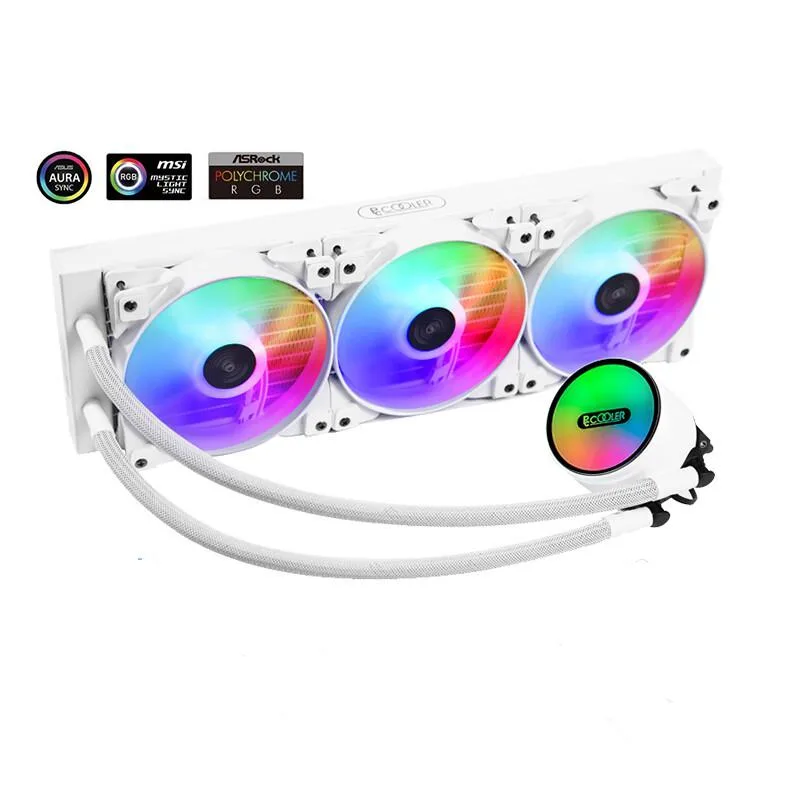
Corn Electronics laptop cooling pad white 360 mm 3 fan 120 mm ARGB
- White
- 3
$162.99
0.00187915BTC
In stockWe take cryptocurrency — so the coins you hold can buy real hardware.Pay in crypto, spend it on real hardware. Free insured shipping worldwide over $399. Plain, unbranded boxes, sent from Germany.Free insured shipping over $399. Your rate is locked for 30 minutes once checkout opens.Rate locked 30 minutes. Every item sealed, serial-checked and covered by a 24-month warranty.Sealed, 24-month warranty.


HP
A 120W dock with 4 USB 3.0, 2 USB 2.0, eSATA, 2 DisplayPort, VGA, 2 DVI-D and an integrated SATA upgrade bay for compatible EliteBook and Mobile Workstation models
The HP A7E36AA#ABA is a 120W advanced docking station released in 2012. It provides port replication and charging for a specific range of HP EliteBook and mobile workstation notebooks. An integrated SATA upgrade bay allows a hard drive or optical drive to be installed for extra storage while docked.
This dock suits owners of compatible HP 2170p, 2560p, 8400 series, 8440p, 8460p, 8460w, 8470w and 6360t models who want a single-cable desktop setup with multiple video outputs. Notebooks outside the listed compatibility list cannot connect to the proprietary docking connector.
The proprietary HP docking connector limits use to the exact notebook models named in the compatibility list. Systems without this specific interface cannot use the station regardless of their other ports.
| Brand | HP |
|---|---|
| Model | A7E36AA#ABA |
| Compatibility | HP 6360t Mobile Thin Client HP EliteBook - 2170p Notebook PC - 2560p Notebook PC (ENERGY STAR) - 8400 Mobile Workstation series - 8460w Mobile Workstation - 8470w Mobile Workstation - 8440p Notebook PC - 8460p Notebook PC - 8470p Notebook PC - 8560p Notebook PC - 8570p Notebook PC - 8760w Mobile Workstation HP ProBook - 6360b Notebook PC - 6440b Notebook PC - 6460b Notebook PC - 6465b Notebook PC - 6470b Notebook PC - 6475b Notebook PC - 6560b Notebook PC - 6565b Notebook PC - 6570b Notebook PC |
| Ports Spec | 4 x USB 3.0 ports (Always-On) 2 x USB 2.0 ports (1 Always-On, 1 powered) 1 x eSATA adapter 1 x Line-in jack 1 x Audio-out (headphone) jack 2 x DisplayPort 1 x VGA 2 x DVI-D AC adapter connector with light 1 x Mouse connector 1 x Keyboard connector 1 x Parallel port 1 x Serial port 1 x Monitor stand port 1 x RJ-45 (network) jack |
| Features | Conveniently charges the notebook while it is in the docking station. Easy docking system provides port replication and cable management, plus expandability through an integrated SATA upgrade bay- all in one product. Four USB 3.0 ports; Two USB 2.0 ports; Support for DisplayPort 1.2. Optional integrated HP Docking Station Cable Lock for securing the dock and notebook with one lock. The integrated upgrade bay lets you use a hard drive or optical drive for additional storage while docked. |
| Dimension | 10.65" x 10.24" x 2.6" |
| Weight | 3.61 lbs. |
| Shipping weight | 3.63 kg |
| Package size | 338 × 323 × 155 mm |
The dock is built for the HP 6360t Mobile Thin Client and EliteBook models 2170p, 2560p, 8400 series, 8460w, 8470w, 8440p and 8460p.
The station provides two DVI-D ports and one VGA port natively; the two DisplayPort 1.2 outputs can drive additional digital displays without adapters.
The inserted hard drive or optical drive will appear in the operating system as a local storage device once the notebook is docked and powered on.
Also in this aisle
Same shelf, same checkout — eight coins and a 30-minute rate lock.
What you pay in, and what you read prices in.
Sent from your wallet at checkout
Display only — the catalogue is priced in USD
No currency matches that.
Pick the language the site speaks to you in.
No language matches that.
New here?
Already have one?
There is no automatic reset: this shop sends no mail, so there is no one-time link to ask for. Leave the address on the account and it gets picked up by hand.
Request noted
Nothing is on its way to your inbox — this shop sends no mail at all. Someone picks these up by hand.
Remembered it?