


HP
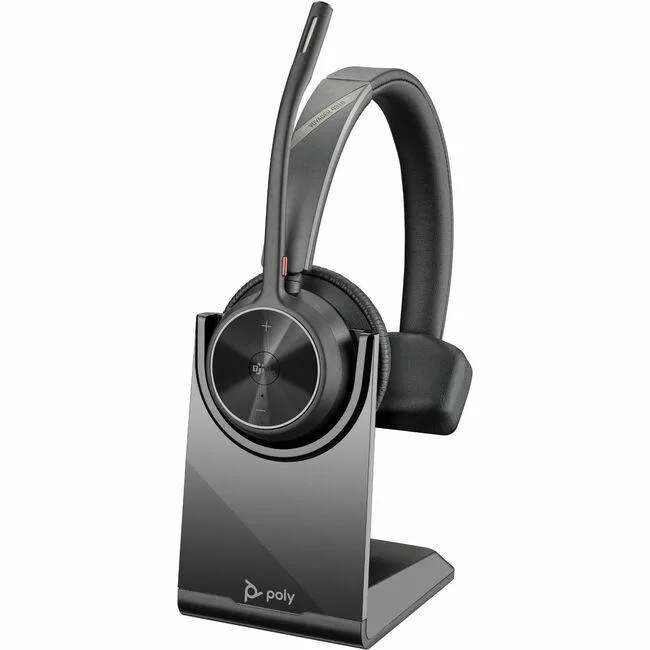
HP 77Y97AA Voyager 4310 Bluetooth 5.2 Headset with Charge Stand
Bluetooth 5.2 headset with charge stand, 24 hours talk time and 50 m wireless range
- ColorBlack
- Wireless TypeBluetooth
- Up to 24 hours of wireless talk time
- Bluetooth 5.2 connectivity with included BT700 USB adapter
- Acoustic Fence technology reduces background noise
- Microsoft Teams & Zoom certified for meetings
- Charge stand and carrying case included
Voyager 4310 UC Headset with Charge Stand
The Poly Voyager 4310 UC is a Bluetooth 5.2 wireless headset built for professionals who move between desk and mobile devices. It includes a BT700 USB-C adapter and a desktop charge stand for continuous power. Microsoft Teams and Zoom certification ensures native call control on leading collaboration platforms.
Suited to mobile knowledge workers.
This headset serves users who need up to 50 m / 164 ft of wireless freedom and the ability to pair two devices at once. Acoustic Fence technology reduces background noise during calls. Buyers who require a wired-only DECT solution or a boomless form factor should consider other categories.
24 hours of talk time on a single charge
The battery delivers up to 24 hours of wireless talk time, extendable by docking on the included charge stand or switching to corded USB mode. A carrying case and charging cable are supplied for travel. This single figure determines whether the headset covers a full workday without recharging.
Highlights
- Up to 24 hours of wireless talk time
- Bluetooth 5.2 connectivity with included BT700 USB adapter
- Acoustic Fence technology reduces background noise
- Microsoft Teams & Zoom certified for meetings
- Charge stand and carrying case included
Specifications
| Color | Black |
|---|---|
| Wireless Type | Bluetooth |
| Shipping weight | 0.61 kg |
| Package size | 211 × 188 × 117 mm |
Questions about this item
Does the headset include a USB-C adapter for a desktop without Bluetooth?
Yes, the box contains a BT700 USB adapter that plugs into a USB-C port and provides the Bluetooth 5.2 link for the headset.
How do I pair the headset to both my laptop and phone at the same time?
Turn the headset on, hold the Bluetooth button until the LEDs flash, then complete pairing on the first device; repeat the process for the second device to enable two simultaneous connections.
What part will need replacement after daily use, and is it user-replaceable?
The ear cushions wear over time; they are designed to be removed and replaced by the user without tools.
Also in this aisle
People compared these
Same shelf, same checkout — eight coins and a 30-minute rate lock.


Sony
Sony ZX Series MDR-ZX110AP Wired On-Ear Headphones White 30mm 3.5mm
- Headphone
$16.99
0.00020113BTC
In stock
usbroway
usbroway 10-pack VHF Antenna 136-174MHz for Motorola HT1000 MTS2000 XTS2500 XTS3000 XTS3500
- Two-way Radio
$38.99
0.00046156BTC
In stock