

Accsoon
Accsoon CineView SE Multi-Spectrum Wireless Video Transmitter 1200ft 1080p HDMI SDI
$181.99
0.00211848BTC
In stockWe take cryptocurrency — so the coins you hold can buy real hardware.Pay in crypto, spend it on real hardware. Free insured shipping worldwide over $399. Plain, unbranded boxes, sent from Germany.Free insured shipping over $399. Your rate is locked for 30 minutes once checkout opens.Rate locked 30 minutes. Every item sealed, serial-checked and covered by a 24-month warranty.Sealed, 24-month warranty.


HP
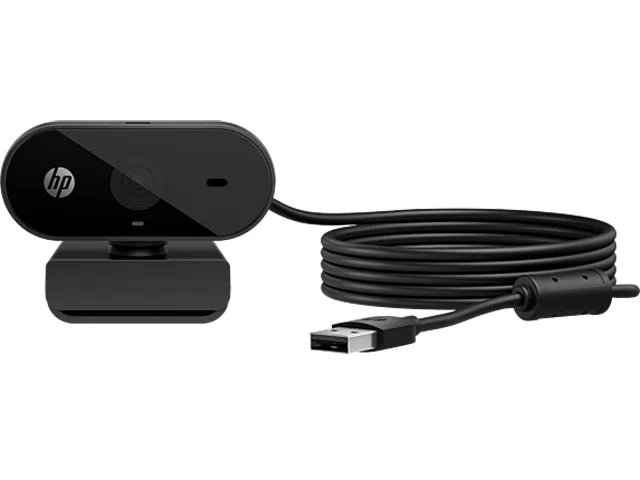
A plug-and-play USB webcam delivering 1920 x 1080 video with a 66° field of view, automatic light correction and a privacy lens cap
The HP 320 53X26AA#ABL is a fixed-focus webcam that captures Full HD 1920 x 1080 video over a standard USB connection. It supports Windows 10, Windows 11, macOS and Chrome OS and is certified for Chromebook compatibility. A built-in privacy lens cap covers the sensor when the camera is not in use.
This model replaces integrated laptop cameras that max out at 720p, delivering a sharper 1080p image with a 66° diagonal field of view for a more natural conversational frame. The jump is worth it when you need clearer video for daily meetings and want automatic light correction without installing extra software or drivers.
It suits anyone who wants a simple clip-on camera for Zoom, Microsoft Teams, Google Meet, XSplit, OBS or YouTube streaming with 360° swivel and optional tripod mounting. Buyers who need autofocus for close-up demos, a wider field of view for group conferencing, or advanced manual controls should look at something else.
| Brand | HP |
|---|---|
| Name | 320 |
| Model | 53X26AA#ABL |
| Part Number | 53X26AA#ABL |
| Interface | USB |
| Image Sensor | CMOS |
| Max. Image Resolution | 1920 x 1080 |
| Video Capture Resolution | 1920 x 1080 |
| Lens | Lens type: Plastic |
| Operating Systems Supported | Windows 10, Windows 11 macOS Chrome OS Compatible UC Apps: Zoom, Microsoft Teams, Google Meet, XSplit, OBS, YouTube |
| Color | Black |
| Features | Diagonal field of view (dFOV): 66 degree Autofocus: No Auto-Light Correction: Yes Image Correction: Yes Privacy Enhancement: Privacy lens cap |
| Package Contents | Webcam Quick Start guide Warranty card |
| Shipping weight | 0.16 kg |
| Package size | 108 × 100 × 65 mm |
The built-in clip grips the top edge of a display; the 360-degree swivel lets you angle the camera, and a standard tripod thread is also provided for alternative mounting.
Plug the USB cable into the computer; the driver loads automatically, then open your video app and select the 320 as the camera source.
Fold down the privacy lens cap, then gently wipe the exposed lens surface with a dry microfibre cloth; avoid liquids or abrasive materials.
Also in this aisle
Same shelf, same checkout — eight coins and a 30-minute rate lock.
What you pay in, and what you read prices in.
Sent from your wallet at checkout
Display only — the catalogue is priced in USD
No currency matches that.
Pick the language the site speaks to you in.
No language matches that.
New here?
Already have one?
There is no automatic reset: this shop sends no mail, so there is no one-time link to ask for. Leave the address on the account and it gets picked up by hand.
Request noted
Nothing is on its way to your inbox — this shop sends no mail at all. Someone picks these up by hand.
Remembered it?



