
Honeywell
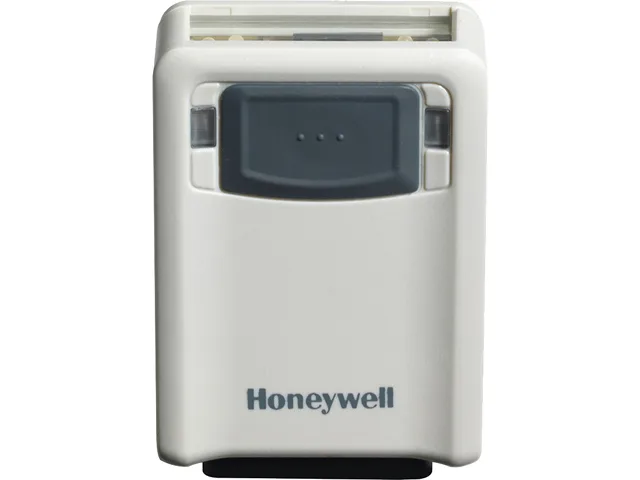
Honeywell 3320GHD-4-N barcode scanner HD Focus Ivory USB RS-232 Keyboard Wedge
Corded imager reads 1D, PDF417 and 2D codes with HD Focus optics and automatic USB, RS-232 or Keyboard Wedge detection
- ConnectivityCorded
- Scan Engine1D, PDF417, 2D
- Interfaces SupportedUSB, RS-232, Keyboard Wedge
- Imager Field of ViewHD Focus
- Resolution1D (Code 39): 5 mil (0.125 mm) 2D (Data Matrix): 6.7 mil (0.
- Depth of Scan Field5 mil (Code 39): 55.00 to 159.00 mm (2.20" to 6.30") 6.7 mil
- Scans 1D, PDF417 and 2D codes with HD Focus precision
- Automatic interface detection works with USB, RS-232 and keyboard wedge
- Laser-free aiming removes eye-injury risk and suits customer-facing areas
- Reads barcodes directly from mobile and computer screens
- Low 0.45 W standby power reduces energy draw
Compact Ivory Barcode Scanner
The Honeywell Vuquest 3320g is a corded imager that reads 1D, PDF417 and 2D codes from paper or screens. It draws 2.3 W while operating and 0.45 W on standby at 5 VDC. Automatic interface detection selects USB, RS-232 or Keyboard Wedge without programming barcodes. The ivory housing measures 1.00" x 2.00" x 2.90" and weighs 0.17 lb.
Upgrade from Single-Interface Scanners
Replaces older corded scanners that require manual barcode programming to switch between USB, RS-232 and Keyboard Wedge. The jump is worthwhile when a single device must serve multiple host types or when laser aiming is undesirable. Not for buyers who need wireless freedom or a scanner that decodes symbologies beyond 1D, PDF417 and 2D.
HD Focus Field Limits
HD Focus optics resolve 1D Code 39 down to 5 mil at 55.00 to 159.00 mm and 2D Data Matrix at 6.7 mil from 36.00 to 178.00 mm. Pitch tolerance is ±45 degree and yaw ±65 degree with a minimum 20% print contrast ratio. Scanning outside these ranges or on lower-contrast codes will fail.
Highlights
- Scans 1D, PDF417 and 2D codes with HD Focus precision
- Automatic interface detection works with USB, RS-232 and keyboard wedge
- Laser-free aiming removes eye-injury risk and suits customer-facing areas
- Reads barcodes directly from mobile and computer screens
- Low 0.45 W standby power reduces energy draw
Specifications
| Brand | Honeywell |
|---|---|
| Series | Vuquest |
| Model | 3320g |
| Part Number | 3320GHD-4-N |
| Connectivity | Corded |
| Scan Engine | 1D, PDF417, 2D |
| Interfaces Supported | USB, RS-232, Keyboard Wedge |
| Imager Field of View | HD Focus |
| Resolution | 1D (Code 39): 5 mil (0.125 mm) 2D (Data Matrix): 6.7 mil (0.17 mm) |
| Depth of Scan Field | 5 mil (Code 39): 55.00 to 159.00 mm (2.20" to 6.30") 6.7 mil (PDF417): 36.00 mm to 178.00 mm (1.40" to 7.00") |
| Pitch | ±45 degree |
| Yaw | ±65 degree |
| Print Contrast Ratio (Minimum) | 20% |
| Decoding Capability | Reads standard 1D, PDF417, 2D |
| Input Voltage | 5VDC +/- 0.25V |
| Current | Operating Power: 2.3W (450mA @ 5V) Standby Power: 0.45W (90mA @ 5V) |
| Color | Ivory |
| Dimensions | 1.00" x 2.00" x 2.90" |
| Weight | 0.17 lb. |
| Features | The intelligent multi-interface design supports all popular interfaces in one device, replacing the time-consuming process of scanning programming barcodes with automatic interface detection. TotalFreedom enables the loading and linking of multiple applications directly onto the scanner, eliminating the need for host system modifications while offering expanded decoding and data formatting functionality. Easily scans barcodes directly from mobile device or computer screens, almost as if they were printed on paper. Laser-free aiming provides an accurate scan indication, creating a cus |
| Drop | 5 feet |
| Shipping weight | 0.91 kg |
| Package size | 203 × 127 × 76 mm |
Questions about this item
What are the exact dimensions of the Honeywell 3320GHD-4-N scanner body?
The scanner measures 1.00 inch wide, 2.00 inches deep and 2.90 inches high, weighing 0.17 lb, so it fits in tight countertop spaces without a separate mounting bracket.
How do I connect the scanner to a POS system using USB, RS-232 or Keyboard Wedge without scanning programming codes?
Plug the appropriate cable into the host port; the multi-interface design detects USB, RS-232 or Keyboard Wedge automatically, eliminating the need to scan setup barcodes.
What ongoing maintenance does the imager window need to keep reading 5 mil Code 39 and 6.7 mil Data Matrix codes?
Wipe the scan window regularly with a lint-free cloth; avoid solvents. The solid-state imager has no moving parts, so no lamps or lasers require replacement over the scanner life.
Also in this aisle
People compared these
Same shelf, same checkout — eight coins and a 30-minute rate lock.



CHIEF MANUFACTURING
CHIEF MANUFACTURING CMS018 18" 457 mm Fixed Extension Column projector accessory
- Extension Column
- Projector
$22.99$22.99
0.00027196BTC
In stock