


Hitoor
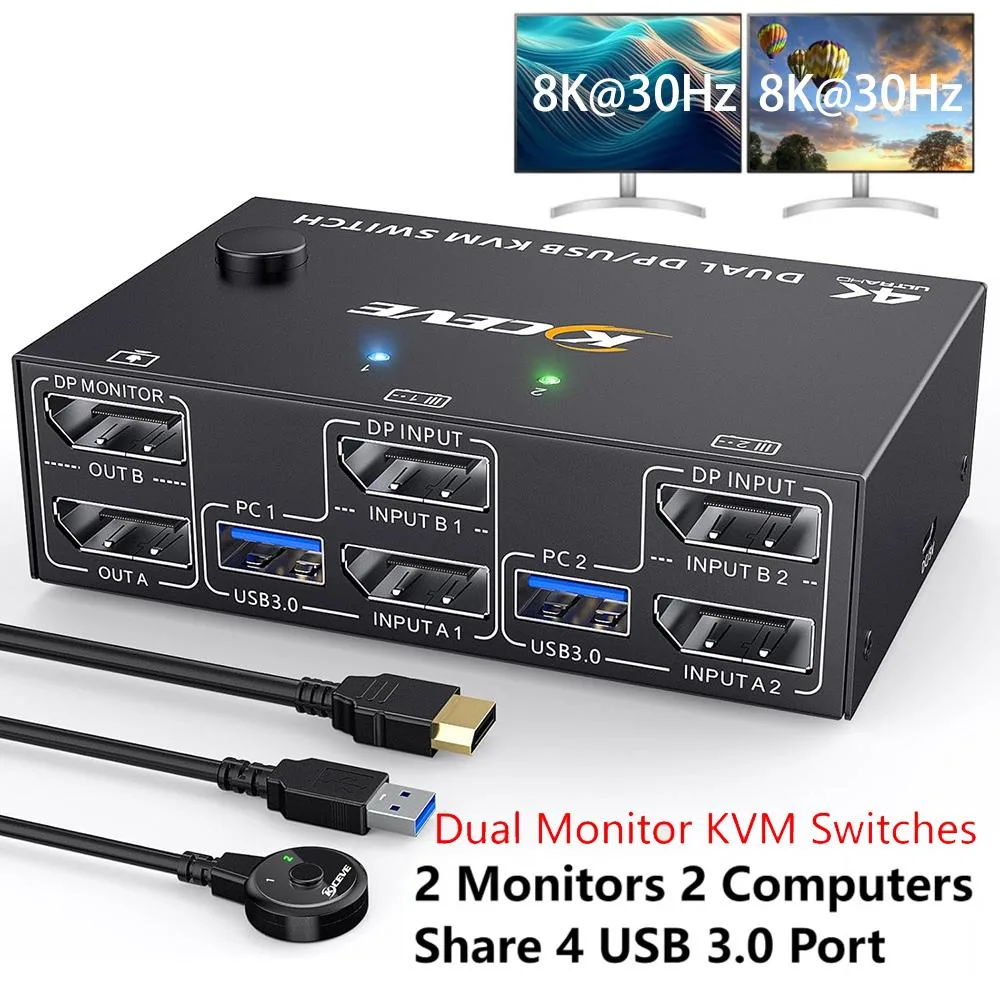
Hitoor DisplayPort KVM Switch 2 Monitors 2 Computers 8K@30Hz 4K@144Hz USB 3.0 4 Ports Wired Remote
Controls two computers across dual monitors at up to 8K@30Hz or 4K@144Hz with four USB 3.0 ports and a 1.5m wired remote
- TypeDisplayport KVM Switch 2 Monitors 2 Computers
- PC ConnectorsDP1.4, USB 3.0
- Computer Connections2 Ports
- Monitor Connections2 Ports
- Video Resolutionup to Ultra HD 8K@30Hz 4K@144Hz
- PC SelectionPush Buttons and Wired Remote
- Control two computers with one keyboard, mouse and dual monitors
- Share four USB 3.0 peripherals across both connected systems
- Switch instantly via front buttons or 1.5 m wired remote
- Supports 8K at 30 Hz and 4K at 144 Hz resolution
- Compact 4.72 x 2.56 x 1.26 inch design with 12 V power adapter
Dual-monitor KVM for two computers
This DisplayPort 1.4 KVM switch lets you operate two computers from a single keyboard, mouse and dual-monitor setup. It supports extended or mirrored desktop modes across both screens and provides four USB 3.0 ports for shared peripherals. The unit includes a wired remote for convenient switching.
Metal enclosure with front-panel controls
The compact chassis measures 4.72 by 2.56 by 1.26 inches and weighs 280 grams, making it easy to place on a crowded desk. Two DisplayPort inputs and outputs per computer connect with the four supplied cables, while the 1.5 metre wired remote duplicates the front push buttons for instant source changes. A 12 V power adapter ensures stable operation with power-hungry keyboards or docks.
Replaces separate cables and manual switching
Users who currently unplug DisplayPort and USB leads to move between a workstation and a laptop can consolidate everything into one always-connected hub. The jump is worthwhile when you need 8K at 30 Hz or 4K at 144 Hz across two monitors without losing USB 3.0 bandwidth. It does not suit single-monitor setups or anyone requiring more than two computer ports.
Highlights
- Control two computers with one keyboard, mouse and dual monitors
- Share four USB 3.0 peripherals across both connected systems
- Switch instantly via front buttons or 1.5 m wired remote
- Supports 8K at 30 Hz and 4K at 144 Hz resolution
- Compact 4.72 x 2.56 x 1.26 inch design with 12 V power adapter
Specifications
| Type | Displayport KVM Switch 2 Monitors 2 Computers |
|---|---|
| PC Connectors | DP1.4, USB 3.0 |
| Computer Connections | 2 Ports |
| Monitor Connections | 2 Ports |
| Video Resolution | up to Ultra HD 8K@30Hz 4K@144Hz |
| PC Selection | Push Buttons and Wired Remote |
| Monitors Supported | Displayport |
| LED Indicators | Yes |
| Power Features | with 12V Power Adapter |
| USB Features | with USB support |
| Application | This KVM switch dual monitor help you to control 2 computers or laptops by only one set of wired or wireless keyboard mouse,share 2 monitors and 4 USB 3.0 devices |
| Features | Dual Displayport KVM Switches with 4 USB 3.0 Ports; Great Compatibility & 2 Switching Mode; Support Ultra HD 8K@30Hz 4K@144Hz |
| Dimensions | 4.72 x 2.56 x 1.26 inch |
| Weight | 280g |
| Package Contents | Displayport KVM Switch; 2*DP Cable;2*USB Cable; Wired remote;USB power cable. |
Questions about this item
What resolution and refresh rate does the DisplayPort 1.4 interface cap at on this KVM switch?
The DisplayPort 1.4 interface supports up to 8K at 30Hz and 4K at 144Hz, plus 2560×1440 at 144Hz and 1920×1080 at 144Hz.
What are the physical dimensions and weight of the unit, and what mounting options exist?
The switch measures 4.72 x 2.56 x 1.26 inches and weighs 280g; no mounting brackets or VESA holes are listed, so it sits on a desk.
How is the switch installed and which step do users often miss?
Connect both computers via the included DP and USB cables, attach monitors and USB devices, plug in the 12V power adapter, then use the push buttons or 1.5m wired remote to switch; users often forget the power adapter when driving high refresh rates or mechanical keyboards.
Also in this aisle
People compared these
Same shelf, same checkout — eight coins and a 30-minute rate lock.


Black Box Corporation
Black Box Corporation 4K60 HDMI Dual-Head KVM Switch 4 Port
$774.99
0.00911828BTC
In stock