
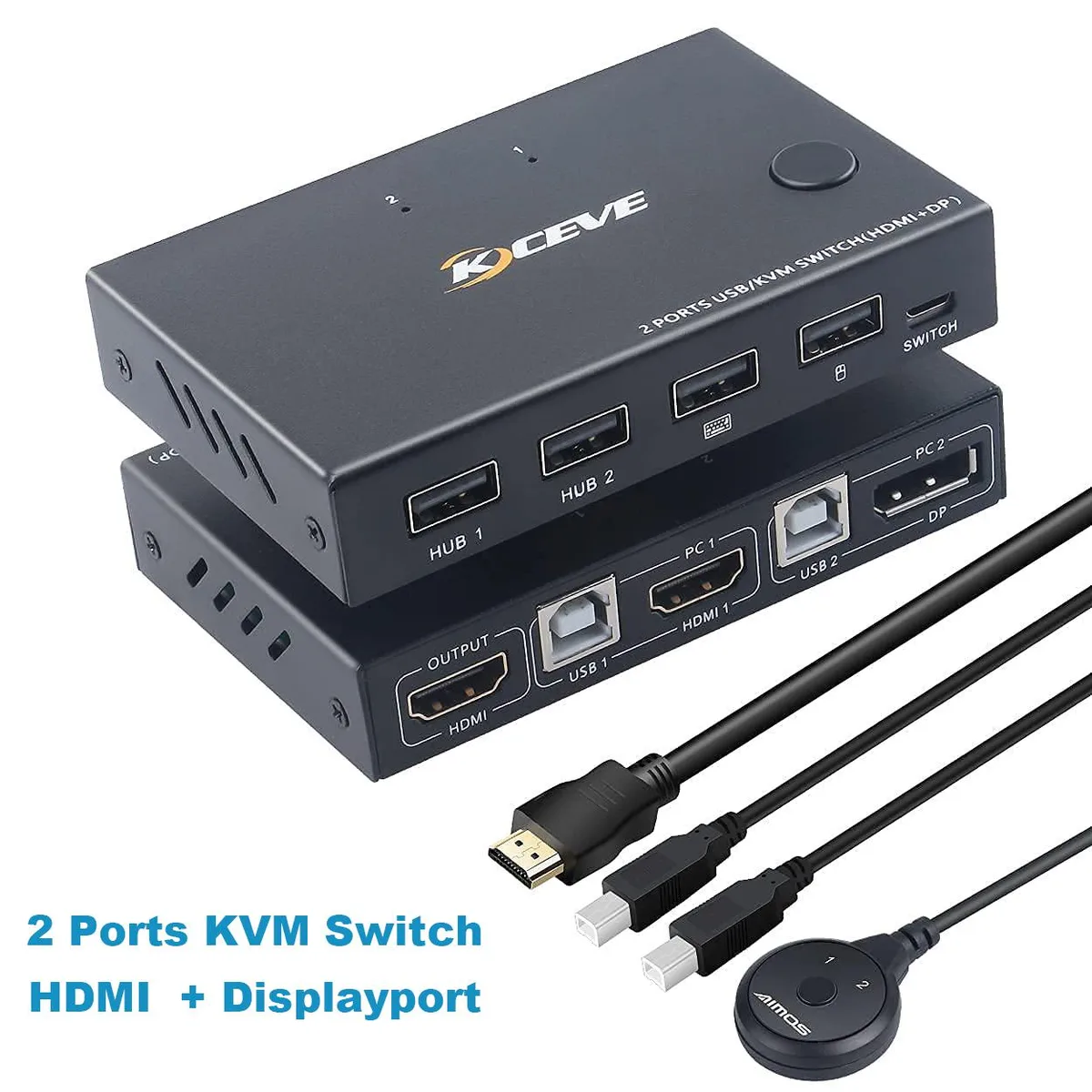


Hitoor
Hitoor 2-Port DP/HDMI KVM Switch 4K30 1080p 4×USB 2.0
Controls two computers with one monitor, keyboard, mouse and four USB 2.0 peripherals, switching by button or remote, with HDMI 4K 30 Hz and DP 1080p input
- TypeHDMI
- Computer Connections2 Ports
- Video Resolution3840 x 2160
- PC Selectionthis KVM switch supports key switch and remote control toggl
- ApplicationWith this KVM switch you can easily control 2 signal sources
- FeaturesHDMI input port Supports up to 4K @ 30Hz, DP input port supp
- Control two computers with one keyboard and mouse set
- HDMI input delivers 3840 x 2160 at 30 Hz
- DP input handles 1080p and converts to HDMI
- Four USB 2.0 ports share printers, scanners and more
- Switch via front button or wired remote control
Two-Port KVM with HDMI and DP Inputs
This Hitoor KVM switch lets you operate two computers or consoles from a single HDMI monitor, keyboard and mouse. One HDMI input accepts video up to 3840 x 2160 at 30 Hz, while the DisplayPort input handles up to 1080p. Four USB 2.0 ports share peripherals such as printers or barcode scanners across both systems. Switching is done by a front-panel button or the included wired remote.
Desktop users who need 4K30 on one port
The asymmetric resolution limits make this unit a good fit for a primary 4K workstation paired with a secondary 1080p laptop or console. Buyers who require 4K at 60 Hz on either input, or who rely on keyboard hotkey switching, should look elsewhere. The supplier also notes limited compatibility with high-definition webcams.
HDMI input reaches 3840 x 2160 at 30 Hz
That single specification decides whether the switch matches your monitor and source capabilities. The DisplayPort input is capped at 1080p, so a 4K DisplayPort source would be downscaled. No other video modes or refresh rates are supported beyond what is listed.
Highlights
- Control two computers with one keyboard and mouse set
- HDMI input delivers 3840 x 2160 at 30 Hz
- DP input handles 1080p and converts to HDMI
- Four USB 2.0 ports share printers, scanners and more
- Switch via front button or wired remote control
Specifications
| Type | HDMI |
|---|---|
| Computer Connections | 2 Ports |
| Video Resolution | 3840 x 2160 |
| PC Selection | this KVM switch supports key switch and remote control toggle mode, not keyboard hotkeys. |
| Application | With this KVM switch you can easily control 2 signal sources with just one set of USB keyboard and mouse. Save space, electricity and device costs, you can control and manage two PC host / game consoles centrally without having to switch from one workstation to the other. |
| Features | HDMI input port Supports up to 4K @ 30Hz, DP input port supports up to 1080p. Of course, it also supports 3D and 1080p resolutions or lower.(one HDMI input & one DP input & one HDMI output). Can be used as a DP to HDMI adapter. EASY TO USE - Metal shell is hard and anti-drop. Built-in high-performance chips, using high technology to decode, plug and play, no need to drive. Powered by USB, No external power adapter required, it is very suitable for home and office. KVM switch with 2 additional USB 2.0 standard hub ports that can recognize barcode scanners, USB hard drives, printers, s |
| Package Contents | 1x Displayport/HDMI KVM switch 1x HD MI cable 2x USB cables 1x Remote control cable |
Questions about this item
What resolution does the HDMI input actually cap at in practice?
The HDMI input caps at 3840 x 2160 at 30 Hz; the DP input is limited to 1080p.
What does the unit need to sit securely on a desk?
A metal shell with rubber feet provides anti-skid stability and protects the desktop from scratches.
How do I switch between the two computers and what catches people out?
Use the front button or the wired remote; keyboard hotkeys are not supported and the remote needs two AAA batteries.
Also in this aisle
People compared these
Same shelf, same checkout — eight coins and a 30-minute rate lock.


Black Box Corporation
Black Box Corporation 4K60 HDMI Dual-Head KVM Switch 4 Port
$774.99
0.00914842BTC
In stock