microMICR Corporation
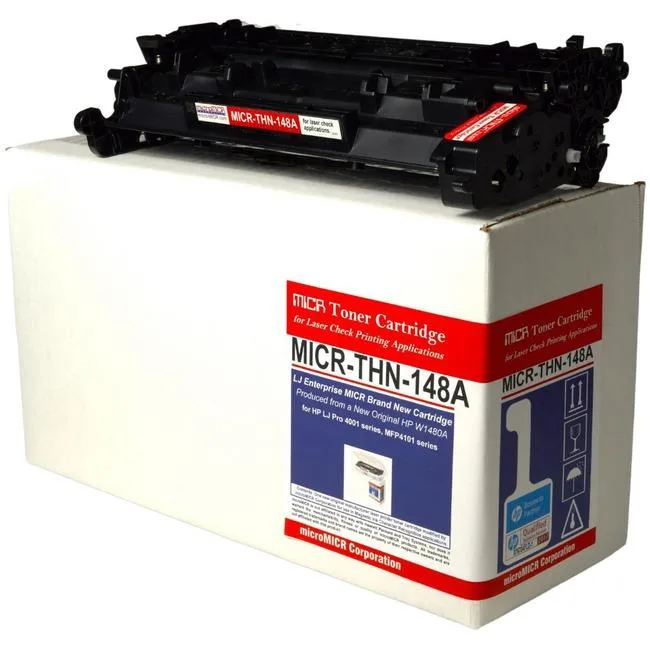
microMICR High Yield MICR Toner Cartridge 9500 Pages Black W1480A
$258.99
0.00303029BTC
In stockWe take cryptocurrency — so the coins you hold can buy real hardware.Pay in crypto, spend it on real hardware. Free insured shipping worldwide over $399. Plain, unbranded boxes, sent from Germany.Free insured shipping over $399. Your rate is locked for 30 minutes once checkout opens.Rate locked 30 minutes. Every item sealed, serial-checked and covered by a 24-month warranty.Sealed, 24-month warranty.


Evolis
Consumable kit with YMCKO ribbon and 100 PVC cards for Badgy100 and Badgy200 printers
This Evolis ribbon and card kit supplies everything the Badgy100 and Badgy200 systems need to produce personalised colour cards. Each box contains a YMCKO colour ribbon rated for 100 prints and 100 white PVC cards. The cards measure CR-80 credit-card size and are 0.76 mm (30 mil) thick for durable handling. Both sides of every card accept full-colour printing.
The YMCKO ribbon uses direct-to-card thermal transfer, so the printer applies colour and a black resin panel in one pass without separate ink tanks or toner cartridges. Power draw and acoustic output match the host printer’s normal idle and print cycles; no additional cooling or power provision is required beyond what the Badgy unit already provides. The ribbon cassette snaps in and out for quick replacement between jobs.
Because the kit bundles ribbon and 100 matching cards, there is no need to track separate SKUs or worry about card-ribbon mismatches. The CR-80 format fits standard card holders, lanyards and badge reels used in office, education and event environments. Buyers who need higher-volume output or dual-sided lamination should look elsewhere, as this kit is sized for 100-print runs on the Badgy platform only.
| Brand | Evolis |
|---|---|
| Color | Black |
Open the printer, insert the ribbon cartridge until it clicks, then load the 0.76 mm thick white PVC cards into the hopper; the step most people miss is removing the protective film from the ribbon before closing the cover.
Both the YMCKO colour ribbon and the 100 white PVC cards are single-use; once the 100 prints are done you must buy a new ribbon and a fresh pack of CR-80 cards.
The kit is rated for 100 prints per ribbon, so the ribbon runs out before any other component reaches its limit.
Also in this aisle
Same shelf, same checkout — eight coins and a 30-minute rate lock.
What you pay in, and what you read prices in.
Sent from your wallet at checkout
Display only — the catalogue is priced in USD
No currency matches that.
Pick the language the site speaks to you in.
No language matches that.
New here?
Already have one?
There is no automatic reset: this shop sends no mail, so there is no one-time link to ask for. Leave the address on the account and it gets picked up by hand.
Request noted
Nothing is on its way to your inbox — this shop sends no mail at all. Someone picks these up by hand.
Remembered it?