


ESTONE
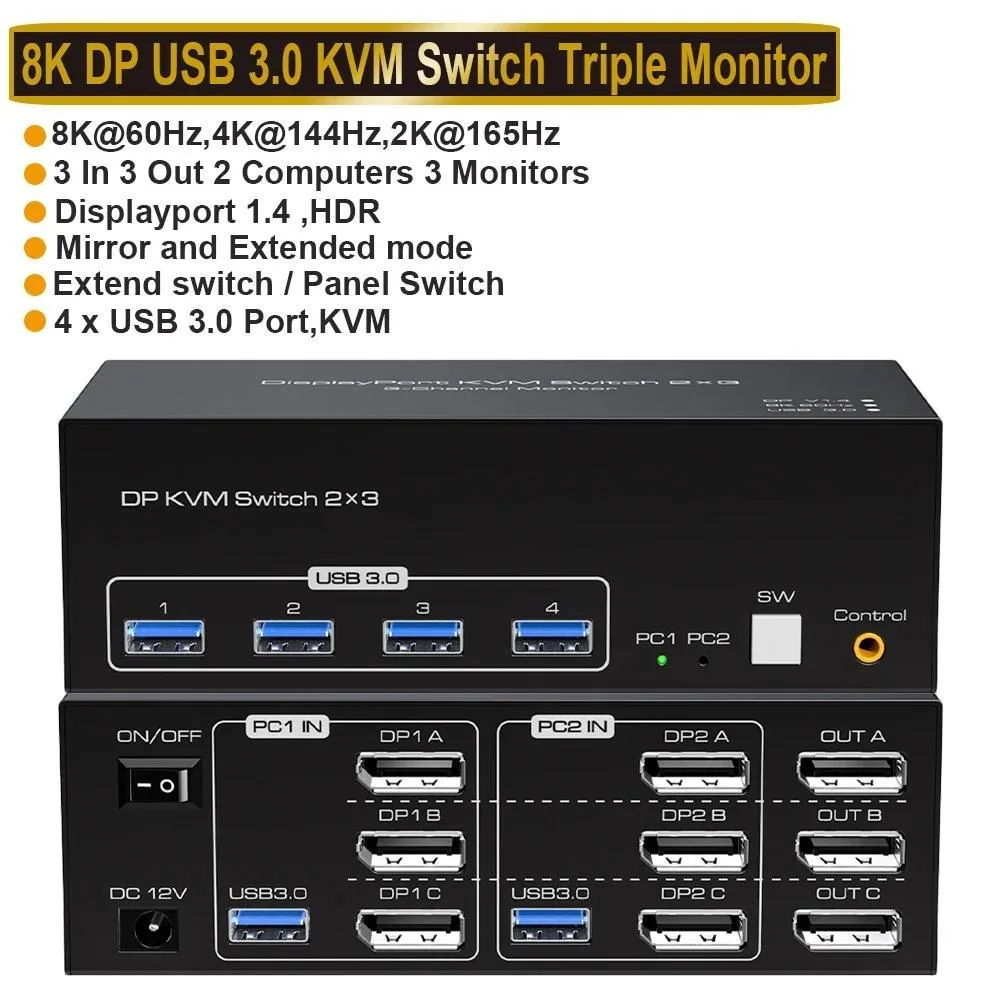
ESTONE SW233-3DP KVM Switch 3 Monitors 2 Computers 8K@60Hz
Share two computers across three monitors at up to 8K 60 Hz with four USB 3.0 ports and a wired controller
- TypeDisplayPort, USB
- PC ConnectorsDisplayport and USB
- Computer Connections3 Ports
- Monitor Connections3 Ports
- Video Resolution8K 60Hz
- PC SelectionPush Buttons/Desktop Controller
- Control two computers with one keyboard and mouse across three monitors
- Triple-monitor extended or mirrored desktop up to 8K at 60 Hz
- Four USB 3.0 ports share peripherals at up to 5 Gbps
- 12 V power adapter keeps high-draw devices stable
- Push-button and wired remote give two ways to switch sources
Triple-monitor KVM for dual-PC workstations
The ESTONE SW233-3DP lets two desktops or laptops share three DisplayPort monitors, a single keyboard and mouse, and four USB 3.0 peripherals. It supports extended or mirrored layouts across all three screens. Each connected computer must be able to drive three displays and provide extended-desktop mode.
Passive switching with external 12 V power
A 12 V/1 A adapter powers the unit, keeping video and USB 3.0 ports stable when high-draw devices such as external drives are attached. Switching is manual via front-panel buttons or the included wired remote; an auto-scan mode cycles inputs every three seconds. No fan or active cooling is present, so operation is silent.
Compact desktop footprint with cables included
The switch measures 5.43 by 5.35 by 1.46 inches and weighs 9.52 ounces, fitting easily beside a monitor stand. Two USB 3.0 cables, the power adapter, the wired controller and a manual ship in the box. Buyers whose systems lack three DisplayPort outputs or extended-display support will need a different connectivity solution.
Highlights
- Control two computers with one keyboard and mouse across three monitors
- Triple-monitor extended or mirrored desktop up to 8K at 60 Hz
- Four USB 3.0 ports share peripherals at up to 5 Gbps
- 12 V power adapter keeps high-draw devices stable
- Push-button and wired remote give two ways to switch sources
Specifications
| Brand | ESTONE |
|---|---|
| Series | SW233-3DP |
| Model | SW233-3DP |
| Type | DisplayPort, USB |
| PC Connectors | Displayport and USB |
| Computer Connections | 3 Ports |
| Monitor Connections | 3 Ports |
| Video Resolution | 8K 60Hz |
| PC Selection | Push Buttons/Desktop Controller |
| AutoScan Interval | 3 seconds |
| LED Indicators | Yes |
| USB Features | with USB support |
| Application | DP KVM Switch 3 Monitors 2 Computers: This DisplayPort KVM Switch 2 port connects 2 desktops or laptops to share 3 monitors and 4 USB 3.0 ports. You only need one set of keyboard and mouse to control all the monitors, and it supports expanding and copying displays. To expand and copy the display, each laptop/PC must support 3 or more screens and must support extended displays. 8K DisplayPort KVM Switch for 2 Computers Share 3 Monitors and 4 USB 3.0 devices. It is possible to control two computers and three monitors directly with one set of keyboard and mouse. Three monitors can suppo |
| Features | 2 computers/laptops share one set of keyboard, mouse, and 3 Displayport monitors Triple monitors output support up to 8K@60Hz for extended and mirror display, support DP 1.4V standards. 2 Switching modes: Button switch and wired remote. With extra 4 x 5Gbps USB 3.0 ports . Cross-support most major OS including Windows, Linux, Mac, and more. The ports that need to plug in Displayport/USB cables are all hidden behind the 3 monitor kvm switch, so the desktop doesn't get cluttered, you can enjoy the clean work space. |
| Dimensions | 5.43 x 5.35 x 1.46 inches |
| Weight | 9.52 Ounces |
| Package Contents | 1x USB 3.0 3x3 DisplayPort Triple Monitor KVM Switch, 2x USB 3.0 Cables, 1x Power Adapter, 1x Wired Button Switch, 1x User's manual. |
Questions about this item
How do I connect the two computers and three monitors to the SW233-3DP, and what step do people often miss?
Connect each computer with one USB 3.0 cable and three DisplayPort cables to the switch, then link the three monitors to the output ports. The step often missed is confirming that both computers support three simultaneous extended displays before setup.
What maintenance or replacement will the 12V DC adapter or USB 3.0 cables need over time?
The 12V/1A power adapter and the two included USB 3.0 cables are the only consumable parts. Replace them if the switch loses power stability or if USB 3.0 data rates drop below 5Gbps during peripheral use.
What limit appears first when running three 8K@60Hz monitors continuously on this KVM?
The 12V/1A power supply sets the first sustained-use ceiling. Driving three 8K@60Hz streams plus four USB 3.0 peripherals can exceed its current headroom, causing signal drops or port resets before thermal limits are reached.
Also in this aisle
People compared these
Same shelf, same checkout — eight coins and a 30-minute rate lock.


Black Box Corporation
Black Box Corporation 4K60 HDMI Dual-Head KVM Switch 4 Port
$774.99
0.00898581BTC
In stock