


ESTONE
ESTONE OZK8 8K USB-C KVM Switch 2-Port 100W PD
Share one monitor, keyboard, mouse and seven USB 2.0 devices between two USB-C computers with 8K 60 Hz video and 100 W charging
- TypeUSB C
- PC ConnectorsUSB-C
- Computer Connections2 Ports
- Monitor Connections1 Port
- Video Resolution7680*4320
- PC SelectionPush Buttons
- Share one monitor and seven USB 2.0 devices between two computers
- 8K at 60 Hz or 4K at 144 Hz video output via DisplayPort 1.4 or HDMI 2.1
- 100 W Power Delivery keeps both laptops charged while switching
- Front push-button lets you change active system in three seconds
- Includes two 1.2 m USB-C Gen 2 cables for immediate setup
Two-computer USB-C KVM with 8K video
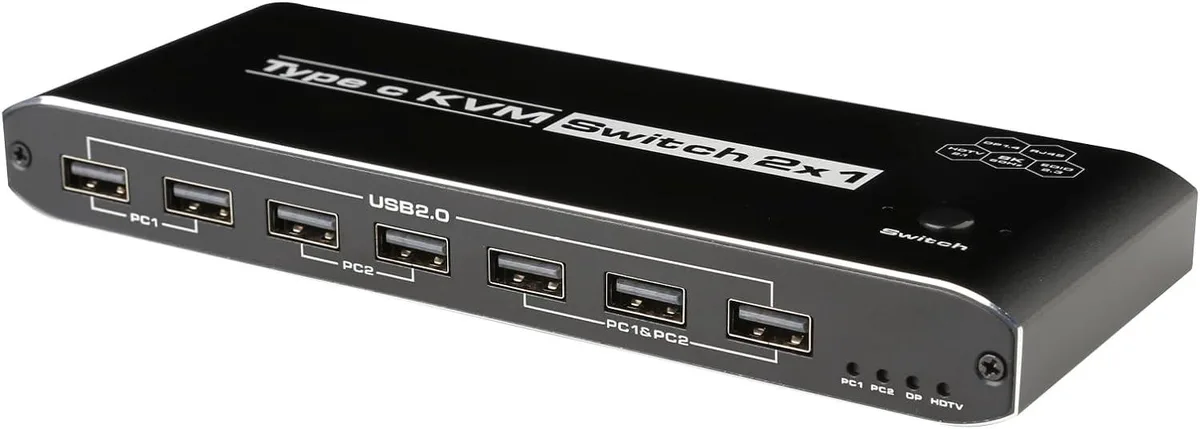
This ESTONE OZK8 switch lets two USB-C computers share one DisplayPort 1.4 or HDMI 2.1 monitor, a keyboard, a mouse, five USB 2.0 peripherals, one RJ45 connection and a 3.5 mm audio jack. It delivers up to 100 W power delivery to the active laptop. A push button on the top panel changes the active system.
Ideal for dual-laptop desk setups
Users who move between two USB-C laptops or a laptop and a desktop will keep a single monitor and peripheral set without re-plugging cables. The unit requires its included USB-C to USB-A cable for power, so a free USB-A port or charger is necessary. Buyers whose machines lack USB-C video output or who need more than two computer ports should look elsewhere.
8K 60 Hz video over DisplayPort 1.4 or HDMI 2.1
The single monitor port supports a maximum resolution of 7680 x 4320 at 60 Hz and 4K at 144 Hz. USB 2.0 peripherals operate at 480 Mbps. Two 1.2 m USB-C Gen 2 cables are included for the computer links.
Highlights
- Share one monitor and seven USB 2.0 devices between two computers
- 8K at 60 Hz or 4K at 144 Hz video output via DisplayPort 1.4 or HDMI 2.1
- 100 W Power Delivery keeps both laptops charged while switching
- Front push-button lets you change active system in three seconds
- Includes two 1.2 m USB-C Gen 2 cables for immediate setup
Specifications
| Brand | ESTONE |
|---|---|
| Series | OZK8 |
| Model | OZK8 |
| Type | USB C |
| PC Connectors | USB-C |
| Computer Connections | 2 Ports |
| Monitor Connections | 1 Port |
| Video Resolution | 7680*4320 |
| PC Selection | Push Buttons |
| AutoScan Interval | 3 seconds |
| LED Indicators | Yes |
| USB Features | with USB support |
| Application | Widely used in many occasions:Our This USB-C Switch is easy to use and can be widely used in Studying, Entertainment, Work and other Occasions, ultra-High-Definition Smooth Video and Picture Quality Experience, Multi-source Switching, providing multiple possibilities for work and entertainment |
| Features | 2 x USB-C 8K KVM Switch with one DisplayPort 1.4 or HDMI 2.1 Port for Video,with this 2 Port 8K KVM Switcher,you are able to connect from the switcher's two PC Input Port to your USB-C PC/Laptops via two standard USB-C Gen-2 Cable,then connect from the switcher's Standard DP 1.4 /HDMI 2.1 port to your Monitors via your own displayport 8K Standard Cable,you can press the "Switch"button to switch between two of your PCs. 2in 1out USB C KVM 8K Switcher: 2 x USB-C PC Input Ports, 2 x 100W PD Charge 1 x RJ45,two computers online at the same time 1 x 3.5mm jack,audio extractor 7x USB Ports |
| Dimensions | 5.43 x 5.35 x 1.46 inches |
| Weight | 9.52 Ounces |
| Package Contents | 1 x USB C Thunderbolt 4 KVM Switch 2 x 1.2 meter USB Gen 2 Cable(Type C to Type C) 1 x User Manual |
Questions about this item
Can I keep using my existing DisplayPort monitor with this KVM switch?
Yes — the switch outputs up to 8K at 60 Hz or 4K at 144 Hz through its DisplayPort 1.4 or HDMI 2.1 port, so your current monitor will work if it supports one of those interfaces.
How do I know the switch is actively controlling the correct computer after I press the button?
The unit has LED indicators that show which of the two USB-C ports is currently selected, and the switch cycles automatically every 3 seconds in AutoScan mode if you enable it.
What cables come in the box and what do I still need to buy?
The package includes the KVM switch, two 1.2 m USB-C Gen 2 cables and a user manual; you must supply your own DisplayPort or HDMI cable to connect the monitor.
Also in this aisle
People compared these
Same shelf, same checkout — eight coins and a 30-minute rate lock.


Black Box Corporation
Black Box Corporation 4K60 HDMI Dual-Head KVM Switch 4 Port
$774.99
0.00897166BTC
In stock