EN-Labs
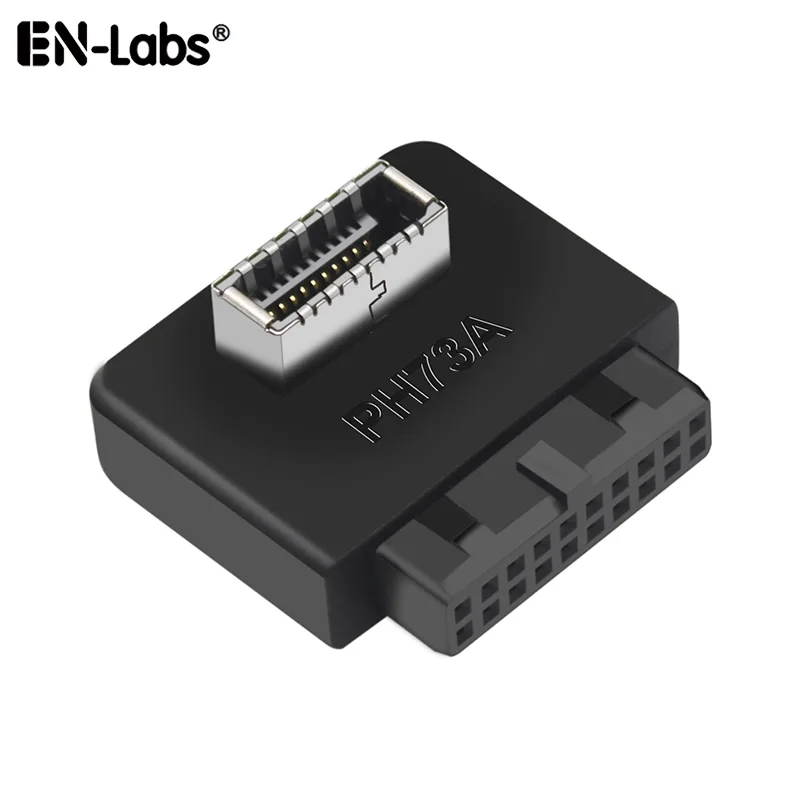
EN-Labs U20PTOU31MODB USB 3.0 19/20-pin to USB 3.1 Type-E adapter
- Black
- Providing a conveni…
$5.99
0.00007205BTC
In stockWe take cryptocurrency — so the coins you hold can buy real hardware.Pay in crypto, spend it on real hardware. Free insured shipping worldwide over $399. Plain, unbranded boxes, sent from Germany.Free insured shipping over $399. Your rate is locked for 30 minutes once checkout opens.Rate locked 30 minutes. Every item sealed, serial-checked and covered by a 24-month warranty.Sealed, 24-month warranty.


EN-Labs
Converts a motherboard USB 3.0 19/20-pin header to a USB 3.1 20-pin Type-C front-panel connector at up to 10 Gbps
Style Right Angled
The EN-Labs U20PTOU31MODA converts a motherboard USB 3.0 19/20 pin header into a USB 3.1 20 pin Type C front panel connector. It is intended for PC builders adding a USB Type C port to a chassis front panel using an existing internal header. The adapter supports data rates up to 10Gbps and works with common motherboards that have a USB 3.0 19 pin header. It is not suitable for systems that only provide USB 2.0 internal headers.
The adapter operates on a plug and play basis with no driver installation needed for supported operating systems. Compatibility covers Windows XP, 7, 8, 10 in both 32 and 64 bit versions as well as Mac and Linux platforms. The bundle includes only the physical adapter; no additional cables, mounting brackets or configuration utilities are supplied. The product changes the physical connector type and enables the higher 10Gbps signalling of the USB 3.1 header.
The supplier specifies a strict installation sequence to avoid shorting pins or triggering power warnings. The system must be powered off, unplugged and left for ten seconds before fitting the male USB C end in the correct orientation and then plugging the adapter into the USB 3.0 header. Deviating from this order can result in the device not being recognised or USB over current warnings. The adapter is black and uses a standard Type E A Key pinout for the front panel connection.
| Brand | EN-Labs |
|---|---|
| Model | U20PTOU31MODA |
| Color | Black |
| Features | Providing a convenient solution for converting the available USB 3.0 header of a motherboard into a USB 3.1 header; Data transfer speed is up to 10Gbps, plug and play(Do not need to install drivers.) Connector A (motherboard): USB 3.0 internal 19/20 pin motherboard male housing header, Connector B (front panel): USB 3.1 A-Key 20 pin front panel female header; Compatible with all of common motherboards with USB 3.0 19 pin header.(Note: Does not work with USB 2.0 header.) Support systems: WINXP/WIN7/WIN8/WIN10 32/64BIT/MAC/Linux |
Other versions of this model
Same family, different memory, cooler or clock — compare before you commit.
The adapter uses a fixed 19-pin male header for the motherboard and a 20-pin female header for the front panel, so only the front-panel cable is plugged and unplugged.
The 10Gbps ceiling comes from the USB 3.1 Gen 2 signalling on the 20-pin Type-C header; the motherboard USB 3.0 19-pin header and cable quality determine real-world throughput.
The passive adapter draws no extra power and has no active cooling, so it adds negligible heat and zero noise to the system.
Also in this aisle
Same shelf, same checkout — eight coins and a 30-minute rate lock.
What you pay in, and what you read prices in.
Sent from your wallet at checkout
Display only — the catalogue is priced in USD
No currency matches that.
New here?
Already have one?
There is no automatic reset: this shop sends no mail, so there is no one-time link to ask for. Leave the address on the account and it gets picked up by hand.
Request noted
Nothing is on its way to your inbox — this shop sends no mail at all. Someone picks these up by hand.
Remembered it?