
Elo Touch Solutions
Elo Touch Solutions E336899 digital signage media player 2GB 16GB
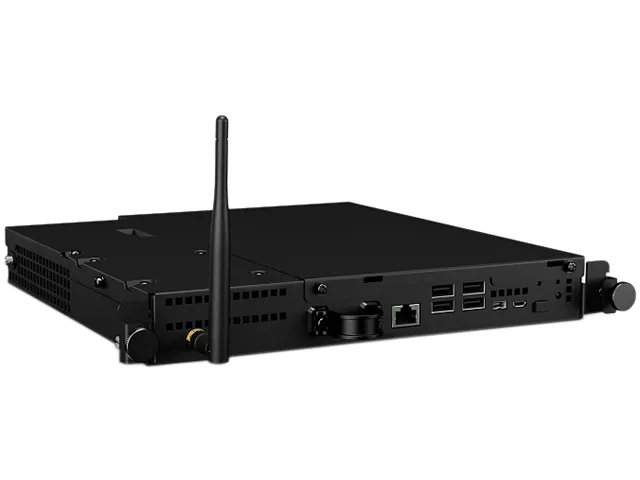
Android media player with 2GB RAM and 16GB storage slides into compatible Elo IDS touchscreens via OPS slot for integrated digital signage
- ProcessorQualcomm APQ8064
- Memory2GB RAM
- Storage16GB EMMC Flash
- Screen SizeNo Screen
- ColorBlack
- HDMI1 x HDMI (OPS slot)
- Plug-in module installs inside compatible Elo IDS displays
- Snapdragon APQ8064 processor drives media-rich interactive applications
- Fanless cooling ensures silent operation in commercial environments
- Wireless connectivity via IEEE 802.11b/g/n and Bluetooth 4.0
- 2GB RAM with 16GB storage runs Android 4.4.2
Android OPS Module for Elo IDS Displays
This Elo E336899 computer module slides into the OPS slot of compatible Elo IDS touchscreens. It runs Android 4.4.2 on a Qualcomm APQ8064 processor with 2GB RAM and 16GB eMMC storage. The fanless design draws power directly from the display via a 19V internal connection.
Suits Single-Screen Signage Deployments
Installers needing a cable-free, all-in-one Android player for supported Elo 3201L, 3202L, 4201L, 4202L, 4602L, 5501LT or 7001LT displays will benefit. Buyers requiring a standalone media box, newer Android versions, or displays from other manufacturers should look elsewhere.
OPS Slot Form Factor Decides Fit
The module only operates when inserted into the proprietary OPS docking connector on the rear of a listed Elo IDS touchscreen. That slot supplies 19V power, HDMI video, and USB signals simultaneously. Without a compatible display, the unit cannot function.
Highlights
- Plug-in module installs inside compatible Elo IDS displays
- Snapdragon APQ8064 processor drives media-rich interactive applications
- Fanless cooling ensures silent operation in commercial environments
- Wireless connectivity via IEEE 802.11b/g/n and Bluetooth 4.0
- 2GB RAM with 16GB storage runs Android 4.4.2
Specifications
| Brand | Elo |
|---|---|
| Model | E336899 |
| Processor | Qualcomm APQ8064 |
| Memory | 2GB RAM |
| Storage | 16GB EMMC Flash |
| Screen Size | No Screen |
| Color | Black |
| HDMI | 1 x HDMI (OPS slot) |
| Network Interface | 1 x Giga bit Ethernet |
| USB Port | 4 x USB 2.0 on front panel 1 x USB On-The-Go (micro USB) |
| System Requirements | Android 4.4.2 |
| Power Consumption | ON: 28.5W IDLE: 5W |
| Power Supply | +19V power supplied via Elo Interactive Digital Signage monitor |
| Specification | Max/Slot: SD slot inside box Cooling system: Fanless Technology Control Buttons: Power LED, Home button Wireless: IEEE 802.11b/g/n, WEP/WPA/WPA2 capable Bluetooth 4.0+EDR Real-Time Clock: lithium-ion battery MTBF: 30,000 hours demonstrated Regulatory approvals and declarations:UL, cUL, FCC, IC, RCM, CB, CE |
| Feature | Commercial-grade. Elo's Android computer module, available for use with the Elo 3201L, 3202L, 4201L, 4202L, 4602L, 5501LT and 7001LT IDS touchscreens, slides into the back of the touch screen display to deliver the industry's thinnest commercial grade all-in-one Android touchscreen computer at their distinguished screen sizes. Easily connected. Use of computer modules reduces complexity, by seamlessly incorporating the AC power, video and USB signals between the computer module and the Elo IDS touch display via an internal docking connector. Reliability. Centralized management and se |
| Dimensions | 1.42" x 9.95" x 10.74" |
| Weight | 3.22 lbs. |
| Shipping weight | 6.35 kg |
| Package size | 544 × 422 × 246 mm |
Questions about this item
Which Elo IDS touchscreens accept the E336899 module in their OPS slot?
The module fits Elo 3201L, 3202L, 4201L, 4202L, 4602L, 5501LT and 7001LT IDS displays, sliding into the rear OPS bay.
What is the correct order for seating the module and connecting power?
Slide the module into the display's OPS slot until the internal docking connector engages, then apply 19V power from the monitor; the module has no separate power input.
When should the internal lithium-ion real-time clock battery be replaced?
Replace the coin cell when the system loses date and time after power cycles; the battery is mounted inside the sealed module and requires opening the chassis.
Also in this aisle
People compared these
Same shelf, same checkout — eight coins and a 30-minute rate lock.



CHIEF MANUFACTURING
CHIEF MANUFACTURING CMS018 18" 457 mm Fixed Extension Column projector accessory
- Extension Column
- Projector
$22.99$22.99
0.00027228BTC
In stock