

Elo Touch Solutions
Elo Touch Solutions 1991L 19" Open-Frame Touchscreen Monitor
- 19"
$615.99$650.99−5%
0.0073501BTC
In stockWe take cryptocurrency — so the coins you hold can buy real hardware.Pay in crypto, spend it on real hardware. Free insured shipping worldwide over $399. Plain, unbranded boxes, sent from Germany.Free insured shipping over $399. Your rate is locked for 30 minutes once checkout opens.Rate locked 30 minutes. Every item sealed, serial-checked and covered by a 24-month warranty.Sealed, 24-month warranty.
E-buy
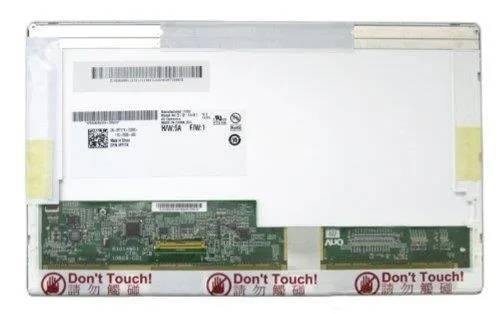
A 10.1 inch LED LCD replacement panel with 1024x600 resolution, 40-pin connector and glossy finish
This 10.1 inch LED LCD panel serves as a direct replacement for a damaged original display. It suits repair technicians and owners of compatible laptops who need to restore visual output. The glossy finish and 1024 x 600 maximum resolution match the factory specification for supported models.
LED backlight technology keeps heat output minimal during normal use. The panel draws very little power, which helps preserve battery runtime on portable devices. With no moving parts, the screen operates completely silently in any environment.
A 40-pin interface connects the panel to the laptop’s video cable for a secure link. The glossy surface enhances colour saturation but reflects ambient light in bright settings. You will receive a 100% compatible screen; the exact brand and part number depend on market availability.
| Model | Laptop screen |
|---|---|
| Features | 10.1" |
Power off the laptop and disconnect the battery. Remove the bezel, then unscrew the old panel. Gently insert the 40-pin cable straight into the connector until it seats fully — forcing it at an angle is the step most people get wrong. Re-secure screws and bezel.
The LED backlight gradually dims after years of use; when brightness becomes insufficient, the whole panel is replaced. Clean the glossy surface only with a microfibre cloth and screen-safe cleaner — avoid ammonia-based products that damage the coating.
Extended operation at maximum brightness accelerates LED backlight ageing, causing gradual luminance loss and potential colour-shift before any other component fails.
Also in this aisle
Same shelf, same checkout — eight coins and a 30-minute rate lock.
What you pay in, and what you read prices in.
Sent from your wallet at checkout
Display only — the catalogue is priced in USD
No currency matches that.
Pick the language the site speaks to you in.
No language matches that.
New here?
Already have one?
There is no automatic reset: this shop sends no mail, so there is no one-time link to ask for. Leave the address on the account and it gets picked up by hand.
Request noted
Nothing is on its way to your inbox — this shop sends no mail at all. Someone picks these up by hand.
Remembered it?



